10 Best Gl.inet Kvm Switches Of 2026
Gl.inet Kvm Switches — Reviews, Recommendations & Updated Buying Guide November 2026

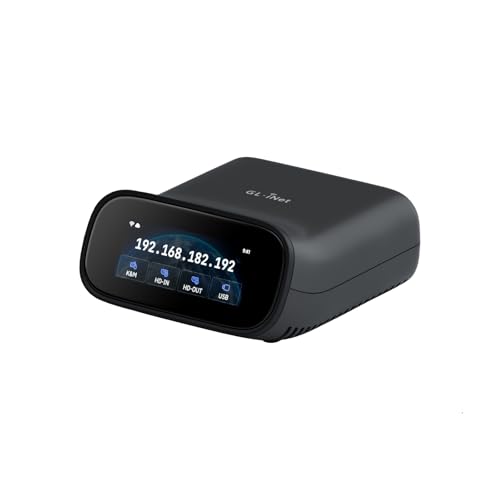
GL.iNet GL-RM10 Comet Pro Remote KVM Over Wi-Fi 6 Dual Band
Why We Love It


GL.iNet Comet Q (GL-RMQ1) Pocket KVM
Why We Love It

GL.iNet Comet X (GL-RM4PE) Quad-Port Remote KVM for Home Lab
Why We Love It

GL.iNet Comet (GL-RM1) Remote KVM Over Internet
Why We Love It

GL.iNet Comet PoE Remote KVM GL-RM1PE with Tailscale 4K
Why We Love It
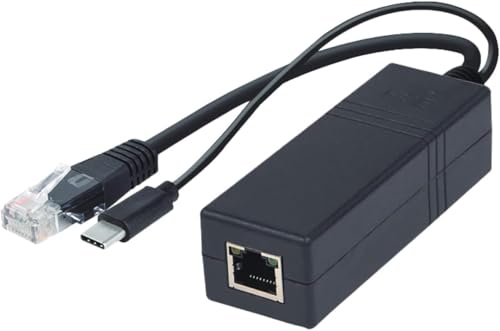
GL.iNet PoE to Type-C Splitter 5V 2.5A Gigabit 802.3af for
Why We Love It

UGREEN Displayport KVM Switch 2 Monitors 2 Computers Support
Why We Love It

Azonee KVM Switch, KVM Switch 1 Monitors 2 Computers
Why We Love It

Anker KVM Switch (4K
Why We Love It

NALACAL KVM Switch HDMI 2 Port Box
Why We Love It
Quick Pick
10 Best Gl.inet Kvm Switches Of 2026
Quick Pick
GL.iNet GL-RM10 Comet Pro Remote KVM Over Wi-Fi 6 Dual Band 4K Passthrough
GL.iNet Comet Q (GL-RMQ1) Pocket KVM, Plug & Play Remote for Laptop iPhone
GL.iNet Comet X (GL-RM4PE) Quad-Port Remote KVM for Home Lab and IT Pro
GL.iNet Comet (GL-RM1) Remote KVM Over Internet, 4K@30Hz Tailscale Support,Remote Keyboard, Video, Mouse, Install OS Via BIOS Control, Adapted KVM Switches for Home Offices,Data Center
GL.iNet Comet PoE Remote KVM GL-RM1PE with Tailscale 4K Streaming
GL.iNet PoE to Type-C Splitter 5V 2.5A Gigabit 802.3af for Comet KVM
UGREEN Displayport KVM Switch 2 Monitors 2 Computers Support 8K@60Hz | 4 Port USB3.0 KVM Switcher 4K@240Hz DP1.4 KVM Switches for 2 Computers Share Keyboard, Mouse, Hard Drive and 2 Monitors
Azonee KVM Switch, KVM Switch 1 Monitors 2 Computers, KVM Switches HDMI for 2 Computers Share 1 Monitor, Supports 4K @60 Hz, 2 HDMI Cables and 2 USB Cables Included
Anker KVM Switch (4K, Desktop and Laptop)
NALACAL KVM Switch HDMI 2 Port Box, USB 3.0 and HDMI Switch 4K@60Hz for 2 Computers Share 1 Monitor, 4 USB 3.0 Devices for 2 Computers Sharing Monitor Keyboard Mouse Hard Drives Printer
Buying Guide: Gl.inet Kvm Switches
📋 Table of Contents
1How many devices can a KVM switch realistically handle?
Most KVM switches support 2 to 16 devices, with 4-8 being common for home or small office use. If you manage more than 8 computers regularly, look for a switch with expandable ports or daisy-chaining support for scalability.
2What connection types should I prioritize for performance?
USB 3.0 or higher ensures fast peripheral switching, while HDMI or DisplayPort is best for high-resolution video. Avoid older USB 2.0 or VGA if you need low latency or 4K support for professional workflows.
3Is a KVM switch worth it for just two computers?
Yes, especially if you frequently switch between systems and want to save desk space. A 2-port KVM with a single keyboard, mouse, and monitor can streamline your workflow and reduce cable clutter effectively.
4What should I look for in a KVM switch for audio and USB devices?
Choose a model that supports audio switching and USB 3.0 for external drives, webcams, and other peripherals. Some switches also let you assign specific devices to certain computers, which is handy for shared printers or headsets.
5Can I control a KVM switch without a physical button?
Many KVM switches offer hotkey combinations or on-screen displays (OSD) for switching between devices. Some also support software control, which is useful for remote access or advanced user configurations.
How we choose
Our editors are people who genuinely love testing and writing about products. We compare each product's real-world usability and strengths, then distill what matters most into our own "Why We Love It" points — so you get an honest, at-a-glance sense of what counts before you buy.