10 Best Gigabit Wireless Access Point Of 2026
Gigabit Wireless Access Point — Reviews, Recommendations & Updated Buying Guide November 2026


TP-Link TL-WA1201 AC1200 Dual Band Extender
Why We Love It


TP-Link EAP610
Why We Love It

TP-Link TL-WA1201
Why We Love It

Omada EAP650 WiFi 6 AX3000 Dual Band Wireless Gigabit Access
Why We Love It

TP-Link EAP615-Wall
Why We Love It

TP-Link EAP225-Outdoor
Why We Love It

Omada EAP655-Wall WiFi 6 AX3000 in-Wall Gigabit Access Point
Why We Love It
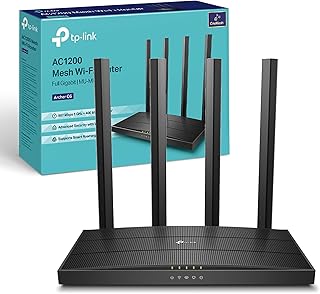
TP-Link AC1200 Wireless Dual Band Wi-Fi Router
Why We Love It

TP-Link EAP230-Wall
Why We Love It

Omada EAP225 AC1350 Dual Band Ceiling Mount Access Point
Why We Love It
Quick Pick
10 Best Gigabit Wireless Access Point Of 2026
Quick Pick
TP-Link TL-WA1201 AC1200 Dual Band Extender, PoE, EasyMesh, Gigabit Port
TP-Link EAP610 | Omada Business WiFi 6 AX1800 Wireless Gigabit Access Point| Support Mesh, OFDMA, Seamless Roaming & MU-MIMO | SDN Integrated | Cloud Access & Omada App | PoE+ Powered | White
TP-Link TL-WA1201, AC1200 Dual Band Wireless Gigabit Access Point | Desktop WiFi Bridge, MU-MIMO Beamforming, Support Multi SSID Client Range Extender Mode, 4 Fixed Antennas
Omada EAP650 WiFi 6 AX3000 Dual Band Wireless Gigabit Access Point | 1G Port, PoE+ or DC Powered, Adapter Included, 5yr Warranty, Captive Portal, Mesh, WPA3 Roaming, Business WiFi Experience
TP-Link EAP615-Wall | Omada Business WiFi 6 AX1800 in-Wall Wireless Gigabit Access Point | Support OFDMA, MU-MIMO & Beamforming | PoE Powered | Support Omada SDN | Cloud Access & Omada app
TP-Link EAP225-Outdoor | Omada AC1200 Wireless Gigabit Outdoor Access Point | Business WiFi Solution w/Mesh Support, Seamless Roaming & MU-MIMO | PoE Powered | SDN Integrated | Cloud Access & App | Dual Band, IP65 Weatherproof, Remote Managed
Omada EAP655-Wall WiFi 6 AX3000 in-Wall Gigabit Access Point | High-Efficiency, Seamless Roaming, PoE Passthrough, Multiple SDN Controller Options, Remote & App Control
TP-Link AC1200 Wireless Dual Band Wi-Fi Router - Speed Up to 867 Mbps/5 GHz + 300 Mbps/2.4 GHz, 4+1 Gigabit Ports, Dual-Core CPU, Parental Control, Easy setup (Archer C6)
TP-Link EAP230-Wall, Omada AC1200 Wireless MU-MIMO+Dual-Band Gigabit Wall-Plate Access Point,802.3af/802.3at, Easily Wall Mount, Free EAP Controller Software
Omada EAP225 AC1350 Dual Band Ceiling Mount Access Point, w/Injector | 2x2 MU-MIMO, Seamless Roaming & Beamforming, PoE Powered w/PoE Injector Included, Cloud Access & Free Omada App
Buying Guide: Gigabit Wireless Access Point
📋 Table of Contents
1What speed and range should I look for in a gigabit wireless access point?
A true gigabit access point should support at least 1.2 Gbps throughput for wired connections and 800 Mbps or more on the 5 GHz band. Look for models with dual-band or tri-band support to ensure reliable coverage and reduce interference, especially in larger homes or offices.
2Does the number of spatial streams matter for performance?
Yes — more spatial streams (like 3x3 or 4x4 MIMO) allow the access point to handle more data simultaneously, improving speed and reducing latency. For high-demand applications like 4K streaming or online gaming, 3x3 MIMO is a minimum, with 4x4 offering better performance in multi-device environments.
3What’s the difference between 802.11ac and 802.11ax (Wi-Fi 6) access points?
Wi-Fi 6 (802.11ax) access points offer faster speeds, better efficiency in crowded networks, and improved performance with multiple devices. They use OFDMA and MU-MIMO technologies to handle more devices at once, making them ideal for homes or offices with many connected devices like smart TVs, phones, and IoT gadgets.
4How important is the antenna design and placement?
Antenna design significantly impacts coverage and signal strength. Access points with external, adjustable antennas or omnidirectional designs provide better range and signal consistency. For larger spaces, consider models with beamforming technology to direct signals more efficiently to connected devices.
5What features should I prioritize for a business-grade gigabit access point?
Look for features like VLAN support, Quality of Service (QoS) settings, and advanced security protocols (WPA3, 802.1X). These ensure network segmentation, prioritization of critical traffic, and protection against unauthorized access, which are essential for maintaining productivity and data security in a business environment.
How we choose
Our editors are people who genuinely love testing and writing about products. We compare each product's real-world usability and strengths, then distill what matters most into our own "Why We Love It" points — so you get an honest, at-a-glance sense of what counts before you buy.