10 Best Gaming Monitor Fhd 1080p Of 2026
Gaming Monitor Fhd 1080p — Reviews, Recommendations & Updated Buying Guide November 2026


GAMEON GOE24FHD165IPS 24 Inch Gaming Monitor FHD 1080p 165Hz
Why We Love It


Z-Edge 24.5 inch 300Hz 280Hz 240Hz Gaming Monitor
Why We Love It

KOORUI Gaming Monitor 24-inch IPS FHD 1080p
Why We Love It
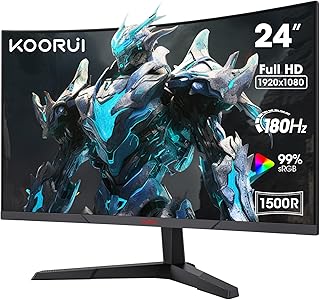
KOORUI 24 Inch Gaming Monitor -FHD 1080P Curved Monitor
Why We Love It

KOORUI 27 inch 240HZ FHD Gaming Monitor DCI-P3 90% Color
Why We Love It

Samsung 24" Essential Monitor S33F FHD (1
Why We Love It

Z-EDGE 24inch IPS Gaming Monitor
Why We Love It

Z-EDGE 24inch IPS Gaming Monitor
Why We Love It

Z-EDGE 24inch IPS Gaming Monitor
Why We Love It

UPERFECT 24" 120Hz QLED Portable Monitor 1080P 125% sRGB
Why We Love It
Quick Pick
10 Best Gaming Monitor Fhd 1080p Of 2026
Quick Pick
GAMEON GOE24FHD165IPS 24 Inch Gaming Monitor FHD 1080p 165Hz Fast IPS Computer Monitor, 0.5ms MPRT, HDMI 2.1, HDR400, 99% sRGB, G-Sync & FreeSync, Built-in Speakers, PS5 Ready, Black
Z-Edge 24.5 inch 300Hz 280Hz 240Hz Gaming Monitor, UG25S FHD 1080p, Ultra Fast MPRT 1ms, IPS Monitor Gaming, PC Computer Monitor, 16.7M Colors, DP x2, HDMI x2
KOORUI Gaming Monitor 24-inch IPS FHD 1080p, 200Hz 1ms HDR400 90% DCI-P3 Color Gamut, Adaptive Sync Ultra Slim Frame, VESA Mountable, HDMI x 2, DisplayPort, Black, G2411P
KOORUI 24 Inch Gaming Monitor -FHD 1080P Curved Monitor 165Hz VA 1ms 1500R PC Monitors with Adaptive Sync, HDMI X2 /DP, VESA Compatible, Tilt Adjustable, Eye Care
KOORUI 27 inch 240HZ FHD Gaming Monitor DCI-P3 90% Color Gamut 1MS,1080P, Freesync,DisplayPort.HDMI Cable Black VESA
Samsung 24" Essential Monitor S33F FHD (1,920 x 1,080) 100Hz Refresh Rate 5Ms for Gaming and Office Use, (New Launch) LS24F330EAMXUE
Z-EDGE 24inch IPS Gaming Monitor, FHD 1080P, Max 240Hz,LED,UG24PJ,White | FreeSync/Frameless/1ms/Brightness 350cd/m²/VESA Compatible/HDMI & DisplayPort/for Game,Office
Z-EDGE 24inch IPS Gaming Monitor, FHD 1080P, Max 180Hz,HDR,LED,1ms,UG24F | FreeSync/Frameless/Brightness 350cd/m²/VESA Compatible/5000:1Contrast Ratio/HDMI & DisplayPort/for Game,Office
Z-EDGE 24inch IPS Gaming Monitor, FHD 1080P, Max 240Hz,LED,UG24PJ,Black | FreeSync/Frameless/1ms/Brightness 350cd/m²/VESA Compatible/HDMI & DisplayPort/for Game,Office
UPERFECT 24" 120Hz QLED Portable Monitor 1080P 125% sRGB 400Nits w/Stand & VESA, HDMI USB-C FHD Travel Monitor for Laptop/Gaming Devices/Phone/Mini PC, External Second Screen for Gaming & Work
Buying Guide: Gaming Monitor Fhd 1080p
📋 Table of Contents
1What refresh rate should I look for in a gaming monitor?
For 1080P gaming, 144Hz is the sweet spot that delivers smooth gameplay without requiring high-end hardware. If your budget is tight, 120Hz is still good, but anything below 100Hz will feel sluggish for fast-paced games.
2How does response time affect gaming performance?
Response time (measured in milliseconds) determines how quickly pixels change color—lower is better for competitive play. Aim for 1ms to 5ms; anything slower than 5ms can create ghosting and blur, especially noticeable in shooters and fighting games.
3What's the difference between IPS and TN panels for gaming?
TN panels have faster response times (better for competitive gaming) but worse color accuracy and viewing angles, while IPS panels offer better colors and angles but slightly slower response. For pure gaming, TN is more common, but IPS works fine if you also do creative work.
4What monitor size is best for 1080P gaming?
24 inches is ideal for 1080P because it provides sharp image quality without noticeable pixelation. Going larger than 27 inches at 1080P makes individual pixels visible, while smaller monitors (21-22 inches) can feel cramped.
5Should I prioritize brightness or contrast specs?
For gaming, contrast ratio matters more than raw brightness—it improves visibility in dark scenes and makes details pop. Aim for contrast ratios of at least 1000:1, and brightness of 250 nits or higher is sufficient for most indoor gaming setups.
How we choose
Our editors are people who genuinely love testing and writing about products. We compare each product's real-world usability and strengths, then distill what matters most into our own "Why We Love It" points — so you get an honest, at-a-glance sense of what counts before you buy.