10 Best Gaming Monitor 144hz Of 2026
Gaming Monitor 144hz — Reviews, Recommendations & Updated Buying Guide November 2026

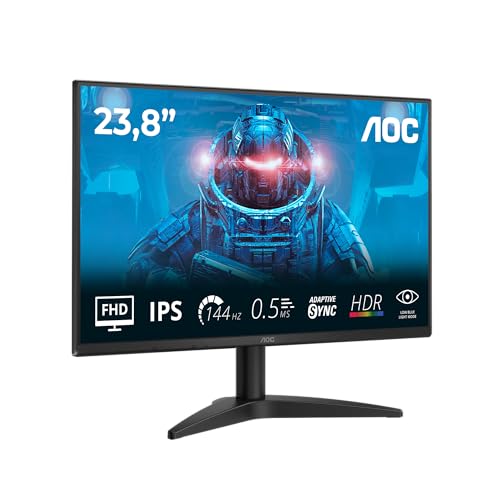
AOC 24B36X 24 inch FHD Gaming Monitor 144Hz
Why We Love It


MSI PRO MP251 E14L 24.5-Inch FHD 1920x1080
Why We Love It

Minifire 24 Inch 160Hz Gaming Monitor Full HD 1080p HDMI &
Why We Love It

KOORUI 24 Inch Monitor
Why We Love It

24 Inch Computer Monitor
Why We Love It

27 inch Gaming Monitor 144Hz
Why We Love It

AOC 27B36X 27 Inch FHD Gaming Monitor
Why We Love It

ASUS VY279HGR Eye Care Gaming Monitor
Why We Love It

MSI MAG 275QF 27 Inch WQHD Gaming Monitor
Why We Love It

KOORUI 24 Inch Gaming Monitor
Why We Love It
Quick Pick
10 Best Gaming Monitor 144hz Of 2026
Quick Pick
AOC 24B36X 24 inch FHD Gaming Monitor 144Hz, IPS Panel, 4ms GtG, HDR10, (1920x1080 HDMI 1x 1.4) Black
MSI PRO MP251 E14L 24.5-Inch FHD 1920x1080, Computer Monitor IPS, 144Hz, 1ms, Adaptive-Sync, Eye Care, HDMI 1.4b, Frame-Less, Tilt Adjustable, Vesa Mount, Black
Minifire 24 Inch 160Hz Gaming Monitor Full HD 1080p HDMI & DP MFG24F4M | 4000:1 Contrast, 1ms MPRT, Free-Sync, sRGB 110%, DCI-P3 80%, Anti-Bluelight, HDR, VESA 75x75mm
KOORUI 24 Inch Monitor, Gaming 144Hz, FHD 1080P, Hardware Anti-Blue Light
24 Inch Computer Monitor, PC Gaming Monitors 144Hz, 5ms, FHD 1080p, Eye-Care Screen, Lowblue, 99% sRGB, VESA 75x75mm, HDMI 2.0 & DP 1.2
27 inch Gaming Monitor 144Hz, FHD 1080P IPS Display with 99% sRGB, FreeSync, Tilt Adjustable, lowblue mode, HDMI/VGA Ports for Home Office and computer monitor V2718S
AOC 27B36X 27 Inch FHD Gaming Monitor, 144Hz, IPS, 0.5ms MPRT, Adaptive Sync, HDR10, (1920x1080,HDMI 1x 1.4,DP 1x 1.4) Black
ASUS VY279HGR Eye Care Gaming Monitor – 27 inch FHD (1920x1080), IPS, 120Hz OC, SmoothMotion, 1ms MPRT, Adaptive Sync, Eye Care Plus, Blue Light Filter, Flicker Free, antibacterial, SmoothMotion
MSI MAG 275QF 27 Inch WQHD Gaming Monitor - 2560 x 1440 Rapid IPS Panel, 180 Hz / 0.5ms (GtG, Min.), 101% sRGB Colour Gamut, Frameless Design, HDR Ready - DisplayPort 1.4, HDMI 2.0b (WQHD @ 144Hz)
KOORUI 24 Inch Gaming Monitor, 200Hz, Fast IPS, HDR 400, 1ms, Full-HD 1080P | Adaptive Sync, VESA Mountable, HDMI/DP, Low Blue Light, 99% SRGB
Buying Guide: Gaming Monitor 144hz
📋 Table of Contents
1What should I look for in a 144Hz gaming monitor?
Look for a monitor with a high refresh rate (144Hz or higher), low input lag, and support for high resolutions like 1080p or 1440p. IPS or VA panels are good for color accuracy and viewing angles.
2What are the key specifications to check?
Key specs include refresh rate, response time (preferably 1ms), panel type (IPS, TN, or VA), resolution, and compatibility with your graphics card and gaming setup.
3How do I ensure the monitor is compatible with my setup?
Check the monitor's input ports (HDMI, DisplayPort) to ensure they match your graphics card's outputs. Also, confirm the monitor's resolution and refresh rate are supported by your GPU.
4When should I pay more for a gaming monitor?
Pay more if you need features like G-Sync or FreeSync for tear-free gaming, higher resolution (like 1440p or 4K), or advanced panel technology for better color and response times.
5What are common mistakes when buying a 144Hz gaming monitor?
Common mistakes include ignoring response time, not checking port compatibility, or assuming all 144Hz monitors are the same, when panel type and features can vary significantly.
How we choose
Our editors are people who genuinely love testing and writing about products. We compare each product's real-world usability and strengths, then distill what matters most into our own "Why We Love It" points — so you get an honest, at-a-glance sense of what counts before you buy.