10 Best Gaming Microphones With Mute Button Of 2026
Gaming Microphones With Mute Button — Reviews, Recommendations & Updated Buying Guide November 2026


VCOM USB Microphone for PC
Why We Love It


FIFINE AmpliGame A6T Gaming PC USB Microphone Kit for
Why We Love It

FIFINE AmpliGame AM8 USB/XLR Dynamic Microphone for Gaming
Why We Love It

USB Computer Microphone
Why We Love It

UGREEN USB Condenser Gaming Microphone for Streaming and
Why We Love It

Gaming Microphone with Noise Cancellation & Mute Button
Why We Love It

FIFINE Gaming Audio Mixer
Why We Love It
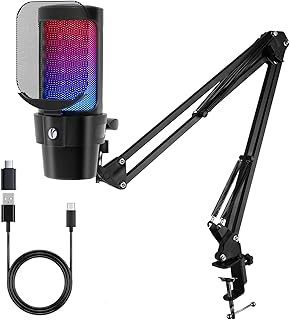
VCOM Gaming USB Microphone
Why We Love It

USB Computer Microphone with Mute Button and Volume Control
Why We Love It

FDUCE Dynamic Gaming Microphone kit
Why We Love It
Quick Pick
10 Best Gaming Microphones With Mute Button Of 2026
Quick Pick
VCOM USB Microphone for PC, RGB Gaming Microphone with Mute Button, Gain Control, Monitoring Headphone 3.5mm Jack, PC Mic for Gaming, Streaming, Podcast, VoiceOver, Recording
FIFINE AmpliGame A6T Gaming PC USB Microphone Kit for Streaming,Podcasting | Condenser Mic with Boom Arm, Pop Filter, Mute Button for Twitch, Online Chat, RGB Computer Mic for PS4/5 PC Gamer Youtuber
FIFINE AmpliGame AM8 USB/XLR Dynamic Microphone for Gaming Streaming | Podcast Mic with RGB Light, Mute Button, Headphones Jack, Desktop Stand, for Vocal Recording Singing YouTube, Metal
USB Computer Microphone, Omnidirectional Condenser Podcast Mic for Recording and Streaming, Desktop Microphone with Mute Button and Volume Control, Plug & Play Stand for PC, Laptop, Mac, YouTube
UGREEN USB Condenser Gaming Microphone for Streaming and Voice Chat | 24-bit/96kHz Audio, Quick Mute and Zero-Latency Monitoring; Includes Pop Filter, Shock Mount and 7 RGB Modes for PC and PS5
Gaming Microphone with Noise Cancellation & Mute Button, USB Condenser Mic for Streaming/Recording, Ultra-Compact Design, Compatible with PC/Mac/PS4/PS5, Podcast/YouTube/Twitch/Discord (Black)
FIFINE Gaming Audio Mixer, Streaming RGB PC Mixer with XLR Microphone Interface, Individual Control, Volume Fader, Mute Button, 48V Phantom Power, for Podcast/Recording/Vocal/Game Voice-AmpliGame SC3 | USB PnP For PC,Mute Button,XLR Preamp,RGB,Voice change,48V Phantom Power,Monitoring,Podcast,Recording,Vocal,Streaming
VCOM Gaming USB Microphone,Condenser Dynamic Boom Arm Mic for Podcasting,Streaming, with Boom Arm Stand,Quick Mute,Pop Filter,RGB Indicator,Shock Mount,Rotate gain Button, Compatible with PS4/5/PC
USB Computer Microphone with Mute Button and Volume Control
FDUCE Dynamic Gaming Microphone kit, USB/XLR Podcast Computer Microphone with Desktop Stand, RGB Light, Mute Button and Headphone Jack, for Gamer Streaming Recording Studio YouTube Online Chat(D20)
Buying Guide: Gaming Microphones With Mute Button
📋 Table of Contents
1What microphone sensitivity is best for gaming and voice chat?
Look for a sensitivity range of -38dB to -45dB for a good balance between capturing clear voice and avoiding background noise. Too high and you'll pick up room sounds; too low and your voice may sound muffled, especially in voice-heavy games or team chats.
2Should I prioritize USB or XLR connection for my setup?
USB mics are plug-and-play and ideal for casual or solo gaming, while XLR mics offer better sound quality and are preferred for streaming or professional setups. If you plan to upgrade your audio gear later, XLR with a mixer or audio interface gives more flexibility.
3How important is a mute button for a gaming microphone?
A physical mute button is essential for quick, hands-free muting during fast-paced games or voice chats. Avoid models with only software mute, as it can be slower and less reliable, especially if your keyboard or mouse is unresponsive.
4What frequency response range should I look for in a gaming mic?
Aim for a range of 20Hz to 20kHz for full audio coverage, but for voice clarity, focus on mics with a tailored range of 100Hz to 12kHz. This ensures your voice is clear and natural without unnecessary bass or treble that can distort speech.
5Are noise-canceling features worth the extra cost?
Yes, especially if you game in a noisy environment. Look for mics with unidirectional (cardioid) pickup patterns and built-in noise suppression to reduce background sounds. This helps keep your voice clear for teammates and stream viewers without needing a soundproof room.
How we choose
Our editors are people who genuinely love testing and writing about products. We compare each product's real-world usability and strengths, then distill what matters most into our own "Why We Love It" points — so you get an honest, at-a-glance sense of what counts before you buy.