10 Best Gaming Mice For Pc Of 2026
Gaming Mice For Pc — Reviews, Recommendations & Updated Buying Guide November 2026


Rechargeable Wireless Gaming Mouse - Silent Click
Why We Love It


Razer DeathAdder Essential (2021)
Why We Love It
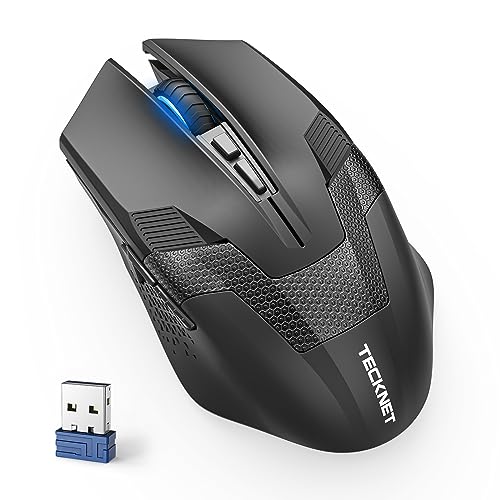
TECKNET Wireless Mouse-USB Ergonomic Optical Cordless Mouse
Why We Love It

Wireless Gaming Mouse Bluetooth Mouse RGB Rechargeable 2.4G
Why We Love It

ATTACK SHARK X11SE Wireless Gaming Mouse
Why We Love It
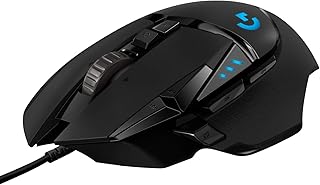
Logitech G502 Hero Wired Gaming Mouse - Black
Why We Love It

HP Wired RGB Gaming Mouse High Performance Mouse with
Why We Love It

HyperX Pulsefire Haste 2 Core Wireless – Gaming Mouse for PC
Why We Love It

Wired Gaming Mouse with Honeycomb Shell
Why We Love It

AULA Gaming Keyboard and Mouse
Why We Love It
Quick Pick
10 Best Gaming Mice For Pc Of 2026
Quick Pick
Rechargeable Wireless Gaming Mouse - Silent Click, Colorful RGB Light, Dual Mode (Bluetooth 5.1 + USB 2.4G), 25Hrs Battery, Ergonomic Design, Adjustable DPI (3200), for PC, Laptop, Mac, iOS & Android
Razer DeathAdder Essential (2021) - Wired Gaming Mouse (Optical Sensor, 6400 DPI, 5 Programmable Buttons, Ergonomic Form Factor) Black
TECKNET Wireless Mouse-USB Ergonomic Optical Cordless Mouse with 8 Buttons,12-Month Battery Life,4800 DPI Optical Tracking,High-Precision 5 Adjustable DPI for PC/Mac/Laptop, Black
Wireless Gaming Mouse Bluetooth Mouse RGB Rechargeable 2.4G USB Cordless Computer Mice with 7 Color Backlit, 6 Buttons & Silent Click for Laptop, iPad, Mac OS, PC, Windows -Black
ATTACK SHARK X11SE Wireless Gaming Mouse, 63g Superlight With PixArt PAW3311 Sensor, 22000 DPI, Tri-Mode BT/2.4Ghz/Wired, 1000Hz Polling rate, 300mAh Battery, Dual Driver, for PC/Xbox/PS/Mac (Black)
Logitech G502 Hero Wired Gaming Mouse - Black | High Performance, 25,600 DPI, RGB, Adjustable Weights, 11 Programmable Buttons, On-Board Memory, PC/Mac Compatible
HP Wired RGB Gaming Mouse High Performance Mouse with Optical Sensor, 3 Buttons, 7 Color LED for Computer Notebook Laptop Office PC Home
HyperX Pulsefire Haste 2 Core Wireless – Gaming Mouse for PC, Long Battery Life, Lightweight, Custom Core Sensor, Dual Wireless Connectivity, Black
Wired Gaming Mouse with Honeycomb Shell, 12800DPI Optical Sensor, 6 Programmable Macros, Software Support for Custom Key Config, and LED Settings for Windows 7/8/10/11/XP, Vista, Linux-Whi (white)
AULA Gaming Keyboard and Mouse,Wired 104-Key Mouse and Keyboard Combo Metal | Full Size Computer Keyboards with Number Pad,New Update Version,RGB Backlit Anti-Ghosting PC Keyboard for Laptop WinXP/7/8/10
Buying Guide: Gaming Mice For Pc
📋 Table of Contents
1What DPI range is best for competitive gaming?
Aim for 400-1600 DPI for most games, as higher settings can cause inconsistency. Many pro gamers use 400-800 DPI for better control, while 1600 DPI suits casual or fast-paced action.
2How many programmable buttons do I actually need?
6-12 buttons are common, but only use what you need — extra buttons can clutter your hand. MMO or strategy gamers benefit from 12+ buttons, while FPS players often prefer 6-8 for simplicity and speed.
3Is a wired or wireless mouse better for PC gaming?
Wired mice offer zero latency and are more reliable for competitive play, while wireless models provide freedom of movement and modern ones have near-zero lag. Look for a wireless mouse with a dedicated gaming-grade battery and low polling rate.
4What sensor type should I look for in a gaming mouse?
Optical or laser sensors are standard, but a high-quality optical sensor (like a PAW3395 or similar) ensures better tracking on most surfaces. Avoid budget laser sensors, which can be less accurate on glossy or reflective surfaces.
5How important is weight for a gaming mouse?
Lighter mice (80-100g) reduce hand fatigue during long sessions and improve speed, but heavier mice offer more stability for precise aiming. Choose based on your grip style and game type — lighter for fast movement, heavier for control.
How we choose
Our editors are people who genuinely love testing and writing about products. We compare each product's real-world usability and strengths, then distill what matters most into our own "Why We Love It" points — so you get an honest, at-a-glance sense of what counts before you buy.