10 Best Gaming Keyboards For Mac Of 2026
Gaming Keyboards For Mac — Reviews, Recommendations & Updated Buying Guide November 2026


ATTACK SHARK X68 HE 8000Hz Rapid Trigger Keyboard
Why We Love It


BIGTHREE 60% Wired Gaming Keyboard
Why We Love It

FREEWOLF M87V2 Wireless Keyboard
Why We Love It

EPOMAKER TH108 V2 PRO Full Size Mechanical Keyboard with
Why We Love It

Seeken Gaming Keyboard
Why We Love It

Wired RGB Keyboard and Mouse Combo
Why We Love It

EPOMAKER HE68 Lite Hall Effect Gaming Keyboard
Why We Love It
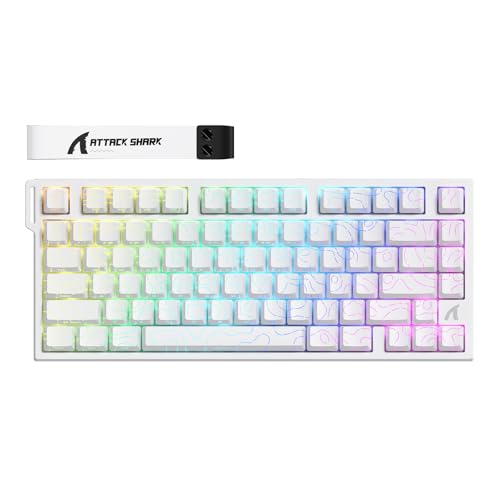
ATTACK SHARK R82 HE 8000Hz Rapid Trigger Keyboard
Why We Love It
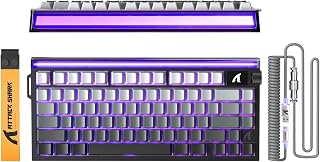
ATTACK SHARK R85 HE Wired 75% Gaming Keyboard with C01ULTRA
Why We Love It

FREEWOLF T96 Wireless Keyboard and Mouse Combo
Why We Love It
Quick Pick
10 Best Gaming Keyboards For Mac Of 2026
Quick Pick
ATTACK SHARK X68 HE 8000Hz Rapid Trigger Keyboard, 0.01mm RT Accuracy Wired Gaming Keyboard with Magnetic Switch, Adjustable Actuation, Rapid Trigger, Snap Tap, RGB Lighting for PC/Mac, White Contours
BIGTHREE 60% Wired Gaming Keyboard, Ultra-Compact RGB Backlit Mini Keyboard with 61 Keys, Waterproof Membrane Design for PC/Mac Gamers & Typists, Portable for Travel & Office (Black-White)
FREEWOLF M87V2 Wireless Keyboard, Tri Mode-BT/2.4G/Wired, Silent and smooth, 4000mAh, Side-printed Keycap, QWERTY US layout, Anti-ghosting, 16M RGB Gaming Keyboard for MAC/Win (Night)
EPOMAKER TH108 V2 PRO Full Size Mechanical Keyboard with Screen & Knob, 10000mAh, BT/2.4Ghz, Mac PBT Keycap, Hot Swap, RGB, Gasket, Wireless Gaming Keyboard for Mac/PC (Black, Sea Salt Silent V2)
Seeken Gaming Keyboard – Compact 60% Design Mechanical Keyboard, Wired Keyboard with RGB, Anti-Ghosting, 21-Key Rollover, USB-C, Windows/Mac/Linux Compatible, Plug‑and‑Play, Black (Red Switches)
Wired RGB Keyboard and Mouse Combo, Adjustable Rainbow Backlit, 104-Key Full-Size with Numpad, 6400 DPI Ergonomic High-Precision Mouse, Plug & Play, for PC Laptop Mac Windows Mac Office Gaming (Black)
EPOMAKER HE68 Lite Hall Effect Gaming Keyboard, 8k Polling & 128K Scan Rate | 0.005mm Adjustable Trigger, 0.125ms Latency, 5-Layer Sound-Dampened, Snap Key, SOCD, A-RGB, Wired, Mac Software (Black Red)
ATTACK SHARK R82 HE 8000Hz Rapid Trigger Keyboard, 0.005 mm RT Accuracy, Wired RGB 75% Gaming Keyboard with Magnetic Switches, Adjustable Actuation, Snap Tap, for PC/Mac, White Contours
ATTACK SHARK R85 HE Wired 75% Gaming Keyboard with C01ULTRA LED Cable, Magnetic Switch, 5 Layers, Multifunctional software, RGB light box, Knob, 8000Hz, 0.005mm RT Tech
FREEWOLF T96 Wireless Keyboard and Mouse Combo, Retro, BT & 2.4G Modes, PBT Keycaps, Media Knob, Display Screen, Silent Keys, 26-Key Anti-ghosting, American QWERTY, for Mac/Windows/Linux
Buying Guide: Gaming Keyboards For Mac
📋 Table of Contents
1What type of switches are best for gaming on a Mac?
Red or linear switches offer smooth, fast key presses ideal for competitive gaming, while Brown or tactile switches provide a satisfying click for casual play. For Mac compatibility, ensure the keyboard uses switches that work well with macOS and don’t require third-party software to function properly.
2Do I need a mechanical keyboard for serious gaming?
Mechanical keyboards offer better durability, faster actuation, and a more responsive feel compared to membrane or scissor-switch models. While not strictly necessary, they are highly recommended for long gaming sessions and high-performance needs due to their reliability and tactile feedback.
3How important is RGB lighting for a gaming keyboard on a Mac?
RGB lighting is mostly a visual feature and not essential for gameplay, but it can enhance your setup’s aesthetics and help with key visibility in low-light environments. Look for models with macOS-compatible lighting software if you want to customise the effects without relying on Windows-only tools.
4What cable type should I look for in a wired gaming keyboard?
A braided USB-C or USB-A cable is preferable for durability and a stable connection. Avoid thin or flimsy cables that may fray or disconnect during intense use. A detachable cable adds convenience for cleaning or replacing without buying a new keyboard.
5Are wireless gaming keyboards suitable for Mac users?
Wireless models can work well for Mac gaming, but look for low-latency Bluetooth or proprietary wireless tech to avoid input lag. Ensure the keyboard has long battery life and a reliable connection, especially if you plan to use it for fast-paced or competitive games where timing is critical.
How we choose
Our editors are people who genuinely love testing and writing about products. We compare each product's real-world usability and strengths, then distill what matters most into our own "Why We Love It" points — so you get an honest, at-a-glance sense of what counts before you buy.