10 Best Gaming Ips Computer Monitor Of 2026
Gaming Ips Computer Monitor — Reviews, Recommendations & Updated Buying Guide November 2026


Z-Edge 24.5 inch 300Hz 280Hz 240Hz Gaming Monitor
Why We Love It


BenQ EW270Q 27" 2K QHD 200Hz IPS Gaming Monitor with USB-C
Why We Love It
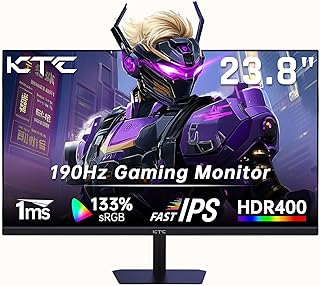
KTC 24 Inch 180Hz/190Hz Gaming Monitor
Why We Love It

KOORUI 27-inch QHD 260Hz 1ms IPS Gaming Monitor
Why We Love It

AOC GAMING 24G50Z 24-Inch Fast IPS Gaming Monitor
Why We Love It

KOORUI Gaming Monitor 24-inch IPS FHD 1080p
Why We Love It
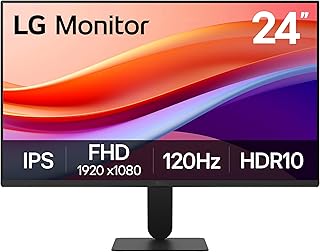
LG 24U411A-B 24-inch Full HD (1920 x 1080) IPS Computer
Why We Love It

Z-Edge 34" UWQHD 165Hz 1ms Curved IPS Gaming Monitor
Why We Love It

GAMEON 24 inch Fast IPS Gaming Monitor Marksman Series
Why We Love It

GAMEON GOE24FHD165IPS 24 Inch Gaming Monitor FHD 1080p 165Hz
Why We Love It
Quick Pick
10 Best Gaming Ips Computer Monitor Of 2026
Quick Pick
Z-Edge 24.5 inch 300Hz 280Hz 240Hz Gaming Monitor, UG25S FHD 1080p, Ultra Fast MPRT 1ms, IPS Monitor Gaming, PC Computer Monitor, 16.7M Colors, DP x2, HDMI x2
BenQ EW270Q 27" 2K QHD 200Hz IPS Gaming Monitor with USB-C (65W) HDRi | 1200:1 Contrast | 90% P3 Gamut | 350 Nits | Built-in Speakers (5W x2) | AMD FreeSync Premium | HDMI | Game Color Mode
KTC 24 Inch 180Hz/190Hz Gaming Monitor, FHD PC Computer Monitor H24F8 | with Fast IPS Panel, HDR400, 133% sRGB, Bluelight Filter, 2 HDMI & 1 DP Port, Compatible Freesync and Wall Mountable
KOORUI 27-inch QHD 260Hz 1ms IPS Gaming Monitor, Flat PC Screen, HDR400, 99% sRGB, HDMI/DP, Black - Ideal for Competitive Gaming & Home Office
AOC GAMING 24G50Z 24-Inch Fast IPS Gaming Monitor, Full HD 1080p, 260Hz, 0.3ms MPRT / 1ms GtG, Adaptive-Sync, MBR Sync, Low Blue Mode, DisplayPort 1.4, HDMI 2.0 – Black
KOORUI Gaming Monitor 24-inch IPS FHD 1080p, 200Hz 1ms HDR400 90% DCI-P3 Color Gamut, Adaptive Sync Ultra Slim Frame, VESA Mountable, HDMI x 2, DisplayPort, Black, G2411P
LG 24U411A-B 24-inch Full HD (1920 x 1080) IPS Computer Monitor, 120Hz, HDR10, Reader Mode, Flicker Safe, HDMI, Slim Stand Base, Black
Z-Edge 34" UWQHD 165Hz 1ms Curved IPS Gaming Monitor, FreeSync, 1500R Curvature, UWQHD 3440 * 1440, 96% DCI-P3, 1.07 Colors, 300 cd/㎡, 21:9, Powerful Connections, 2000:1, UG34I-Black
GAMEON 24 inch Fast IPS Gaming Monitor Marksman Series – FHD 1920x1080, 200Hz Overclocked, 0.5ms MPRT, HDR400, FreeSync G-Sync Compatible, HDMI 2.1 & DP 1.4, Console compatible, GOAM24FHD200IPS White
GAMEON GOE24FHD165IPS 24 Inch Gaming Monitor FHD 1080p 165Hz Fast IPS Computer Monitor, 0.5ms MPRT, HDMI 2.1, HDR400, 99% sRGB, G-Sync & FreeSync, Built-in Speakers, PS5 Ready, Black
Buying Guide: Gaming Ips Computer Monitor
📋 Table of Contents
1What resolution should I look for in a gaming IPS computer monitor?
For most gamers, 1440p (2560x1440) offers a great balance of detail and performance, while 4K (3840x2160) is ideal for those with high-end GPUs. 1080p (1920x1080) remains a solid choice for budget builds or lower-end systems, but may lack sharpness for modern games.
2What refresh rate is best for gaming on an IPS monitor?
A minimum of 144Hz is recommended for smooth gameplay in fast-paced titles, with 165Hz or higher being ideal for competitive gaming. IPS panels typically have slower response times than TN, so look for monitors with 1ms GTG (gray-to-gray) response times for minimal motion blur.
3Should I prioritize IPS over TN or VA panels for gaming?
IPS panels offer superior color accuracy and wide viewing angles, making them great for immersive gaming and content creation. However, they usually have slower response times than TN panels. VA panels provide deep blacks but suffer from input lag and motion blur, so IPS is often the best compromise for most gamers.
4What size monitor is best for gaming with an IPS panel?
27 inches is a popular size for 1440p IPS monitors, offering a good balance of screen real estate and immersion. For 4K, 32 inches or larger is better to avoid pixel density issues. Smaller screens like 24 inches may feel cramped for modern games with expansive environments.
5What kind of connectivity should I look for in a gaming IPS monitor?
Ensure the monitor has at least one HDMI 2.1 port for 4K at 120Hz support and a DisplayPort 1.4 or higher for high refresh rates. Multiple USB-C ports can be useful for docking stations, and built-in speakers or headphone jacks add convenience for casual gaming setups.
How we choose
Our editors are people who genuinely love testing and writing about products. We compare each product's real-world usability and strengths, then distill what matters most into our own "Why We Love It" points — so you get an honest, at-a-glance sense of what counts before you buy.