10 Best Gaming Headsets For Mac Of 2026
Gaming Headsets For Mac — Reviews, Recommendations & Updated Buying Guide November 2026


Razer BlackShark V2 X
Why We Love It


Razer BlackShark V2 X Wired PC Gaming Headset
Why We Love It
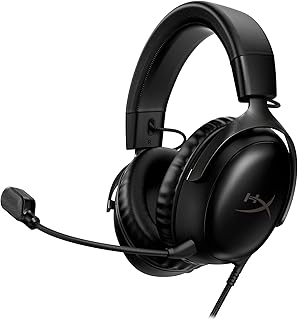
HyperX 727A8AA Cloud III Wired Gaming Headset
Why We Love It

Logitech G Astro A50 LIGHTSPEED Wireless Gaming Headset +
Why We Love It

Razer BlackShark V3 Wireless Gaming Headset for PC: 50mm
Why We Love It

ATTACK SHARK L80 Ultra Light Wireless Gaming Headset
Why We Love It

Razer Kraken X Lite - Wired Ultralight PC Gaming Headset
Why We Love It

EKSA Gaming Headset PC Headset with 7.1 Surround Sound
Why We Love It

AOC TG1 RGB Wireless Gaming Headset
Why We Love It

Razer Barracuda X Chroma Wireless Gaming Headset: 2.4GHz
Why We Love It
Quick Pick
10 Best Gaming Headsets For Mac Of 2026
Quick Pick
Razer BlackShark V2 X - Multi-Platform Wired Esports Headset (Triforce 50 mm Drivers, Advanced Passive Noise Cancellation, 7.1 Surround Sound, Hyperclear Cardioid Mic) White
Razer BlackShark V2 X Wired PC Gaming Headset,3.5mm Audio Jack, Black | 7.1 Surround Sound, 50mm Drivers, Cardioid Mic, Lightweight, Memory Foam, Noise Isolating Earcups, for PC, PS4, PS5, Switch
HyperX 727A8AA Cloud III Wired Gaming Headset, PC, PS5, Xbox Series X|S, Angled 53mm Drivers, DTS, Memory Foam, Durable Frame, Ultra-Clear 10mm Mic, USB-C, USB-A, 3.5mm, Black
Logitech G Astro A50 LIGHTSPEED Wireless Gaming Headset + Base (Gen 5), PRO-G GRAPHENE, 3-System Switching, USB-C to Xbox, PS5, PC/Mac, Nintendo Switch, Switch 2, Bluetooth - White
Razer BlackShark V3 Wireless Gaming Headset for PC: 50mm Drivers - Super Wideband Mic - 2.4 GHz, Bluetooth, USB - Works with Mac, PS5, Nintendo Switch, Smartphone - 70 Hr Battery - Black
ATTACK SHARK L80 Ultra Light Wireless Gaming Headset,Bluetooth 5.3,2.4G,3.5mm Wired,50 Hours,40mm Pro-G Drivers,Gaming Headphones with Noise Cancelling Detachable Mic,for PC Mac Mobile-White
Razer Kraken X Lite - Wired Ultralight PC Gaming Headset - Surround Sound bendable cardioid microphone (230g light, 3.5 jack for PS4, PS5, Switch, Xbox One, Xbox Series X|S) Black
EKSA Gaming Headset PC Headset with 7.1 Surround Sound, Noise Canceling Over Ear USB Wired Headphones with Mic & RGB LED Light, Gaming Headphones Compatible with PS5, PS4, Mac, Laptop (E1000-US-Green)
AOC TG1 RGB Wireless Gaming Headset, 7.1.4 Spatial Audio, 2.4GHz USB & Bluetooth 6.0, 2000mAh Battery, Detachable ENC Mic, for PC PS5 PS4 Mac Switch (Black&Gray)
Razer Barracuda X Chroma Wireless Gaming Headset: 2.4GHz Wireless & Bluetooth, Lightweight, Chroma RGB, 40mm Drivers, Cardioid Mic, 70 Hr Battery, for PC, Mac, PS5, Switch, Smartphone - Black
Buying Guide: Gaming Headsets For Mac
📋 Table of Contents
1Do I need a USB or 3.5mm headset for my Mac?
USB headsets are plug-and-play and often include built-in sound cards, ideal for Macs with limited audio ports. 3.5mm headsets require a TRRS splitter if your Mac has separate mic and headphone jacks, but they offer lower latency for competitive gaming.
2What audio format should I look for to avoid latency?
Opt for headsets with support for low-latency audio formats like AAC or SBC, which are natively supported by macOS. Avoid headsets that rely on Windows-specific drivers or codecs, as they may not work well or at all on Mac.
3How important is a built-in microphone for online gaming?
A noise-canceling mic is essential for clear communication in multiplayer games. Look for headsets with a retractable or detachable mic that offers at least 40mm drivers and a unidirectional pickup pattern to reduce background noise.
4What driver size is best for immersive sound on a Mac?
Headsets with 40-50mm drivers provide a good balance of bass, clarity, and spatial awareness for gaming. Larger drivers (50mm+) can enhance low-end frequencies, but may require more power and could sound muffled on Macs with weaker audio outputs.
5Are wireless headsets reliable for Mac gaming?
Wireless headsets can work well, but ensure they use a Bluetooth 5.0 or higher connection for stable performance. Avoid models that require a dongle unless it's compatible with macOS. Wired options are still the most reliable for low-latency gaming on Mac.
How we choose
Our editors are people who genuinely love testing and writing about products. We compare each product's real-world usability and strengths, then distill what matters most into our own "Why We Love It" points — so you get an honest, at-a-glance sense of what counts before you buy.