10 Best Gaming Curved Computer Monitor Of 2026
Gaming Curved Computer Monitor — Reviews, Recommendations & Updated Buying Guide November 2026


27 Inch Curved Gaming Monitor
Why We Love It


Z-Edge 27 inch Curved Gaming Monitor 300Hz Monitor
Why We Love It

KOORUI 34 Inch UltraWide Curved Gaming Monitor
Why We Love It

Xiaomi Mi Monitor G34WQI
Why We Love It

Z-Edge 34" UWQHD 165Hz 1ms Curved IPS Gaming Monitor
Why We Love It

LG 32G600A-B 32-inch Ultragear QHD (2560 x 1440) Curved
Why We Love It
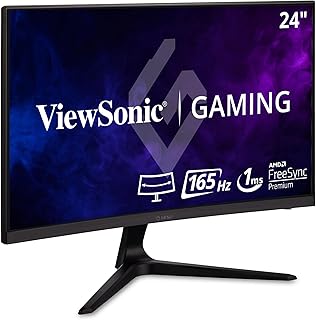
Viewsonic Omni VX2418C 24 Inch 1080p 1ms 165Hz Curved Gaming
Why We Love It
KOORUI 27 Inch Curved Gaming Monitor
Why We Love It

Z-Edge 34" Curved Ultrawide Gaming Monitor
Why We Love It

Gawfolk 27 inch Curved Gaming Monitor 180Hz FHD(1920x1080)
Why We Love It
Quick Pick
10 Best Gaming Curved Computer Monitor Of 2026
Quick Pick
27 Inch Curved Gaming Monitor,180Hz, VA Display, QHD 1440P Computer Monitor, 1ms, HDR10,90% DCI-P3, Adaptive Sync, VESA Compatible,Tilt Adjustable
Z-Edge 27 inch Curved Gaming Monitor 300Hz Monitor, 1ms 16:9 FHD 1080P Frameless Curved Monitor, UG27S Freesync Eye Care, 2×Display Port, 2×HDMI
KOORUI 34 Inch UltraWide Curved Gaming Monitor, WQHD 180Hz, HDR400 | 3440x1440, 1000R VA Panel, 1ms MPRT, Adaptive Sync, 90% DCI-P3, PiP/PbP, DP 1.4, HDMI 2.0, VESA 75 × 75 mm
Xiaomi Mi Monitor G34WQI, 34 Inch Curved Gaming Monitor, Black, EU ELA5454EU, QHD Ultra Wide 1440p
Z-Edge 34" UWQHD 165Hz 1ms Curved IPS Gaming Monitor, FreeSync, 1500R Curvature, UWQHD 3440 * 1440, 96% DCI-P3, 1.07 Colors, 300 cd/㎡, 21:9, Powerful Connections, 2000:1, UG34I-Black
LG 32G600A-B 32-inch Ultragear QHD (2560 x 1440) Curved Gaming Monitor, 180Hz, 1ms, AMD FreeSync, HDMI, DisplayPort, Tilt/Height/Swivel Adjustable Stand, Black
Viewsonic Omni VX2418C 24 Inch 1080p 1ms 165Hz Curved Gaming Monitor with AMD FreeSync Premium, Eye Care, HDMI and DisplayPort
KOORUI 27 Inch Curved Gaming Monitor,180Hz, VA Display, QHD 1440P Computer Monitor, 1ms, HDR10,90% DCI-P3, Adaptive Sync, VESA Compatible,Tilt Adjustable 27E6QCA
Z-Edge 34" Curved Ultrawide Gaming Monitor, Max 240Hz,WQHD,VA LED, AG34P
Gawfolk 27 inch Curved Gaming Monitor 180Hz FHD(1920x1080) 1800R | 1080P Computer Monitors Fast 1ms(GTG) 100%sRGB FreeSync Suitable for home office and e-sports games Display Screen
Buying Guide: Gaming Curved Computer Monitor
📋 Table of Contents
1What resolution should I look for in a gaming curved monitor?
For most gamers, 1440p (QHD) or 4K (UHD) resolution is ideal, offering sharp visuals and more screen real estate. 1440p balances performance and clarity well, while 4K is best for high-end systems with powerful GPUs. Curved monitors often enhance immersion without sacrificing detail.
2What refresh rate is best for gaming on a curved monitor?
A minimum of 144Hz is recommended for smooth gameplay, especially in fast-paced genres like FPS or racing. Monitors with 165Hz or higher provide even better responsiveness, reducing motion blur and input lag. Ensure your GPU can consistently deliver frame rates matching the monitor's capabilities.
3What curvature radius is optimal for gaming?
A curvature radius of 1800R to 2700R is typically ideal for most users, offering a natural field of view without distortion. Smaller radii (like 1500R) may cause eye strain during long sessions, while larger radii feel less immersive. Match the curvature to your seating distance and screen size for the best experience.
4Does a curved monitor offer any real advantages over flat monitors for gaming?
Curved monitors can enhance immersion by wrapping around your field of view, reducing the need to move your head. They also minimize screen distortion and can provide a more uniform viewing angle. However, they may not be ideal for multi-tasking or split-screen gaming due to the curved edges.
5What panel type is best for gaming on a curved monitor?
IPS panels are preferred for their wide color gamut and accurate colors, which are crucial for competitive and visually demanding games. TN panels offer faster response times but with narrower viewing angles. Look for monitors with IPS and a 1ms response time for the best balance of performance and visual quality.
How we choose
Our editors are people who genuinely love testing and writing about products. We compare each product's real-world usability and strengths, then distill what matters most into our own "Why We Love It" points — so you get an honest, at-a-glance sense of what counts before you buy.