10 Best Gaming Controllers With Back Paddles Of 2026
Gaming Controllers With Back Paddles — Reviews, Recommendations & Updated Buying Guide November 2026

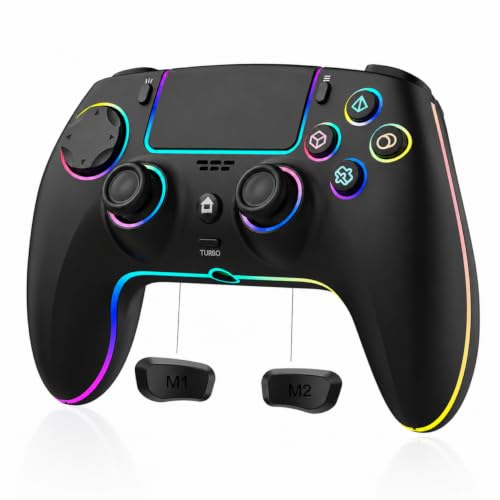
Wireless Controller for PS5 Pro/PlayStation-5/PC/Mac with
Why We Love It


SCUF Envision PRO Wireless Gaming Controller for PC
Why We Love It

EXknight Leverback FPS Mechanical Paddles Attachment
Why We Love It

8Bitdo Ultimate Mobile Gaming Controller for iPhone
Why We Love It

Junsi Back Paddles Compatible with PS5 Edge Controller
Why We Love It

SCUF NOMAD Wireless iPhone Mobile Gaming Controller
Why We Love It
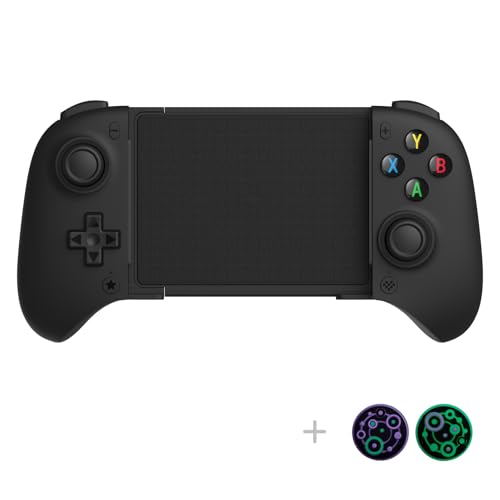
8Bitdo Ultimate Mobile Gaming Bluetooth Controller for
Why We Love It

ELECDON Strike Pack for PS4 Controller
Why We Love It

SCUF ENVISION PRO Wireless V2 (2025) PC Gaming Controller
Why We Love It

Razer Raiju V3 Pro Wireless Esports Controller for
Why We Love It
Quick Pick
10 Best Gaming Controllers With Back Paddles Of 2026
Quick Pick
Wireless Controller for PS5 Pro/PlayStation-5/PC/Mac with Hall Effect joystick trigger/Back Paddles/Cool RGB/Motion Sensor/TURBO/3.5mm Audio Jack - Built-in Speakers Support P-S5 Console Audio
SCUF Envision PRO Wireless Gaming Controller for PC Only-Anti-Drift Thumb Pins-Five Reusable G Buttons-Back Paddles-Instant Trigger-Steel Grey
EXknight Leverback FPS Mechanical Paddles Attachment, Back Buttons Gaming Paddles for PS5 Controller (White)
8Bitdo Ultimate Mobile Gaming Controller for iPhone, Apple, Android & Xbox Cloud Gaming, Bluetooth Gamepad with Hall Effect Joysticks, 2 Pro Back Buttons, Officially Licensed (Black)
Junsi Back Paddles Compatible with PS5 Edge Controller - 4pcs Metal Back Buttons Trigger Paddle Interchangeable Replacement Parts, Metallic Silver
SCUF NOMAD Wireless iPhone Mobile Gaming Controller – Customizable Paddles – Anti-Drift Thumbsticks – Bluetooth 5.0 Connectivity – PS Remote, Xbox Game Pass, Apple Arcade, Steam Link – Black
8Bitdo Ultimate Mobile Gaming Bluetooth Controller for Android Devices with Hall Effect Joysticks and Hall Triggers, Back Buttons, Mapping and Turbo Function (Black)
ELECDON Strike Pack for PS4 Controller, Controller Back Button Attachment,Paddles for PS4 for Elite Professional FPS&TPS Gaming
SCUF ENVISION PRO Wireless V2 (2025) PC Gaming Controller – White and Black
Razer Raiju V3 Pro Wireless Esports Controller for PlayStation 5 & PC: 4 Removable Mouse Click Back Buttons & 2 Claw Grip Bumpers, Symmetrical TMR Thumbsticks, Razer Pro HyperTriggers - Black
Buying Guide: Gaming Controllers With Back Paddles
📋 Table of Contents
1What types of back paddle inputs are available, and which is best for me?
Back paddles can be physical buttons, capacitive touchpads, or hybrid switches. Physical buttons offer tactile feedback for fast, precise actions, while touchpads allow for gesture-based inputs. Choose based on your playstyle — action-heavy games often benefit from physical buttons for quick access to abilities or commands.
2How many back paddle buttons do I actually need?
Most controllers offer 2–4 back paddle buttons, with some high-end models offering up to 8. For most gamers, 2–4 paddles are sufficient for mapping essential actions like sprint, crouch, or weapon swaps. More paddles can be useful for complex games or modded setups, but may require more hand movement and learning time.
3Are programmable back paddles worth the extra cost?
Programmable paddles let you customise button mappings for different games or profiles, which is ideal for competitive or multi-genre players. If you frequently switch between games with different control schemes, this feature can improve efficiency and reduce muscle memory confusion. However, if you stick to one or two games, fixed mappings may be enough.
4What cable or connectivity options should I look for?
Wired controllers with USB-C or micro-USB offer low latency and reliable performance, while wireless models use Bluetooth or proprietary protocols. For the lowest input lag, look for a controller with a dedicated dongle or a high-quality Bluetooth connection. Wireless options are more convenient but may drain battery faster during long sessions.
5How do back paddles affect ergonomics and comfort?
Back paddles are typically placed on the top or sides of the controller, so check the placement and size to ensure they fit your hand naturally. Some paddles are small and require a light touch, while others are larger and more accessible. A poorly placed paddle can cause strain during long play sessions, so test the layout if possible or read user reviews for comfort insights.
How we choose
Our editors are people who genuinely love testing and writing about products. We compare each product's real-world usability and strengths, then distill what matters most into our own "Why We Love It" points — so you get an honest, at-a-glance sense of what counts before you buy.