10 Best Gaming Audio Mixers For Streaming Of 2026
Gaming Audio Mixers For Streaming — Reviews, Recommendations & Updated Buying Guide November 2026

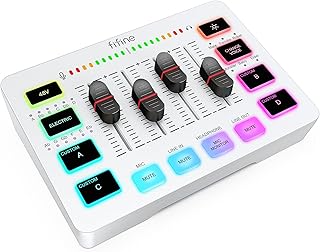
FIFINE AmpliGame SC3 White Audio Mixer for
Why We Love It


Azonee Gaming Audio Mixer
Why We Love It

FIFINE Gaming Audio Mixer
Why We Love It

NALACAL Gaming Audio Mixer
Why We Love It

FIFINE AmpliGame KS5W Streaming Equipment Bundle
Why We Love It

FIFINE Gaming Equipment Bundle
Why We Love It

Nalacal Sound Mixer Board
Why We Love It

SINWE Podcast Equipment Bundle
Why We Love It

OneNine Audio Mixer
Why We Love It

FIFINE AmpliGame AM8 USB/XLR Dynamic Microphone for Gaming
Why We Love It
Quick Pick
10 Best Gaming Audio Mixers For Streaming Of 2026
Quick Pick
FIFINE AmpliGame SC3 White Audio Mixer for Gaming/Video/Podcast Recording | Streaming RGB PC Mixer, XLR Microphone Interface, Individual Control, Volume Fader, Mute Button, 48V Phantom Power
Azonee Gaming Audio Mixer, Streaming RGB PC Mixer with XLR Microphone Interface, Voice Changer, Volume Fader, 48V Phantom Power, and Mute Button for Podcasting, Recording, Gaming
FIFINE Gaming Audio Mixer, Streaming RGB PC Mixer with XLR Microphone Interface, Individual Control, Volume Fader, Mute Button, 48V Phantom Power, for Podcast/Recording/Vocal/Game Voice-AmpliGame SC3 | USB PnP For PC,Mute Button,XLR Preamp,RGB,Voice change,48V Phantom Power,Monitoring,Podcast,Recording,Vocal,Streaming
NALACAL Gaming Audio Mixer, Streaming RGB PC Mixer with XLR Microphone Interface, Individual Control Volume Fader/Mute Button/48V Phantom Power for Podcast/Recording/Vocal/Game Voice, PC, Guitar, F11
FIFINE AmpliGame KS5W Streaming Equipment Bundle, XLR/USB Microphone Set
FIFINE Gaming Equipment Bundle, Dynamic XLR/USB Gaming Microphone Set with Streaming Audio Mixer for Podcast Recording Video Vocal, RGB Gamer Set with Volume Fader/XLR Interface for PC-AmpliGame KS5
Nalacal Sound Mixer Board, Live Card And Audio Interface Board With Multiple Dj Effects, Gaming Mixer, Voice Changer, Bluetooth Noise Reduction, Use For Streaming, Podcasting
SINWE Podcast Equipment Bundle, Condenser Microphone with Tripod Stand and Professional Audio Mixer for Studio Recording Vocals, Voice Overs, Streaming Broadcast and YouTube Videos
OneNine Audio Mixer, Professional Live Sound Card Studio Record Soundcard Bluetooth Microphone Mixer Voice Changer Live Streaming Audio Sound Mixer for Streaming Podcasting Gaming
FIFINE AmpliGame AM8 USB/XLR Dynamic Microphone for Gaming Streaming | Podcast Mic with RGB Light, Mute Button, Headphones Jack, Desktop Stand, for Vocal Recording Singing YouTube, Metal
Buying Guide: Gaming Audio Mixers For Streaming
📋 Table of Contents
1How many audio inputs do I actually need for streaming?
For basic streaming, 2-3 inputs (e.g., mic, game console, and music) are sufficient. If you plan to mix voice, game audio, and background music simultaneously, aim for at least 4-6 inputs to avoid signal routing workarounds.
2What's the difference between USB and analog mixers for streaming?
USB mixers connect directly to your computer and often include built-in sound cards, simplifying setup. Analog mixers require a separate audio interface but offer more control over signal levels and are better for advanced users who want to fine-tune their mix.
3Should I prioritize XLR or 3.5mm mic inputs?
XLR inputs provide balanced audio and are ideal for professional microphones, reducing noise over long cable runs. 3.5mm inputs work for basic mics and are more compact, but may introduce noise in high-quality setups. Choose XLR if you use a condenser mic or plan to upgrade later.
4What's the benefit of having a dedicated monitor output?
A dedicated monitor output lets you hear your mix in real time without latency, which is crucial for voiceovers and live commentary. It also allows you to adjust your audio independently from what your audience hears, improving your performance and clarity.
5Are software controls worth the extra cost?
Software controls let you adjust levels, EQ, and effects from your computer, which is great for streamers who want a clean desk setup. However, physical knobs and faders offer faster, hands-on adjustments during live sessions. Choose based on your workflow and preference for tactile feedback.
How we choose
Our editors are people who genuinely love testing and writing about products. We compare each product's real-world usability and strengths, then distill what matters most into our own "Why We Love It" points — so you get an honest, at-a-glance sense of what counts before you buy.