10 Best Gamesir Wired Controllers Of 2026
Gamesir Wired Controllers — Reviews, Recommendations & Updated Buying Guide November 2026


GameSir G7 SE Wired Controller for Xbox Series X|S
Why We Love It

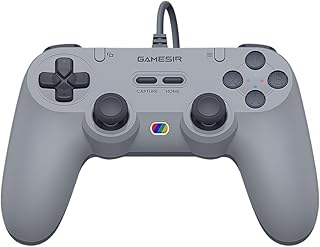
GameSir Tegenaria Lite Wired Game Controller For Switch
Why We Love It

GameSir G7 HE Wired XBOX Controller
Why We Love It

GameSir Nova Lite Wireless Controller for PC
Why We Love It

GameSir Tegenaria Lite Wired Game Controller For Switch
Why We Love It
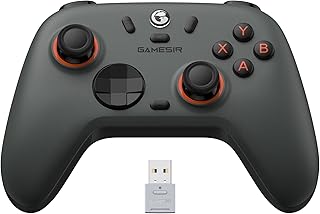
GameSir Nova 2 Lite Wireless Controller with Hall Effect
Why We Love It

GameSir Tegenaria Lite Wired Controller for PC
Why We Love It
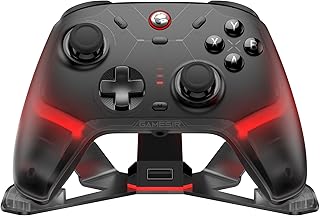
GameSir Cyclone 2 PC Controller Mag-Res TMR Sticks 1000Hz
Why We Love It

GameSir G7 SE Wired XBOX Controller
Why We Love It

GameSir Kaleid Wired Controller for Xbox Series X|S
Why We Love It
Quick Pick
10 Best Gamesir Wired Controllers Of 2026
Quick Pick
GameSir G7 SE Wired Controller for Xbox Series X|S, Xbox One & Windows 10/11, Plug and Play Gaming Gamepad with Hall Effect Joysticks/Hall Trigger, 3.5mm Audio Jack
GameSir Tegenaria Lite Wired Game Controller For Switch, Android, iOS, PC, Steam With Retro 90s Design, Hall Effect Sticks, 1000Hz Polling Rate, Dual Rumble Motors, Ultra-Low Latency -Retro Gray
GameSir G7 HE Wired XBOX Controller,Hall Effect Sticks | Officially licensed Controller for XBOX Series X|S, XBOX One, Windows 10|11, PC, Video Game Controller
GameSir Nova Lite Wireless Controller for PC, Hall Effect Sticks & Trigger | Bluetooth Controller Gamepad with Hall Effect Trigger,Turbo,Rumble Vibration, Android, Switch & Steam Deck
GameSir Tegenaria Lite Wired Game Controller For Switch, Android, iOS, PC, Steam With Retro 90s Design, Hall Effect Sticks, 1000Hz Polling Rate, Dual Rumble Motors, Mappable Back Buttons - Mena
GameSir Nova 2 Lite Wireless Controller with Hall Effect Joysticks & Triggers, 2.4G & Wired 1000Hz Polling Rate, Macro Back Buttons, PC Gamepad Compatible with PC/Switch/Steam/iOS/Android (Grey)
GameSir Tegenaria Lite Wired Controller for PC, Wired 1000Hz Polling Rate, Hall Effect Joysticks and 2 Remappable Buttons, Dual Vibration, Turbo, PC Controller for Steam/Android/iOS/Switch (Grey)
GameSir Cyclone 2 PC Controller Mag-Res TMR Sticks 1000Hz Report Rate Hall & Micro 2-in-1 Triggers RGB Lighting with Charging Dock for PC/Switch/iOS/Android (Black)
GameSir G7 SE Wired XBOX Controller,Hall Effect Joysticks | Works with XBOX Series X|S, XBOX One, Windows 10/11 PC, Officially Licensed for XBOX, 1000hz, Mappable Back Buttons
GameSir Kaleid Wired Controller for Xbox Series X|S, Xbox One,Windows 10/11 & Steam, Plug and Play Gaming Gamepad, Transparent Video Game Controller with Hall Effect Joysticks/Hall Trigger, 3.5mm Audio Jack
Buying Guide: Gamesir Wired Controllers
📋 Table of Contents
1What connection type should I look for in a wired controller?
Most wired controllers use USB-C or USB-A for charging and connectivity. USB-C is faster and more modern, while USB-A is still common in older devices. Check your device’s port to ensure compatibility before buying.
2How many buttons and features do I actually need?
Basic controllers have 12-14 buttons and two analog sticks, ideal for most games. Advanced models add triggers, paddles, or motion sensors for competitive or immersive play. Match the feature set to your gaming style, not just the number of buttons.
3Is a wired controller better than a wireless one for my needs?
Wired controllers offer zero latency and no charging worries, making them ideal for fast-paced or competitive games. Wireless models offer more freedom of movement but may lag or require frequent charging, especially during long sessions.
4What about comfort and ergonomics for long play sessions?
Look for a controller with a contoured grip, textured surfaces, and adjustable tension on the sticks. A lightweight design and rubberized grips reduce hand fatigue during extended use, especially for gamers with smaller hands or wrist sensitivity.
5Are extra accessories like charging docks or skins worth it?
A charging dock keeps your controller powered up and organized, while skins protect the surface and personalize the look. These add-ons are optional but can improve convenience and longevity, especially for frequent users.
How we choose
Our editors are people who genuinely love testing and writing about products. We compare each product's real-world usability and strengths, then distill what matters most into our own "Why We Love It" points — so you get an honest, at-a-glance sense of what counts before you buy.