10 Best Gameon Gaming Monitor 2k Qhd Of 2026
Gameon Gaming Monitor 2k Qhd — Reviews, Recommendations & Updated Buying Guide November 2026

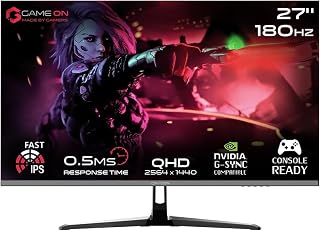
GAMEON GOPS27QHD180IPS 27 Inch Gaming Monitor QHD 2K 180Hz
Why We Love It


GAMEON 27 Inch QHD Gaming Monitor 180Hz IPS Panel 1ms
Why We Love It

GAMEON GOAE24QHD180IPS 24 Inch Gaming Monitor QHD 2K 180Hz
Why We Love It

GAMEON 27 Inch QD-OLED Gaming Monitor
Why We Love It

27 inch QHD, 165Hz
Why We Love It

GAMEON GOA27QHD180IPS Arctic Pro-Series 27" White Gaming
Why We Love It

GAMEON GOM27QHD180IPS Midnight Pro X 27" Black Gaming
Why We Love It

GAMEON GOML27QHD240IPS Midnight Signature 27" Black Gaming
Why We Love It

GAMEON 27" Black OLED QHD Gaming Monitor
Why We Love It

GAMEON 26.5 inch QHD OLED Gaming Monitor 280Hz
Why We Love It
Quick Pick
10 Best Gameon Gaming Monitor 2k Qhd Of 2026
Quick Pick
GAMEON GOPS27QHD180IPS 27 Inch Gaming Monitor QHD 2K 180Hz Fast IPS Computer Monitor, 0.5ms MPRT, HDMI 2.1, HDR, 99% sRGB, G-Sync & FreeSync Compatible, Built-in Speakers, PS5 & Console Ready, Black
GAMEON 27 Inch QHD Gaming Monitor 180Hz IPS Panel 1ms Response Time 2560x1440 Resolution FreeSync Premium PC PS5 Xbox Display HDMI DisplayPort
GAMEON GOAE24QHD180IPS 24 Inch Gaming Monitor QHD 2K 180Hz Fast IPS Computer Monitor, 0.5ms MPRT, HDMI 2.1, HDR, 99% sRGB, G-Sync & FreeSync Compatible, Built-in Speakers, PS5 & Console Ready, Black
GAMEON 27 Inch QD-OLED Gaming Monitor - 2K QHD 1440p - 144Hz - 0.03ms GTG - HDR400-1.07B Colors - 99% DCI-P3 - HDMI 2.1 - DisplayPort 1.4 - FreeSync VRR - PC & Console Ready - Black - GO27QDOLD144
27 inch QHD, 165Hz, 0.5ms (2560x1440) 2K Flat IPS Gaming Monitor With G-Sync & FreeSync - (HDMI 2.1 Console Compatible) GOAEP27QHD165 Black
GAMEON GOA27QHD180IPS Arctic Pro-Series 27" White Gaming Monitor, 2560x1440p 2K QHD, Fast IPS Panel, 180Hz, 0.3ms, HDMI 2.1, FreeSync & G-Sync, Crosshair Assistant, HDR, PS5, VRR Support
GAMEON GOM27QHD180IPS Midnight Pro X 27" Black Gaming Monitor, 2560x1440p 2K QHD Fast IPS, 180Hz Refresh Rate, Ultra-Fast Response, HDMI 2.1,FreeSync/G-Sync, Crosshair Assistant, HDR, PS5, VRR Support
GAMEON GOML27QHD240IPS Midnight Signature 27" Black Gaming Monitor, 2560x1440p 2K QHD Fast IPS, 240Hz Refresh Rate, Ultra-Fast Response, HDMI 2.1, FreeSync/G-Sync, Crosshair, HDR, PS5, VRR Support.
GAMEON 27" Black OLED QHD Gaming Monitor, 240Hz, 0.03ms, HDMI 2.1, DP 1.4, USB-C 65W, HDR10, FreeSync, G-Sync, 10-Bit, 98.5% DCI-P3, KVM, RGB, Adjustable Height Tilt Pivot Swivel
GAMEON 26.5 inch QHD OLED Gaming Monitor 280Hz, 0.03ms GTG, HDR True Black 400, 2560x1440, FreeSync, Adaptive Sync, HDMI 2.1, VRR, ALLM, 10-Bit, 99% DCI-P3, Flicker-Free, Low Blue Light, RGB Backlight
Buying Guide: Gameon Gaming Monitor 2k Qhd
📋 Table of Contents
1What refresh rate should I look for in a GameOn 2K gaming monitor?
For competitive gaming, aim for at least 144Hz to get smooth gameplay and responsive controls. If you're playing slower-paced games or want something budget-friendly, 60-75Hz is acceptable, but 144Hz or higher makes a noticeable difference in fast-action titles.
2Is a 2K (1440p) monitor worth it over 1080p for gaming?
2K gives you sharper visuals and more screen real estate, making it ideal if you sit closer to your monitor or play story-driven games. You'll need a stronger graphics card to maintain high frame rates at 2K, so check if your GPU can handle it before upgrading.
3What size GameOn 2K monitor is best for gaming?
27 inches is the sweet spot for 2K gaming—it fills your vision without requiring excessive head movement and maintains pixel clarity. 24 inches feels cramped at 2K, while 32 inches makes individual pixels visible if you sit at normal gaming distance.
4What panel type should I choose—IPS, VA, or TN?
IPS panels offer the best color accuracy and wide viewing angles, making them great for all-around gaming. VA panels provide deeper blacks and better contrast but have slower response times, while TN panels are fastest (1-2ms) but have worse colors and viewing angles.
5Should I pay extra for HDR on a GameOn 2K gaming monitor?
HDR is worth it if you play modern AAA games and watch HDR content, as it significantly improves image quality with better brightness and color depth. Skip it if you're mainly playing competitive shooters or older titles, where fast response time matters more than visual enhancement.
How we choose
Our editors are people who genuinely love testing and writing about products. We compare each product's real-world usability and strengths, then distill what matters most into our own "Why We Love It" points — so you get an honest, at-a-glance sense of what counts before you buy.