10 Best Full Size Backlit Keyboard Of 2026
Full Size Backlit Keyboard — Reviews, Recommendations & Updated Buying Guide November 2026


HP GK100 F Wired Mechanical Gaming Keyboard – RGB Backlit
Why We Love It


Wired RGB Keyboard and Mouse Combo
Why We Love It
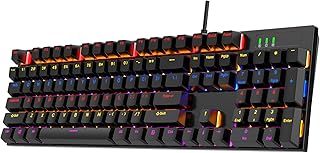
Wired Gaming Mechanical Blue-Switch Keyboard
Why We Love It

Logitech Combo Touch
Why We Love It

Logitech MX Keys S Advanced Full size Wireless Scissor
Why We Love It

Large Print Backlit Keyboard for Seniors and Low Vision
Why We Love It

Soueto Wireless Keyboard with 7-Color RGB Backlit
Why We Love It

ProtoArc XK01 Plus Backlit Foldable Keyboard
Why We Love It

ProtoArc KM100-A Backlit Bluetooth Keyboard and Mouse for
Why We Love It

AULA S99 Gaming Keyboard
Why We Love It
Quick Pick
10 Best Full Size Backlit Keyboard Of 2026
Quick Pick
HP GK100 F Wired Mechanical Gaming Keyboard – RGB Backlit, Full-Size Layout, Double Injection Keycaps, Mechanical Switches, 4 LED Indicators, Windows Key Lock, 3-Year Warranty – BLACK
Wired RGB Keyboard and Mouse Combo, Adjustable Rainbow Backlit, 104-Key Full-Size with Numpad, 6400 DPI Ergonomic High-Precision Mouse, Plug & Play, for PC Laptop Mac Windows Mac Office Gaming (Black)
Wired Gaming Mechanical Blue-Switch Keyboard - WEETOTUNG 104-keys RGB Backlit USB Mechanical Keyboard - for PC Gaming and Office Working (Black)
Logitech Combo Touch, Detachable iPad Keyboard Case (10th gen and A16) with Large Precision Trackpad, Full-Size Backlit Keyboard, and Smart Connector Technology, QWERTY UK English Layout - Grey
Logitech MX Keys S Advanced Full size Wireless Scissor Keyboard with Backlit keys - Black
Large Print Backlit Keyboard for Seniors and Low Vision Black | High Contrast Oversized Letters Full Size USB Wired Computer Keyboard with Silicone Cover, Wrist Rest & White LED.No Glare
Soueto Wireless Keyboard with 7-Color RGB Backlit, Full-Size Computer Keyboard with Phone Tablet Holder, 2.4G Rechargeable Gaming Keyboard with Light Up Keys, Compatible with Mac, Windows (Black)
ProtoArc XK01 Plus Backlit Foldable Keyboard, 105-Key Full-Size, Gray
ProtoArc KM100-A Backlit Bluetooth Keyboard and Mouse for Mac, Space Gray | Full Size Mac Layout with Numeric Keypad, Wireless Keyboard Mouse for Mac, Multi-Device, Rechargeable, for MacBook Pro/Air
AULA S99 Gaming Keyboard, Ergonomic Computer Keyboards, Wireless Creamy Keyboard Full Size Cute Backlit Media Knob Programmable Tri-Mode Bluetooth/2.4GHz/USB-C Keyboard for PC Gamer - Grey & Yellow
Buying Guide: Full Size Backlit Keyboard
📋 Table of Contents
1What keyswitch type should I look for in a full size backlit keyboard?
Cherry MX switches are the gold standard, with variants like MX Blue (clicky), MX Red (linear), and MX Brown (tactile) offering different feels. Look for switches rated for at least 50 million keystrokes for durability, and consider linear switches for gaming or fast typing, or tactile switches for better feedback in daily use.
2How many backlight levels are enough for a full size backlit keyboard?
Three to five brightness levels provide enough flexibility for different lighting environments, from dim rooms to bright offices. Some keyboards also offer color customization, which is great for personalization but not essential for basic use.
3What’s the difference between membrane and mechanical full size backlit keyboards?
Mechanical keyboards use individual switches under each key for a more responsive and durable feel, while membrane keyboards use a single rubber dome under the entire keycap, offering a cheaper but less tactile experience. Mechanical keyboards are preferred for heavy use, gaming, or typing, while membrane models are lighter and more budget-friendly.
4What size and layout should I choose for a full size backlit keyboard?
A full size keyboard typically includes a numeric keypad, arrow keys, and function row, making it ideal for office or productivity use. If you need more desk space or prefer a compact setup, consider a tenkeyless (TKL) version, but full size is best for those who use spreadsheets, coding, or multimedia controls frequently.
5Are wireless full size backlit keyboards worth the extra cost?
Wireless models offer cleaner desk space and greater mobility, but they require batteries or a charging dock and may have a slight input lag compared to wired models. Look for Bluetooth 5.0 or higher for better connectivity, and ensure the keyboard has a low-latency mode if you're a gamer or need fast response times.
How we choose
Our editors are people who genuinely love testing and writing about products. We compare each product's real-world usability and strengths, then distill what matters most into our own "Why We Love It" points — so you get an honest, at-a-glance sense of what counts before you buy.