10 Best Flight Sticks Of 2026
Flight Sticks — Reviews, Recommendations & Updated Buying Guide November 2026


Thrustmaster T.Flight Hotas One Flight Stick for Xbox Series
Why We Love It


Thrustmaster T16000M FCS HOTAS
Why We Love It

Thrustmaster T-Flight Hotas X
Why We Love It
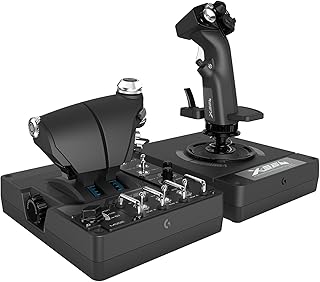
Logitech G X56 H.O.T.A.S Throttle and Joystick Flight
Why We Love It

Thrustmaster TCA Sidestick Airbus Edition
Why We Love It

Thrustmaster Sol-R 2 HOSAS Space Sim Duo
Why We Love It

Thrustmaster TCA Captain Pack X Airbus Edition
Why We Love It

Turtle Beach Velocityone Flightstick Controller
Why We Love It

HORI Ace Combat 8: Wings of Theve Flight Stick for
Why We Love It

Thrustmaster TCA Sidestick X Airbus Edition
Why We Love It
Quick Pick
10 Best Flight Sticks Of 2026
Quick Pick
Thrustmaster T.Flight Hotas One Flight Stick for Xbox Series X|S & PC – Joystick with Detachable Throttle – Officially Licensed Flight Controller – Plug & Play | Complete Flight sim equipment for beginners, programmable buttons, 5-Axis control, high precision, ergonomic design
Thrustmaster T16000M FCS HOTAS – Flight Sim Joystick & Throttle – H.E.A.R.T Precision Technology – 30 Buttons & 8-Way Hat – For PC (Windows 11/10) – Ideal for MSFS, Elite Dangerous & Star Citizen | 16 and 14 programmable buttons, 2 8-way POV hats, precise and smooth throttle, twist rudder, Hall effect
Thrustmaster T-Flight Hotas X - Flight Throttle and Joystick with 12 Programmable Buttons, Detachable Throttle, Adjustable Resistance for Flight Simulator - Compatible with PC - Windows | Detachable design, adjustable resistance, 12 programmable buttons, 5 axes, dual rudder control, preset memory, ergonomic
Logitech G X56 H.O.T.A.S Throttle and Joystick Flight Simulator Game Controller, 6 Dregrees of Freedom, 4 Spring Options, +189 Programmable Controls, RGB Lighting, 2x USB, PC - Black | Flight Simulator Game Controller, 6 Degrees of Freedom, 4 Spring Options, 189+ Programmable Controls, RGB, 2x USB, PC - Black
Thrustmaster TCA Sidestick Airbus Edition - Flight sim Joystick - PC | Officially Airbus licensed, ergonomic 1:1 scale replicas, swappable stick head modules, 17 action buttons, Hall effect
Thrustmaster Sol-R 2 HOSAS Space Sim Duo – Dual Flight Stick Set for PC – 88 Action Buttons, Magnetic Precision (H.E.A.R.T) & Ambidextrous Design – Ideal for Star Citizen & Elite Dangerous
Thrustmaster TCA Captain Pack X Airbus Edition – Official Replica Joystick & Throttle – Magnetic Technology – For Xbox Series X|S, Xbox One & PC – Ideal for Microsoft Flight Simulator 2024 | Officially licensed by Airbus & XBOX, Flight sim equipment, 1:1 ergonomic replicas, Sidestick & throttle quadrant
Turtle Beach Velocityone Flightstick Controller
HORI Ace Combat 8: Wings of Theve Flight Stick for Playstation 5, Playstation 4, and Windows PC- Officially Licensed by Bandai Namco Entertainment and Sony
Thrustmaster TCA Sidestick X Airbus Edition - High-Precision Flight Stick for Xbox Series X|S, Xbox One, and PC
Buying Guide: Flight Sticks
📋 Table of Contents
1What sensitivity range should I look for in a flight stick?
Most flight sticks offer 4-8 levels of sensitivity (or 100-1000 Hz). Higher sensitivity improves precision for advanced maneuvers, but beginners may find 4-6 levels sufficient for basic flight simulation.
2Are force feedback and vibration important for realism?
Yes — force feedback simulates resistance and turbulence, making takeoffs, landings, and turbulence feel more realistic. Look for models with adjustable feedback intensity to match your experience level and game type.
3What connector type is best for my setup?
USB is standard and plug-and-play for most systems, while PS/2 or serial ports are outdated and rarely used. For high-end setups, a USB 3.0 or Thunderbolt connection ensures faster data transfer and lower latency.
4How many buttons and switches do I actually need?
10-16 programmable buttons and 2-4 switches are standard for most flight games. More buttons can be useful for complex simulations, but avoid overcomplicated layouts if you're a casual player.
5Is a detachable control yoke or stick better for me?
Detachable yokes offer a more authentic feel and are easier to store, while fixed sticks are more compact and stable. Choose based on your space and how serious you are about immersive flight simulation.
How we choose
Our editors are people who genuinely love testing and writing about products. We compare each product's real-world usability and strengths, then distill what matters most into our own "Why We Love It" points — so you get an honest, at-a-glance sense of what counts before you buy.