10 Best Film And Slide Document Scanner Of 2026
Film And Slide Document Scanner — Reviews, Recommendations & Updated Buying Guide November 2026


KODAK SLIDE N SCAN Film and Slide Scanner with Large 5” LCD
Why We Love It


Magnasonic All-In-One 24MP Film Scanner with Large 5"
Why We Love It

KODAK RODFS70 Kodak Slide And Scan Digital Film Scanner 7
Why We Love It

Kodak Mobile Film Scanner
Why We Love It

Slide & Negative Viewer Light Box with 4 Magnets
Why We Love It

Kodak RODFS35 Digital Film Scanner - Converts 35mm
Why We Love It

Digitnow! Converts 35mm Negatives & Slides to Digital JPEGs
Why We Love It

Plustek OpticFilm 8300i SE
Why We Love It
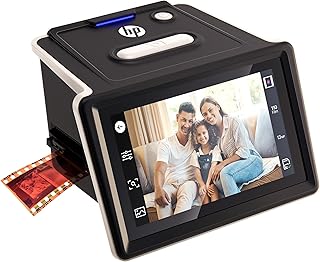
HP FilmScan Touch Screen Film and Slide Scanner with 5" LCD
Why We Love It

AAKYDH Film &Slide Photo Scanner
Why We Love It
Quick Pick
10 Best Film And Slide Document Scanner Of 2026
Quick Pick
KODAK SLIDE N SCAN Film and Slide Scanner with Large 5” LCD Screen, Convert Color & B&W 35mm, 126, 110 Negatives & Slides to High Resolution 22MP JPEG Digital Photos
Magnasonic All-In-One 24MP Film Scanner with Large 5" Display & HDMI, Converts 35mm/126/110/Super 8 Film & 135/126/110 Slides into Digital Photos, Built-in Memory (FS71)
KODAK RODFS70 Kodak Slide And Scan Digital Film Scanner 7 Inches Max - Large 7 Inches LCD Screen, Convert Color and B and W Negatives and Slides 35 mm, High Resolution 22 MP JPEGs,Black
Kodak Mobile Film Scanner – Scan & Save Old 35mm Films & Slides w/Your Smartphone Camera – Portable, Collapsible Scanner w/Built-in LED Light & Free Mobile App for Scanning, Editing & Sharing Photos | Scan and view old 35mm color and B&W negatives and slides; LED backlit; Android compatible; verify iPhone compatibility first
Slide & Negative Viewer Light Box with 4 Magnets, A4 Ultra-Thin LED Light Pad for Smartphone Scanning, 3 Level Dimmable Backlight to Digitize Old Slide, Film Negative & Photos, USB Powered
Kodak RODFS35 Digital Film Scanner - Converts 35mm, 126, 110, Super 8 & 8mm Slides & Negatives to JPEG - Includes 3.5-inch LCD & EasyLoad Inserts (Black)
Digitnow! Converts 35mm Negatives & Slides to Digital JPEGs Using Built-in Software Interpolation - No Computer/Software Required to Operate
Plustek OpticFilm 8300i SE - 35mm Negative Film Stripe & Slide Scanner with 38% scan speed increase, Bundle SilverFast SE Plus 9 + QuickScan Plus, Support Mac and Windows.
HP FilmScan Touch Screen Film and Slide Scanner with 5" LCD Display, Quickly Converts Negatives and Slides into 22MP Digital JPEG Photos, Compatible with 135, 126, and 110 Films and Slides | Digitizes 35mm, 126 & 110 slides and negatives - saves to SD card; gallery mode turns it into a digital picture frame
AAKYDH Film &Slide Photo Scanner, High Resolution 22MP Film Scanner, Convert 135 Film/35mm Slide /110Film/Photo/Document/Business Card To HD 22MP Digital JPG Files
Buying Guide: Film And Slide Document Scanner
📋 Table of Contents
1What resolution should I look for in a film and slide document scanner?
A minimum of 2400 DPI is standard for most archival-quality scans, but 4800 DPI or higher is ideal for capturing fine details in slides and negatives. Higher resolution ensures clarity for enlargements and digital restoration, though it may increase file size and processing time.
2Should I choose a flatbed or dedicated film scanner?
Dedicated film scanners are optimized for slides and negatives with specialized lighting and optics, while flatbed scanners can handle film but may lack the precision and speed. If you scan film frequently, a dedicated model will provide better results and faster throughput.
3What type of film formats are supported?
Look for scanners that support common formats like 35mm film, 120/220 medium format, and slides in both color and black-and-white. Some models also handle 16mm or 8mm film, but these are less common. Ensure the scanner can handle your specific film type and size.
4How important is the scanning speed for my needs?
If you're digitizing a large collection, a scanner with a throughput of 10-20 slides per minute is ideal. Slower models may be sufficient for occasional use, but faster speeds save time when processing many films. Some scanners offer batch scanning to streamline the process.
5What software features should I prioritize?
Look for built-in software that includes dust and scratch removal, color correction, and batch processing. Advanced features like automatic exposure adjustment and support for RAW file formats can improve the quality and usability of your scans, especially for archival purposes.
How we choose
Our editors are people who genuinely love testing and writing about products. We compare each product's real-world usability and strengths, then distill what matters most into our own "Why We Love It" points — so you get an honest, at-a-glance sense of what counts before you buy.