10 Best Fax Home Office Multifunction Printer Of 2026
Fax Home Office Multifunction Printer — Reviews, Recommendations & Updated Buying Guide November 2026


Xerox C235 Colour Multifunction Printer
Why We Love It


EPSON EcoTank L3252 Home ink tank printer A4
Why We Love It
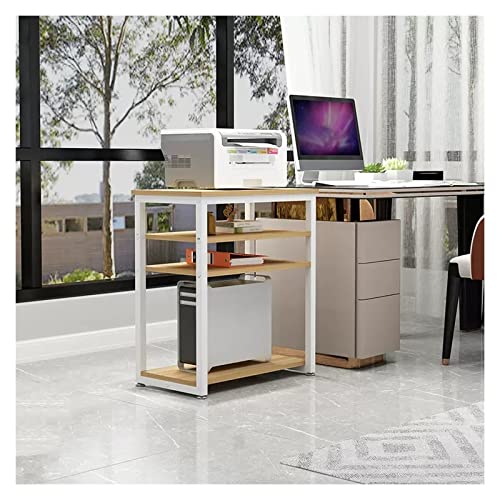
Printer Shelf Printer Stand with 4 Tier Storage Box
Why We Love It

NUNETH Printer Desk/Multi-Purpose Desk Organizer Creative
Why We Love It

KIZQYN Printer Stand Printer Stand Office Desk Mobile
Why We Love It
Saturey Printer Stand Printer Stand Office Desk Mobile
Why We Love It

Printer Cabinet Bamboo Ware Desktop Printer Printer
Why We Love It

Printer Shelf Duplex Printer Rack With Storage Shelves
Why We Love It

Printer Stand 3 Layer White Multifunction CPU Printer Stand
Why We Love It

NAKEAH Desktop Printer Stand Home Wood Printer Stand Office
Why We Love It
Quick Pick
10 Best Fax Home Office Multifunction Printer Of 2026
Quick Pick
Xerox C235 Colour Multifunction Printer, Print/Scan/Copy/Fax, Laser, Wireless, All In One, One size
EPSON EcoTank L3252 Home ink tank printer A4, colour, 3-in-1 printer with WiFi and SmartPanel App connectivity
Printer Shelf Printer Stand with 4 Tier Storage Box, Desktop Printer Table, Multi-Function Desktop Printer Desktop for Fax Scanner File with CPU Organizer for Home/Office (L50xW3
NUNETH Printer Desk/Multi-Purpose Desk Organizer Creative Printer Shelf Multifunction Double Storage Rack Modern Minimalist Multi-layer Rack Copy Rack for Home & Office Fax Machine Stand/Office Suppli
KIZQYN Printer Stand Printer Stand Office Desk Mobile Printer Shelf Home Multi-function Small Pulley Fax Machine Stand with Wheels Desk Printer (Color : A)
Saturey Printer Stand Printer Stand Office Desk Mobile Printer Shelf Home Multifunction Small Pulley Fax Machine Stand with Wheels Printer Cabinet (Color : A)
Printer Cabinet Bamboo Ware Desktop Printer Printer Multifunction Printer Printer Scanner Shelf Used for Office Home Fax Machine for Document and Book Cart
Printer Shelf Duplex Printer Rack With Storage Shelves, Multi-Function Under Desk Printer Table For Scanner, Fax, Home Printer Holder Home/Office Organizer(L50
Printer Stand 3 Layer White Multifunction CPU Printer Stand, Home Office Printer Rack with Storage, Printer CPU Organizer, for Printer, CPU, Scanner, Fax Printer Stand for Desk (Size : L60xW33xH7
NAKEAH Desktop Printer Stand Home Wood Printer Stand Office Floor Printer Shelf Creative Copy Rack Multifunction Printer Fax Machine Stand Mobile Printer Cart (Color : Black, Size : M)
Buying Guide: Fax Home Office Multifunction Printer
📋 Table of Contents
1What print resolution should I look for in a fax home office multifunction printer?
A minimum of 600 x 600 dpi is standard for clear text and basic graphics, but 1200 x 1200 dpi is better for photo-quality prints or detailed documents. Higher resolution ensures sharper faxes and scans, which is especially useful for legal or professional use.
2How much paper capacity is enough for a home office setup?
A standard multifunction printer should have at least a 250-sheet input tray, with 500-sheet models being ideal for heavy use. Look for models with a second paper tray or automatic document feeder (ADF) to handle larger print or scan jobs without frequent refills.
3What fax speed is necessary for a home office?
A fax speed of 33.6 kbps is standard and sufficient for most home users, but faster models with 56 kbps can send and receive faxes more quickly, reducing wait times during busy periods. This is especially useful if you frequently handle multiple faxes in a short time.
4Should I prioritize wireless connectivity in a multifunction printer?
Yes, if you use multiple devices like smartphones, tablets, or laptops. Wireless connectivity via Wi-Fi or Bluetooth allows seamless printing and scanning from anywhere in your home. Some models also support cloud printing, which is great for remote access and collaboration.
5What are the key differences between ink and laser multifunction printers for fax use?
Inkjet printers are better for color printing and photo-quality output, while laser printers offer faster, sharper black-and-white prints and lower long-term costs for high-volume use. Choose inkjet if you need color, and laser if you prioritize speed and efficiency for text-heavy faxes and documents.
How we choose
Our editors are people who genuinely love testing and writing about products. We compare each product's real-world usability and strengths, then distill what matters most into our own "Why We Love It" points — so you get an honest, at-a-glance sense of what counts before you buy.