10 Best Extension Cord With Usb C Of 2026
Extension Cord With Usb C — Reviews, Recommendations & Updated Buying Guide November 2026


LENCENT Extension Lead with USB C Port
Why We Love It


7-in-1 Charging Station: Multiple Power Strip with 3 AC
Why We Love It

UGREEN 10-in-1 Surge Protector Power Strip 6 AC Outlets
Why We Love It

UGREEN 6-in-1 Power Strip 100W GaN Nexode Charging Station
Why We Love It

TESSAN Tower Extension Lead with USB C Slots
Why We Love It

Homesmiths 4 Way Extension Socket 4M with 5 USB-C & 1 USB-A
Why We Love It
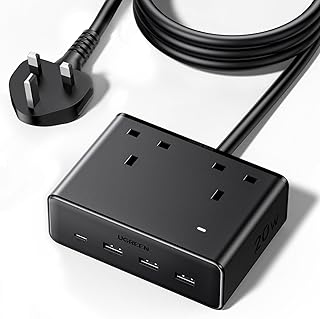
UGREEN Nexode Extension Cord with PD20W USB Ports(3A1C) & UK
Why We Love It

UGREEN Extension Lead 1.5M
Why We Love It

UGREEN GaN 6-in-1 Surge Protector Power Strip with PD30W
Why We Love It

Anker Tower Extension Lead with USB Slots
Why We Love It
Quick Pick
10 Best Extension Cord With Usb C Of 2026
Quick Pick
LENCENT Extension Lead with USB C Port, 4 Way Outlets Power Strip with 4 USB Ports (3.4A, 2 Type C and 2 USB-A Ports) Multi Plug Charging with 1.8M Braided Extension cord for Home Office- Black
7-in-1 Charging Station: Multiple Power Strip with 3 AC Outlets & 4-Port USB Fast Charger (2 USB-C), 2 Meter Cord, Surge Protector for Desk, Travel, Home
UGREEN 10-in-1 Surge Protector Power Strip 6 AC Outlets, 4 USB Ports (3A1C) | Trapezoidal design, PD 20W charge, GaN, wide spacing, overload protector, outlet extender for home/office/dorm/travel (1.5M)
UGREEN 6-in-1 Power Strip 100W GaN Nexode Charging Station with 2AC Outlets | Extension cord for Kitchen/ Home/Office, Fast Charging Plug with 2×AC Outlets,3×Type C, 1×USB-A for MacBook/iPhone 17, 1.8m
TESSAN Tower Extension Lead with USB C Slots | 8 Way Multi Plug Extension Socket, Surge Protected, Extension Cable 2M with Switch, for Home, School Supplies
Homesmiths 4 Way Extension Socket 4M with 5 USB-C & 1 USB-A Fast Charging Ports, Heavy Duty Power Extension Cord, Universal Multi Plug Surge Protector, UK 3-Pin Fireproof Power Strip for Home Office
UGREEN Nexode Extension Cord with PD20W USB Ports(3A1C) & UK Extension Plug | 6 Outlets (2 UK Plug ),Charge Multi Device at Once, 2990W Max, Compact Multi Plug for Home, Office, Bedroom & Desk,1.5M
UGREEN Extension Lead 1.5M, 6 Way Power Strip with 2 USB-A & 2 USB-C
UGREEN GaN 6-in-1 Surge Protector Power Strip with PD30W USB-C (2A1C) | GAN, Overload/Short-Circuit/Overheat Protection Extension Cord, 3 AC Outlets, UK Plugs with 2M Lead, for Home Office Travel
Anker Tower Extension Lead with USB Slots, 12-in-1 Surge Protector Plug Extension Socket with Switch (13A, 2990W), 20W USB C Fast Charging Power Strip, 8 AC Outlets, 4 USB Ports, 2m Extension Cable
Buying Guide: Extension Cord With Usb C
📋 Table of Contents
1What length and gauge should I look for in an extension cord with USB-C?
For short distances (up to 20 feet), a 16-gauge cord is sufficient, but for longer runs, go with 14-gauge to prevent voltage drop. Thicker gauge cords handle more power and reduce the risk of overheating, especially when charging high-wattage devices like laptops or monitors.
2Does the USB-C port support fast charging and data transfer?
Look for USB-C ports that support USB 3.1 or USB 2.1 standards for faster data transfer and higher power delivery. A 60W or 100W USB-C port is ideal for charging laptops, while lower wattage may only power phones or tablets effectively.
3What safety features should I prioritize in an extension cord with USB-C?
Choose cords with built-in surge protection and overcurrent safeguards to prevent electrical damage. Look for certifications like UL or ETL, which ensure the product meets safety standards. Avoid cheap, unbranded options that may lack these protections.
4Is a retractable or foldable design worth the extra cost?
Retractable designs are more convenient for travel and storage, while foldable cords offer better organization. However, these features may add bulk or reduce durability. If you need portability, prioritize a compact, well-constructed design with reinforced connectors.
5How many USB-C ports should I expect on a multi-port extension cord?
Most multi-port models include one or two USB-C ports alongside USB-A or USB-C Type-C ports. If you need to charge multiple devices simultaneously, look for a model with at least two USB-C ports and a built-in power brick for maximum flexibility and convenience.
How we choose
Our editors are people who genuinely love testing and writing about products. We compare each product's real-world usability and strengths, then distill what matters most into our own "Why We Love It" points — so you get an honest, at-a-glance sense of what counts before you buy.