10 Best Ergonomic Mice Of 2026
Ergonomic Mice — Reviews, Recommendations & Updated Buying Guide November 2026


Logitech Lift Vertical Ergonomic Mouse
Why We Love It


UGREEN Vertical Wireless Mouse BT5.4/2.4G Ergonomic 4000DPI
Why We Love It

TECKNET Ergonomic Mouse, Wireless Bluetooth Vertical Mouse
Why We Love It

UGREEN Wireless Ergonomic Vertical Mouse
Why We Love It

Logitech MX Vertical Ergonomic Mouse
Why We Love It
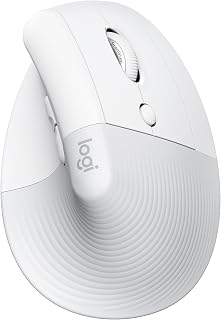
Logitech Lift Vertical Ergonomic Mouse
Why We Love It

TECKNET Wireless Mouse
Why We Love It

Ergonomic Mouse
Why We Love It

Logitech MX Master 4
Why We Love It

UGREEN Wireless Ergonomic Mouse
Why We Love It
Quick Pick
10 Best Ergonomic Mice Of 2026
Quick Pick
Logitech Lift Vertical Ergonomic Mouse, Wireless, Bluetooth or Logi Bolt USB Receiver, Quiet clicks, 4 Buttons, Compatible with Windows/macOS/iPadOS, Laptop, PC-Graphite | Wireless, Bluetooth or Logi Bolt, Silent clicks, 4 buttons, Windows/macOS/iPadOS, Laptop, PC - Grey
UGREEN Vertical Wireless Mouse BT5.4/2.4G Ergonomic 4000DPI 6-Button | Vertical wireless mouse, Bluetooth5.4/2.4G, ergonomic, 4000 DPI, 6 buttons, wrist relief, for PC Mac
TECKNET Ergonomic Mouse, Wireless Bluetooth Vertical Mouse, 4800 DPI Optical Tracking, 6 Adjustable DPI, Quiet Clicks, 2.4GHz with USB A Receiver, 6 Buttons, Wide Compatibility (Single-mode)
UGREEN Wireless Ergonomic Vertical Mouse, 12-Month Battery Life, 6 Buttons | 57° Ergonomic Angle, 4000DPI Optical Tracking, 4 Adjustable DPI Levels Wireless Silent Mouse for Laptop, Desktop, Macbook
Logitech MX Vertical Ergonomic Mouse, Multi-Device, Bluetooth or 2.4GHz Wireless with USB Unifying Receiver, 4000 DPI Optical Tracking, 4 Buttons, Fast Charging, Laptop/PC/Mac/iPad OS- Black
Logitech Lift Vertical Ergonomic Mouse, Wireless, Bluetooth or Logi Bolt USB Receiver, Quiet clicks, 4 Buttons, Compatible with Windows/macOS/iPadOS, Laptop, PC-White | Wireless, Bluetooth, Logi Bolt USB Receiver, Silent Clicks, 4 Buttons, Windows/macOS/iPadOS, Laptop, PC - White
TECKNET Wireless Mouse, Bluetooth Mouse (BT5.3/5.0 & 2.4G) Rechargeable Ergonomic Optical Mouse with 6 Adjustable DPI, Side Scroll, Quiet Clicks, USB A Receiver, 7 Buttons, Wide Compatibility - Black
Ergonomic Mouse, Vertical Mouse Wireless Mouse 6 Buttons Optical Carpal Tunnel Mouse, 5 Adjustment Levels, Up to 4800DPI Silent Click Mouse Office Mouse for Laptop, Desktop, Carpal Tunnel Relief
Logitech MX Master 4, Ergonomic Wireless Mouse with Advanced Performance Haptic Feedback, Ultra-Fast Scrolling, USB-C Charging, Bluetooth, Windows, MacOS - Graphite
UGREEN Wireless Ergonomic Mouse, 2.4G USB, 1600 DPI Optical Tracking, Silent Mice, ≤40dB, 12-Month Battery Life for Laptop, MacBook, Chromebook
Buying Guide: Ergonomic Mice
📋 Table of Contents
1What grip style should I look for in an ergonomic mouse?
Common styles include vertical, horizontal, and contoured grips. Vertical mice reduce wrist twist and are ideal for long sessions, while contoured designs suit natural hand shapes. Choose based on your hand size and how you naturally hold a mouse.
2How important is adjustable weight or shape?
Adjustable weight or modular design allows you to customise the mouse to your hand size and preference, reducing strain. Look for models with removable weights or flexible shapes for a more tailored fit and better comfort over time.
3What sensor type and DPI range should I consider?
Optical or laser sensors are standard, with laser offering better performance on varied surfaces. A DPI range of 400-1600 is typical for ergonomic mice, but higher DPI (up to 12,000) is useful for precise work like graphic design or gaming if needed.
4Are wired or wireless options better for ergonomic use?
Wired mice offer consistent performance and no charging, while wireless models reduce cable clutter and can be more comfortable for some users. Look for a wireless mouse with long battery life and low latency if you value mobility and a clean desk setup.
5What additional features are worth considering for comfort?
Features like thumb rests, scroll wheels with tactile feedback, and programmable buttons can enhance comfort and efficiency. Mice with soft-touch surfaces or textured grips also help reduce hand fatigue during extended use.
How we choose
Our editors are people who genuinely love testing and writing about products. We compare each product's real-world usability and strengths, then distill what matters most into our own "Why We Love It" points — so you get an honest, at-a-glance sense of what counts before you buy.