10 Best Ergonomic Cordless Mice Of 2026
Ergonomic Cordless Mice — Reviews, Recommendations & Updated Buying Guide November 2026


Logitech Lift Vertical Ergonomic Mouse
Why We Love It


UGREEN Wireless Ergonomic Mouse
Why We Love It
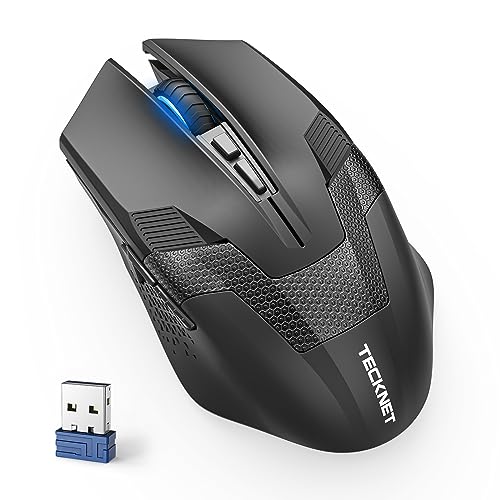
TECKNET Wireless Mouse-USB Ergonomic Optical Cordless Mouse
Why We Love It

UGREEN Vertical Wireless Mouse BT5.4/2.4G Ergonomic 4000DPI
Why We Love It

Wireless Bluetooth Mouse 2-in-1 Dual Mode
Why We Love It

UGREEN Wireless Ergonomic Vertical Mouse
Why We Love It

TECKNET Wireless Mouse for Laptop
Why We Love It

TECKNET Wireless Mouse, 2.4G Ergonomic Optical Mouse
Why We Love It

Promate Wireless Mouse
Why We Love It

Promate Wireless Mouse
Why We Love It
Quick Pick
10 Best Ergonomic Cordless Mice Of 2026
Quick Pick
Logitech Lift Vertical Ergonomic Mouse, Wireless, Bluetooth or Logi Bolt USB Receiver, Quiet clicks, 4 Buttons, Compatible with Windows/macOS/iPadOS, Laptop, PC-Graphite | Wireless, Bluetooth or Logi Bolt, Silent clicks, 4 buttons, Windows/macOS/iPadOS, Laptop, PC - Grey
UGREEN Wireless Ergonomic Mouse, 2.4G USB, 1600 DPI Optical Tracking, Silent Mice, ≤40dB, 12-Month Battery Life for Laptop, MacBook, Chromebook
TECKNET Wireless Mouse-USB Ergonomic Optical Cordless Mouse with 8 Buttons,12-Month Battery Life,4800 DPI Optical Tracking,High-Precision 5 Adjustable DPI for PC/Mac/Laptop, Black
UGREEN Vertical Wireless Mouse BT5.4/2.4G Ergonomic 4000DPI 6-Button | Vertical wireless mouse, Bluetooth5.4/2.4G, ergonomic, 4000 DPI, 6 buttons, wrist relief, for PC Mac
Wireless Bluetooth Mouse 2-in-1 Dual Mode, Rechargeable Silent 4-Button Portable Mouse for Laptop, PC, Mac, Chromebook, Compact Ergonomic Cordless Mouse (BT5.0/3.0 + 2.4Ghz)
UGREEN Wireless Ergonomic Vertical Mouse, 12-Month Battery Life, 6 Buttons | 57° Ergonomic Angle, 4000DPI Optical Tracking, 4 Adjustable DPI Levels Wireless Silent Mouse for Laptop, Desktop, Macbook
TECKNET Wireless Mouse for Laptop, 2.4G Silent Computer Mouse Quiet Click with 5 DPI Levels,Contoured Grip,Small Portable 30 Months Battery Cordless Mice for PC, Chromebook, Mac - Pink
TECKNET Wireless Mouse, 2.4G Ergonomic Optical Mouse, Computer Mouse for Laptop, PC, Computer, Chromebook, Notebook, 6 Buttons, 24 Months Battery Life, 2600 DPI, 5 Adjustment Levels - White
Promate Wireless Mouse, Ergonomic Silent Click Optical 2.4GHz Cordless Mice with Adjustable 2200DPI, 6 Programmable Buttons, USB Nano Receiver and 10m Working Distance for MacBook Air, Samit Black
Promate Wireless Mouse, Comfortable Ambidextrous 2.4GHz Cordless Ergonomic Mice with 4 Programmable Buttons, Adjustable 1600DPI, Nano USB Receiver and 10m Working Range for Laptops, Contour
Buying Guide: Ergonomic Cordless Mice
📋 Table of Contents
1What grip style should I look for in an ergonomic cordless mouse?
Common styles include vertical, contoured, and palm grips. Vertical mice reduce wrist strain for long sessions, while contoured designs suit smaller hands. Choose based on your hand size and how you naturally hold a mouse to avoid fatigue.
2How long should the battery last between charges?
Look for at least 15-30 hours of use on a single charge for daily tasks, with some models offering up to 60 hours. Mice with low-power Bluetooth or energy-efficient sensors tend to last longer, and a quick-charge feature can be handy for short breaks.
3Does the sensor type really affect performance?
Yes — optical sensors work well on most surfaces, while laser sensors offer higher precision but may cause jitter on glossy or reflective surfaces. A 1000-1600 DPI range is standard, but higher DPI isn't always better; look for adjustable settings to match your tasks and preferences.
4Are programmable buttons worth it for everyday use?
Programmable buttons can boost productivity for tasks like scrolling, zooming, or launching apps, especially for frequent computer users. However, too many buttons can complicate the design, so balance functionality with simplicity based on your workflow.
5What should I consider about the charging method?
USB-C is the most common and convenient option for fast, reliable charging. Some mice use replaceable batteries, which are good for long-term use but require regular replacements. Avoid models with non-removable batteries if you want a longer-lasting, low-maintenance option.
How we choose
Our editors are people who genuinely love testing and writing about products. We compare each product's real-world usability and strengths, then distill what matters most into our own "Why We Love It" points — so you get an honest, at-a-glance sense of what counts before you buy.