10 Best Epson Workforce Pro Of 2026
Epson Workforce Pro — Reviews, Recommendations & Updated Buying Guide November 2026


Epson WorkForce Pro WF-4830 | 4-in-1 Printer
Why We Love It


Epson WorkForce Pro WF-M5899DWF
Why We Love It

Epson Workforce Pro WF-4830 Wireless All-in-One Printer with
Why We Love It

Epson WorkForce Pro WF-3820DWF A4 Multifunction Wireless
Why We Love It
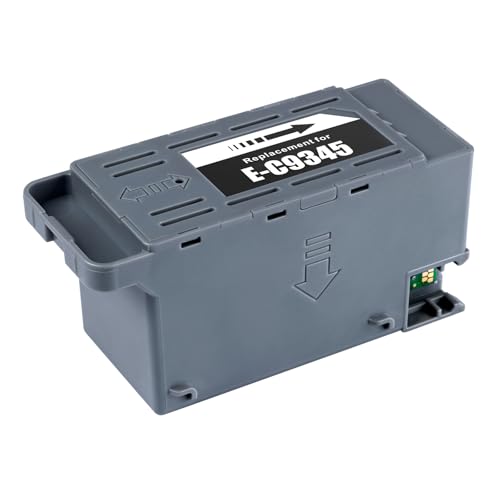
TacTink C9345 Maintenance Cartridge for Epson EcoTank Pro
Why We Love It

Epson Workforce Pro WF-3823 Wireless Color All-in-One Inkjet
Why We Love It

Epson Workforce Pro WF-3820 Wireless Color All-in-One Inkjet
Why We Love It

Epson Workforce® Pro WF-4820 Wireless Color Inkjet
Why We Love It

Epson EcoTank Home L3250 Wi‑Fi Ink Tank Printer
Why We Love It

Epson Workforce WF-4830 All-in-One Wireless Colour Printer
Why We Love It
Quick Pick
10 Best Epson Workforce Pro Of 2026
Quick Pick
Epson WorkForce Pro WF-4830 | 4-in-1 Printer - Duplex Printing, Scan, Copy, Fax - WiFi Direct, Ethernet, 25ppm Black/12ppm Colour, PrecisionCore, ADF, Mobile, Compact
Epson WorkForce Pro WF-M5899DWF
Epson Workforce Pro WF-4830 Wireless All-in-One Printer with Auto 2-Sided Print, Copy, Scan and Fax, 50-Page ADF, 500-sheet Paper Capacity, and 4.3" Color Touchscreen, Works with Alexa, Black, Large | Print, scan, copy, fax; up to 25 ppm, 50-sheet ADF, auto 2-sided, 500-sheet capacity; ideal for small offices
Epson WorkForce Pro WF-3820DWF A4 Multifunction Wireless Inkjet printer
TacTink C9345 Maintenance Cartridge for Epson EcoTank Pro ET-5800, ET-5850, ET-5880, ET-16600, ET-16650, WorkForce Pro WF-7820, WF-7830, WF-7840
Epson Workforce Pro WF-3823 Wireless Color All-in-One Inkjet Printer | Print, scan, copy, fax; up to 21 ppm, 35-sheet ADF, auto 2-sided, 250-sheet tray; ideal for home and small offices
Epson Workforce Pro WF-3820 Wireless Color All-in-One Inkjet Printer | Print, scan, copy, fax; up to 21 ppm, 35-sheet ADF, auto 2-sided, 250-sheet tray; ideal for home and small offices
Epson Workforce® Pro WF-4820 Wireless Color Inkjet All-In-One Printer, Black, Large
Epson EcoTank Home L3250 Wi‑Fi Ink Tank Printer | 3‑in‑1 Print/Scan/Copy | 8100 Black & 6500 Colour Pages | Ultra‑Low‑Cost EcoTank System
Epson Workforce WF-4830 All-in-One Wireless Colour Printer with Scanner, Copier, Fax, Ethernet, Wi-Fi Direct and ADF, Black
Buying Guide: Epson Workforce Pro
📋 Table of Contents
1What print resolution should I look for in an inkjet printer?
Aim for at least 4800 x 1200 dpi for sharp photos and detailed documents. Higher resolutions like 9600 x 2400 dpi improve image quality but may not be necessary for everyday printing unless you frequently print large photos or graphics.
2How many ink cartridges does a typical inkjet printer use?
Most models use separate color (Cyan, Magenta, Yellow) and black cartridges, while some offer a single tri-color cartridge. Separate inks allow for more precise color mixing and longer black ink life, but require more frequent replacements and storage space.
3What paper types and sizes are compatible with inkjet printers?
Look for a printer that supports at least A4 (8.3 x 11.7 in) and photo paper for versatility. Some models also handle envelopes, labels, or cardstock. Check the paper tray capacity and whether the printer has a manual feed slot for thicker or specialty media.
4Is a wireless or USB connection better for my needs?
Wireless connectivity (Wi-Fi or Bluetooth) is ideal for multi-user homes or offices, letting you print from phones, tablets, or multiple devices. USB is simpler and faster for single-user setups but limits mobility and convenience for remote printing.
5What’s the difference between dye-based and pigment-based inks?
Dye-based inks produce vibrant colors and are best for photos, but fade faster in sunlight. Pigment-based inks are more water-resistant and fade-resistant, making them better for documents and long-term storage. Choose based on your primary use and environmental conditions like humidity.
How we choose
Our editors are people who genuinely love testing and writing about products. We compare each product's real-world usability and strengths, then distill what matters most into our own "Why We Love It" points — so you get an honest, at-a-glance sense of what counts before you buy.