10 Best Epson Document Camera Of 2026
Epson Document Camera — Reviews, Recommendations & Updated Buying Guide November 2026


Epson DC-07 Portable Document Camera with USB Connectivity
Why We Love It


Epson ELPDC21 Document Camera fÃ1/4r Projectors 2
Why We Love It

Epson DC-13 High-Definition Document Camera with HDMI
Why We Love It

Epson DC-21 High-Definition Document Camera
Why We Love It

TsoLay Portable A3 A4 Format Document Camera
Why We Love It

Visualiser Classroom
Why We Love It
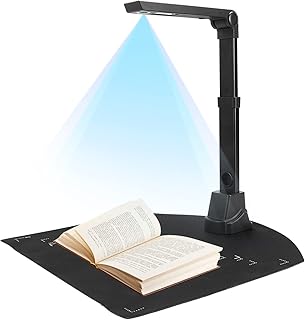
NetumScan 13MP Book Document Camera for Teachers
Why We Love It

NetumScan Book & Document Camera
Why We Love It
Quick Pick
10 Best Epson Document Camera Of 2026
Quick Pick
Epson DC-07 Portable Document Camera with USB Connectivity and 1080p Resolution
Epson ELPDC21 Document Camera fÃ1/4r Projectors 2
Epson DC-13 High-Definition Document Camera with HDMI, 16x Digital Zoom and 1080p Resolution,White
Epson DC-21 High-Definition Document Camera
TsoLay Portable A3 A4 Format Document Camera, 8MP HD Book Scanner with OCR Function, High-brightness LED Light and Video Recording, for Scanning Office Documents, Id Cards, Files Notes
Visualiser Classroom, USB Document Camera for teaching 4K with 3-Level LED Light, Image Invert Function, Fold, Dual Microphones for Mac OS, Windows, Chromebooks work for Distance Learning
NetumScan 13MP Book Document Camera for Teachers, Multi-Language OCR Recognition by AI Technology, Foldable & Portable, Real-time Projection, Video Recording, Capture Size A3/A4-Windows,Mac OS,Linux | Multi-Language OCR Recognition by AI Technology,Foldable&Portable,Real-time Projection,Video Recording, Windows,Mac OS,Linux
NetumScan Book & Document Camera, Multi-Language OCR and English Article Recognition by AI Technology, Real-time Projection, Video Recording, Foldable & Portable, Capture, Windows/MAC/Linux- NS-800NC
Buying Guide: Epson Document Camera
📋 Table of Contents
1What's the difference between Epson document camera models, and which one do I need?
Epson offers different models targeting classrooms, boardrooms, and small offices—the main differences are resolution (720p vs 1080p), zoom capabilities, and connectivity options. Choose based on your use: basic teaching needs work fine with lower-end models, while professional presentations benefit from higher resolution and faster frame rates.
2What specs matter most when choosing an Epson document camera?
Focus on resolution (1080p minimum for clarity), zoom type (optical vs digital), and connectivity (HDMI, USB, wireless). Also check the capture area size and whether it has auto-focus, as these directly affect how well documents and objects display to your audience.
3Can I use an Epson document camera for both teaching and business presentations?
Yes, most Epson models work for both uses, but you'll want 1080p resolution and reliable focus for professional settings. If you need portability, look for lighter models with USB-C power, and confirm it connects easily to your specific projectors or displays.
4Do I need a document camera that connects wirelessly, or is USB/HDMI enough?
USB and HDMI work reliably in most setups and avoid connectivity issues, but wireless (WiFi/Bluetooth) adds flexibility if you're moving between rooms frequently. Consider your venue setup—fixed classrooms do fine with cables, while mobile presenters benefit from wireless options.
5What's the typical capture area size, and does it matter for my use case?
Most Epson models cover A4 documents comfortably; check the specifications for the exact capture dimensions. If you need to display larger items like textbooks, posters, or 3D objects regularly, verify the height clearance and whether zoom quality stays sharp at full magnification.
How we choose
Our editors are people who genuinely love testing and writing about products. We compare each product's real-world usability and strengths, then distill what matters most into our own "Why We Love It" points — so you get an honest, at-a-glance sense of what counts before you buy.