10 Best Epomaker Gaming Mice Of 2026
Epomaker Gaming Mice — Reviews, Recommendations & Updated Buying Guide November 2026


EPOMAKER Click Lite Wireless Gaming Mouse
Why We Love It


EPOMAKER NEX Lite Wireless Gaming Mouse w/Screens & RGB
Why We Love It
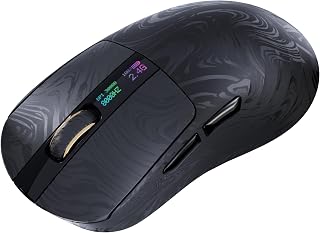
EPOMAKER Carbonis Wireless Gaming Mouse With Digital Display
Why We Love It

EPOMAKER NEX Pro Wireless Gaming Mouse with RGB Charging
Why We Love It
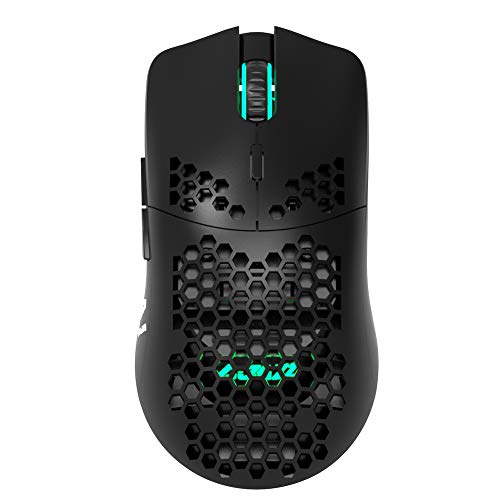
EPOMAKER AJ390 USB Wired Gaming Mouse with 7 Keys Adjustable
Why We Love It

EPOMAKER TH80 V2 PRO Wireless Gaming Keyboard with
Why We Love It

MAMBASNAKE ATTACK SHARK X68 HE Rapid Trigger Keyboard
Why We Love It

ATTACK SHARK X6 Super Lightweight Wireless Gaming Mouse with
Why We Love It

ATTACK SHARK X68 HE Wired Magnetic Keyboard with X3 Wireless
Why We Love It

EPOMAKER HE80 Hall Effect Gaming Keyboard
Why We Love It
Quick Pick
10 Best Epomaker Gaming Mice Of 2026
Quick Pick
EPOMAKER Click Lite Wireless Gaming Mouse, 800 to 12,000 DPI Adjustable, PAW3311 Sensor, 500mAh, 59g, 2.4G/Bluetooth/USB-C Rechargeable with 5 Programmable Buttons for PC/Mac/Linux (Black)
EPOMAKER NEX Lite Wireless Gaming Mouse w/Screens & RGB Charging Dock
EPOMAKER Carbonis Wireless Gaming Mouse With Digital Display, PAW3950 Sensor, 8K Polling, 30K DPI, Carbon Fiber Composite Shell, Ergonomic Right Hand Esports Mouse for PC Gaming (Black)
EPOMAKER NEX Pro Wireless Gaming Mouse with RGB Charging Dock
EPOMAKER AJ390 USB Wired Gaming Mouse with 7 Keys Adjustable DPI Ergonomic Design Hollowed-out Honeycomb Design Black
EPOMAKER TH80 V2 PRO Wireless Gaming Keyboard with Screen&Knob, 10000mAh, 2.4Ghz/BT/USB-C, RGB, Hot Swap, Custom Driver, NKRO, PBT Keycap, Mechanical Keyboard for PC/Mac (White, Creamy Jade)
MAMBASNAKE ATTACK SHARK X68 HE Rapid Trigger Keyboard, Wireless R1 Gaming Mouse and 8Khz Spiral Cable Combos, 0.01mm RT Accuracy, 8Khz Wired Magnetic Keyboard, for PC/Mac White Contours
ATTACK SHARK X6 Super Lightweight Wireless Gaming Mouse with Magnetic RGB Charging Station, BT/2.4GHz Wireless/Wired Mouse, PixArt PAW3395 Sensor, 26000 DPI, Grip Tape, 200 Hours Battery for Win/Mac
ATTACK SHARK X68 HE Wired Magnetic Keyboard with X3 Wireless Gaming Mouse Combos, 8KHz Rapid Trigger Keyboard, 0.01mm RT Accuracy, 49g SUPERLIGHT Mouse, PAW3395, 26000 DPI - Moonlit Night
EPOMAKER HE80 Hall Effect Gaming Keyboard, 8K Polling & 32K Scan, Creamy Gasket, DKS, SOCD, RGB Backlit, Hot-Swappable, Wired Gaming Keyboard for PC & Mac (Black, Magnetic Linear Switch) | Gasket Soft, DKS, SOCD, RGB, Hot-Swappable, Wired Magnetic Gaming Keyboard for PC/Mac (Black, Magnetic Linear Switch)
Buying Guide: Epomaker Gaming Mice
📋 Table of Contents
1What DPI range do I actually need in an Epomaker gaming mouse?
Most competitive gamers use 400-3200 DPI, while casual players rarely go above 1600. Look for mice with adjustable DPI steps so you can fine-tune sensitivity for different games rather than chasing the highest DPI number.
2How important is polling rate for gaming performance?
125Hz is fine for casual play, but 500Hz or higher gives noticeably smoother tracking in fast-paced shooters and competitive games. If you're serious about FPS titles, prioritize 1000Hz polling rate for the best response time.
3What's the difference between wired and wireless Epomaker gaming mice?
Wired mice eliminate latency and battery concerns but restrict movement with a cable. Wireless models offer freedom of movement with minimal lag nowadays, though they need occasional charging and add slight weight from the battery.
4Should I choose an ambidextrous or right-handed Epomaker mouse?
Right-handers have more options with better ergonomics and side button placement, while left-handers really need an ambidextrous design since few gaming mice cater to them. If you're buying for yourself, match your dominant hand.
5What grip style matters when choosing an Epomaker gaming mouse?
Palm grip works best with larger, contoured mice, claw grip suits smaller mice with high profiles, and fingertip grip needs a lightweight mouse you can control with your fingers. Check the shape and weight before buying to match how you naturally hold a mouse.
How we choose
Our editors are people who genuinely love testing and writing about products. We compare each product's real-world usability and strengths, then distill what matters most into our own "Why We Love It" points — so you get an honest, at-a-glance sense of what counts before you buy.