10 Best Edifier Computer Speakers Of 2026
Edifier Computer Speakers — Reviews, Recommendations & Updated Buying Guide November 2026


Edifier Gaming Speakers Black G2000 Bk
Why We Love It


Edifier MR3 Powered Studio Monitor Speakers
Why We Love It
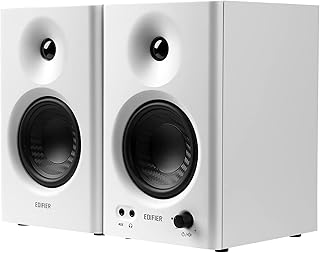
Edifier MR4 Powered Studio Monitor Speakers
Why We Love It

Edifier MR3 Powered Studio Monitor Speakers
Why We Love It

Edifier M60 Compact Desktop Speakers 2.0: Bluetooth 5.3
Why We Love It

Edifier Speakers 2.0 MR4 (black)
Why We Love It

Edifier R1280DBs Active Bluetooth Bookshelf Speakers
Why We Love It
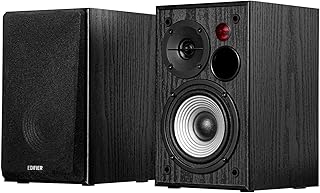
Edifier R990BT Bluetooth Active Bookshelf Speakers 2.0
Why We Love It

Edifier MR5 Active Studio Speakers
Why We Love It

Edifier G2000 32W PC Computer Speakers for Gaming Desktop PC
Why We Love It
Quick Pick
10 Best Edifier Computer Speakers Of 2026
Quick Pick
Edifier Gaming Speakers Black G2000 Bk, Bluetooth
Edifier MR3 Powered Studio Monitor Speakers, Hi-Res Audio Certified Bluetooth V5.4 Active Bookshelf Speakers, 2.0 Computer Speaker with Headphone Output RCA AUX Balanced TRS Input - Black (Pair)
Edifier MR4 Powered Studio Monitor Speakers, 4" Active Near-field Monitor Speaker - White (Pair)
Edifier MR3 Powered Studio Monitor Speakers, Hi-Res Audio Certified Bluetooth V5.4 Active Bookshelf Loudspeakers, 2.0 Computer Speaker with Headphone Output RCA AUX Balanced TRS Input (White)
Edifier M60 Compact Desktop Speakers 2.0: Bluetooth 5.3, 66W RMS, Hi-Res Wireless Audio, LDAC, 3” Mid Bass & 1” Tweeter, USB-C/AUX Inputs, Multimedia Speaker with Stands for PC Gaming & Music – White
Edifier Speakers 2.0 MR4 (black)
Edifier R1280DBs Active Bluetooth Bookshelf Speakers - Optical Input - 2.0 Wireless Studio Monitor Speaker - 42W RMS with Subwoofer Line Out - Wood Grain
Edifier R990BT Bluetooth Active Bookshelf Speakers 2.0 (Black)
Edifier MR5 Active Studio Speakers | 110W Hi-Res 3-Way Monitor + Tri-Amped Crossover | XLR, TRS, RCA + AUX | 24-bit/96kHz LDAC Wireless | ConneX App | EQ + Front Regulator | 2
Edifier G2000 32W PC Computer Speakers for Gaming Desktop PC Laptop Mac Computer Woofer Speakers Bluetooth USB 3.5mm AUX Inputs RGB Lights Multimedia Speakers White
Buying Guide: Edifier Computer Speakers
📋 Table of Contents
1What wattage or power output should I look for in computer speakers?
For casual use, 5-10W per speaker is sufficient, while 15-30W per speaker delivers richer sound for music and movies. Higher wattage doesn’t always mean better quality — check the frequency response and driver size for a balanced sound.
2Do I need a subwoofer for my computer speakers?
A subwoofer is ideal for deep bass in movies, games, or music with heavy low-end. If you prioritize portability or use speakers mainly for calls and light audio, a 2.0 system without a subwoofer may be more practical and space-efficient.
3What’s the difference between 2.0, 2.1, and 5.1 speaker systems?
2.0 systems have two satellite speakers, 2.1 adds a subwoofer for bass, and 5.1 includes surround sound speakers for immersive audio. Choose based on your space and use — 2.1 is great for most users, while 5.1 suits home theaters or gamers.
4Should I prioritize driver size or frequency response range?
A 3-5 inch driver offers a good balance for most setups, but larger drivers (5-6 inches) deliver deeper bass. Frequency response (e.g., 20Hz–20kHz) shows the range of sounds a speaker can reproduce — look for at least 50Hz–20kHz for clear, full audio.
5What connectivity options are most useful for computer speakers?
USB and 3.5mm audio jacks are standard for desktops and laptops. Bluetooth adds wireless flexibility, while optical or HDMI inputs are better for connecting to TVs or soundbars. Choose based on your devices and how you plan to use the speakers.
How we choose
Our editors are people who genuinely love testing and writing about products. We compare each product's real-world usability and strengths, then distill what matters most into our own "Why We Love It" points — so you get an honest, at-a-glance sense of what counts before you buy.