10 Best Duplex Business Card Scanner Of 2026
Duplex Business Card Scanner — Reviews, Recommendations & Updated Buying Guide November 2026


Ambir Technology ImageScan Pro 687 Duplex Card Scanner
Why We Love It

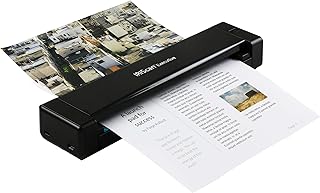
IRIScan Executive Portable Duplex Scanner
Why We Love It

687 Duplex Card Scanner (DP687) with DocketSCAN Business
Why We Love It

PenPower WorldCard Pro Business Card Scanner (Win/Mac)
Why We Love It

IRIScan Anywhere 6 WiFi Duplex Portable Scanner
Why We Love It

Duplex Medical Insurance Card and ID Card Scanner (w/Scan-ID
Why We Love It

687 Duplex Card Scanner (DP687)
Why We Love It

Brother ADS-3100 High speed Desktop Scanner
Why We Love It

Brother DS-940DW Duplex Wireless Mobile Scanner
Why We Love It

IRIScan Pro duplex document scanner with feeder
Why We Love It
Quick Pick
10 Best Duplex Business Card Scanner Of 2026
Quick Pick
Ambir Technology ImageScan Pro 687 Duplex Card Scanner
IRIScan Executive Portable Duplex Scanner - v4pro 8PPM Document Scanner: Free PDF Editor, USB, Scan to Word, PDF, XLS, Business Cards to Outlook, Duplex Scanner Win.
687 Duplex Card Scanner (DP687) with DocketSCAN Business Card
PenPower WorldCard Pro Business Card Scanner (Win/Mac)
IRIScan Anywhere 6 WiFi Duplex Portable Scanner - Double-Sided - Compact - Wireless - Black
Duplex Medical Insurance Card and ID Card Scanner (w/Scan-ID LITE, for Windows)
687 Duplex Card Scanner (DP687)
Brother ADS-3100 High speed Desktop Scanner | Duplex A4 Document Scanner | Super Speed USB3.0 | White
Brother DS-940DW Duplex Wireless Mobile Scanner – Compact Scanner for Double-Sided Photo & Document Scanning On-the-Go
IRIScan Pro duplex document scanner with feeder - v5pro 20PPM ADF 20 pages, free PDF editor, pdf scanner, scan to Word, PDF, XLS, Bus.Cards to Outlook, receipt scanner, scan to cloud Win
Buying Guide: Duplex Business Card Scanner
📋 Table of Contents
1What scanning speed should I look for in a duplex business card scanner?
Aim for a scanner that processes 10-30 cards per minute for efficient use in high-volume settings. Faster models reduce downtime, but slower ones may be sufficient for small offices or personal use where speed is less critical.
2What’s the difference between a duplex and a single-sided business card scanner?
A duplex scanner captures both sides of a card in one pass, saving time and reducing errors, while a single-sided model requires flipping the card. Duplex is ideal for data entry, contact management, or bulk scanning of business cards with information on both sides.
3What resolution is important for a business card scanner?
Look for a resolution of at least 300 DPI to ensure clear text and image capture. Higher resolutions, like 600 DPI, are useful for scanning cards with fine details or logos, but may not be necessary for basic contact information.
4Are there specific connectivity options I should prioritize?
USB 2.0 or USB 3.0 ports are standard and reliable for most users, while USB-C or wireless connectivity (like Bluetooth or Wi-Fi) may be beneficial for integration with modern devices or mobile apps. Choose based on your existing hardware and software ecosystem.
5What software features should I look for in a duplex business card scanner?
Opt for models that include OCR (optical character recognition) software to automatically extract and format contact details. Some scanners also offer cloud integration, batch processing, or compatibility with CRM systems, which can streamline data management and reduce manual entry errors.
How we choose
Our editors are people who genuinely love testing and writing about products. We compare each product's real-world usability and strengths, then distill what matters most into our own "Why We Love It" points — so you get an honest, at-a-glance sense of what counts before you buy.