10 Best Dual Monitor Kvm Switches Of 2026
Dual Monitor Kvm Switches — Reviews, Recommendations & Updated Buying Guide November 2026


V AV Access KVM Switch Dual Monitor 4K@60Hz
Why We Love It


UGREEN Displayport KVM Switch 2 Monitors 2 Computers Support
Why We Love It

NALACAL Dual Monitor KVM Switch HDMI+DisplayPort
Why We Love It

AV Access KVM Switch Dock 2 Monitors 2 Laptops
Why We Love It
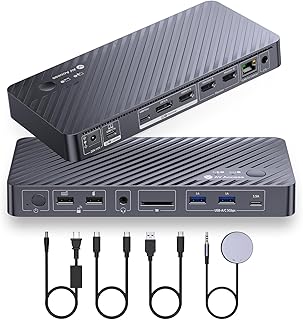
AV Access Docking Station Dual Monitor for Laptop & Desktop
Why We Love It

TERRIFI KVM Switch for 2 Computers 2 Monitors
Why We Love It

AV Access 8K Docking Station KVM Switch 2 Monitors 2
Why We Love It

AV Access KVM Switch Docking Station for MacBook
Why We Love It

Azonee KVM Switch, KVM Switch 1 Monitors 2 Computers
Why We Love It

TERRIFI 4K@60Hz HDMI KVM Switch for 1 Monitor & 2 Computers
Why We Love It
Quick Pick
10 Best Dual Monitor Kvm Switches Of 2026
Quick Pick
v AV Access KVM Switch Dual Monitor 4K@60Hz, 2K@144Hz, 1080P@240Hz, USB 3.0 KVM Switch 2 Monitors 2 Computers, Ultrawide Screen PC Keyboard Mouse Switcher, Hotkey Switch
UGREEN Displayport KVM Switch 2 Monitors 2 Computers Support 8K@60Hz | 4 Port USB3.0 KVM Switcher 4K@240Hz DP1.4 KVM Switches for 2 Computers Share Keyboard, Mouse, Hard Drive and 2 Monitors
NALACAL Dual Monitor KVM Switch HDMI+DisplayPort 4K@60Hz/2K@120Hz - Switcher for Sharing 2 Monitors, 4 USB 2.0 Ports Among 2 Computers, Includes Wired Remote & 4 Cables
AV Access KVM Switch Dock 2 Monitors 2 Laptops, 4K KVM Switch Dual Monitor, 2 USB C MST Ports, 60W PD for Each PC, 1G Ethernet, EDID Emulation, 2K@144Hz, 1080P@240Hz, Ideal for Home Office & Gaming
AV Access Docking Station Dual Monitor for Laptop & Desktop, KVM Switch 2 Monitors 2 Computers with Ethernet, EDID, 4K@60Hz Dual Display, 4xUSB, 1xUSB-C, Power Supply for Laptop, Audio, SD
TERRIFI KVM Switch for 2 Computers 2 Monitors, USB 3.0 HDMI Dual Monitor KVM Switch with EDID Simulation, Supports 4K@60Hz and 2K@144Hz for 2 PCs and 2 Monitors
AV Access 8K Docking Station KVM Switch 2 Monitors 2 Computers for Laptop & Gaming PC/Mac mini, 100W PD, GbE, 4xUSB 3.2 10Gbps USB C Hub, Dual Monitor 8K@60Hz/4K@165Hz, Audio, SD, Remote Switch
AV Access KVM Switch Docking Station for MacBook, USB C KVM Switch 2 Monitors 2 Computers, 4K Dual HDMI Displays, 1 Laptop&1 Desktop Switching, Plug&Play, Ethernet, 100W Power Delivery, EDID Emulation
Azonee KVM Switch, KVM Switch 1 Monitors 2 Computers, KVM Switches HDMI for 2 Computers Share 1 Monitor, Supports 4K @60 Hz, 2 HDMI Cables and 2 USB Cables Included
TERRIFI 4K@60Hz HDMI KVM Switch for 1 Monitor & 2 Computers, USB 2.0 & HDMI 2.0, Seamless Switching, Perfect for Dual Computer Setup
Buying Guide: Dual Monitor Kvm Switches
📋 Table of Contents
1What resolution and refresh rate support should I look for?
Choose a KVM switch that supports at least 1920x1080@60Hz for standard dual monitors, but look for 2560x1440@60Hz or higher if you use 4K or high-refresh displays. Lower specs may cause lag or blurry visuals during video editing or gaming.
2How many devices can a dual monitor KVM switch handle?
Most dual monitor KVM switches support 2-4 computers, but check if you need to control more systems. Some models also allow daisy-chaining or expansion for larger setups, which is useful for IT professionals or multi-taskers.
3Do I need USB 3.0 or higher for peripheral support?
Yes — USB 3.0 or later ensures fast data transfer and power delivery for devices like webcams, external drives, or high-speed mice. Older USB 2.0 ports may bottleneck performance, especially when switching between systems with high-bandwidth peripherals.
4Is audio switching as important as video and USB?
If you use audio from each connected system, look for a KVM switch with built-in audio routing. Some models let you switch audio separately from video, which is handy for streaming or conferencing across multiple machines without unplugging cables.
5What cable types and ports should I check for compatibility?
Most dual monitor KVM switches use HDMI or DisplayPort for video, and USB Type-A for peripherals. Ensure your monitors and devices match these ports, and look for models with USB-C if you use modern laptops or docking stations for seamless connectivity.
How we choose
Our editors are people who genuinely love testing and writing about products. We compare each product's real-world usability and strengths, then distill what matters most into our own "Why We Love It" points — so you get an honest, at-a-glance sense of what counts before you buy.