10 Best Drawing Tablets 13.3 Inch Of 2026
Drawing Tablets 13.3 Inch — Reviews, Recommendations & Updated Buying Guide November 2026

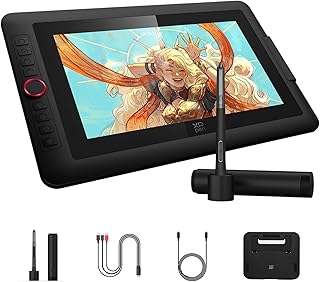
XPPen Artist 13.3 Pro V2 Drawing Tablet with Screen
Why We Love It

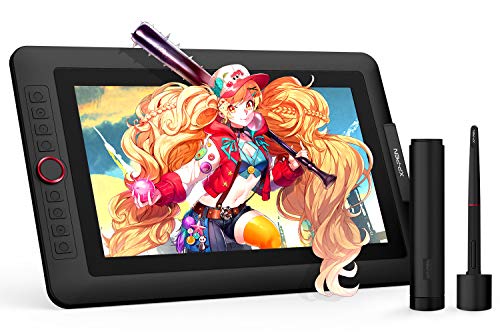
XP-PEN Artist13.3 Pro 13.3 Inch IPS Drawing Monitor Pen
Why We Love It

Ugee 15.4 inch Drawing Tablet with Screen,143% sRGB UE16
Why We Love It

XPPen Artist13.3 Pro V2 Drawing Tablet with Full-laminated
Why We Love It

VEIKK Graphic Drawing Tablet with Screen
Why We Love It

Acepen Drawing Tablet with Screen 13.3 Inch Graphics Tablet
Why We Love It

Wacom One HD Creative Pen Display
Why We Love It

HUION KAMVAS 13 Graphics Drawing Tablet with Full-Laminated
Why We Love It

HUION Kamvas 13 (Gen 3) Drawing Tablet with Screen
Why We Love It

HUION KAMVAS Pro 13 Graphics Drawing Tablet Pen Display with
Why We Love It
Quick Pick
10 Best Drawing Tablets 13.3 Inch Of 2026
Quick Pick
XPPen Artist 13.3 Pro V2 Drawing Tablet with Screen,125% sRGB Graphic Tablet for 13.3" Full-Laminated Art Tablet with Anti-Glare Glass, Dial for PC, Mac, Android, Linux Black,16384 Pen Pressure
XP-PEN Artist13.3 Pro 13.3 Inch IPS Drawing Monitor Pen Display Full-Laminated Graphics Drawing Monitor with Tilt Function and 8 Shortcut Keys (8192 Levels Pen Pressure, 123% sRGB)
Ugee 15.4 inch Drawing Tablet with Screen,143% sRGB UE16 Computer Graphics Tablet with Full-Laminated Screen 8+1 Hot Keys 16K Level Pressure Battery-Free Stylus,Drawing Pad for PC/Windows/Mac/Android
XPPen Artist13.3 Pro V2 Drawing Tablet with Full-laminated Screen, 99% sRGB Color Gamut, 13.3" Portable Graphics Pen Display with X3 Pro Smart Chip Stylus, 8 Shortcut Keys, Works with Windows, macOS
VEIKK Graphic Drawing Tablet with Screen, VK1200 11.6'' Digital Drawing Pad with 2 Battery-Free Pens 6 Shortcut Keys Tilt Function 8192 Pressure Electronic Writing Pad for Laptop PC for Windows Mac
Acepen Drawing Tablet with Screen 13.3 Inch Graphics Tablet Anti-Glare Graphics Drawing Monitor 122% sRGB Full-Laminated Digital Drawing Tablet with Stylus Pen 8192 Pressure
Wacom One HD Creative Pen Display, Drawing Tablet With Screen, 13.3" Graphics Monitor; includes Training & Software, works with Mac, PC & Chromebook, photo/video editing, drawing, design, & education
HUION KAMVAS 13 Graphics Drawing Tablet with Full-Laminated Screen Battery-Free Stylus PW517 Tilt 8 Press Keys, 13.3 inch Pen Display for Android, Mac, Linux and Windows PC, Black
HUION Kamvas 13 (Gen 3) Drawing Tablet with Screen, Dual Dial, 13.3", Black | Full Lamination, Canvas Glass 2.0, 99% sRGB, PenTech 4.0 16384 Levels, Works with PC, Mac and Android, With Stand
HUION KAMVAS Pro 13 Graphics Drawing Tablet Pen Display with Full Lamination Screen Battery-Free Stylus 8192 Pen Pressure - 13.3 inch Monitor with Stand for Linux, Windows and Mac-GT-133
Buying Guide: Drawing Tablets 13.3 Inch
📋 Table of Contents
1What stylus pressure sensitivity is best for serious artists?
Look for at least 8192 levels of pressure sensitivity for precise control over line weight and shading. Higher levels (up to 16384) offer smoother transitions, but 8192 is sufficient for most digital illustration and design work on a 13.3-inch tablet.
2How important is a high-resolution screen for a 13.3-inch drawing tablet?
A 2560x1440 (QHD) or 3840x2160 (4K) display ensures sharp visuals and accurate color, which is crucial for detailed work. A 100% sRGB or Adobe RGB color gamut also helps maintain consistency across devices and print.
3Should I prioritize a built-in stylus or a detachable one?
A built-in stylus is more convenient and less likely to get lost, but a detachable one often offers better ergonomics and replaceable tips. If you plan to use multiple styluses or share the tablet, a detachable option is more flexible.
4What battery life should I expect from a 13.3-inch drawing tablet?
Most models offer 8-12 hours of battery life, depending on usage. Look for at least 10 hours if you work away from a power source for extended periods, and ensure it supports fast charging for quick top-ups between sessions.
5Are extra buttons and touch zones worth it for a 13.3-inch model?
Extra buttons and a touch zone can speed up workflow by customizing shortcuts for common tools. However, on a compact 13.3-inch screen, they may take up valuable space. Prioritize them if you use software with many functions, like Adobe Photoshop or Procreate.
How we choose
Our editors are people who genuinely love testing and writing about products. We compare each product's real-world usability and strengths, then distill what matters most into our own "Why We Love It" points — so you get an honest, at-a-glance sense of what counts before you buy.