10 Best Dolby Vision Android Streaming Device Of 2026
Dolby Vision Android Streaming Device — Reviews, Recommendations & Updated Buying Guide November 2026


XIAOMI TV Stick 4K (2nd Gen) Streaming Device with Google TV
Why We Love It


Xiaomi TV Stick 4K XM310009 Noir
Why We Love It

Xiaomi Mi TV Stick 4K Portable Streaming Media Player
Why We Love It

Xiaomi Mi TV Stick 4K
Why We Love It
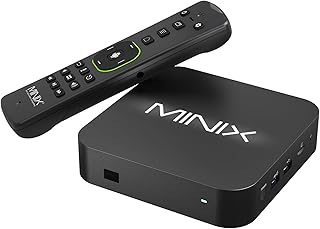
MINIX U8K Android Media AI Box 8K UHD Android Tv Box 128GB
Why We Love It

Roku Ultra
Why We Love It

Nikai 50 Inch 4K QLED Ultra HD Smart Google TV
Why We Love It

Nikai 55 Inch 4K QLED Ultra HD Smart Google TV
Why We Love It

Google Chromecast with Google TV AV Player 4K UHD (2160p)
Why We Love It

Nikai 65 Inch 4K QLED Ultra HD Smart Google TV
Why We Love It
Quick Pick
10 Best Dolby Vision Android Streaming Device Of 2026
Quick Pick
XIAOMI TV Stick 4K (2nd Gen) Streaming Device with Google TV, Dolby Vision & Atmos, Wi-Fi 6, Bluetooth Voice Remote - Black
Xiaomi TV Stick 4K XM310009 Noir
Xiaomi Mi TV Stick 4K Portable Streaming Media Player Powered by Android 11 TV Google Assistant & Smart Cast Dolby & DTS surround sound Supported MDZ-27-AA Xiaomi TV Stick 4K
Xiaomi Mi TV Stick 4K, Mi Streaming Android TV Stick, Built-in Chromecast, IR Bluetooth Remote Control Compatible with Google Vocal Assistant, Supports Dolby Atmos, Dolby Vision and DST HD, Black
MINIX U8K Android Media AI Box 8K UHD Android Tv Box 128GB eMMC, 8GB LPDDR4 RAM Dolby Vision Entertainment Media Player with MINIX A3 Pro Bluetooth Six-Axis Gyroscope Remote
Roku Ultra | Streaming Device HD/4K/HDR/Dolby Vision with Dolby Atmos, Bluetooth Streaming, and Roku Voice Remote with Headphone Jack and Personal Shortcuts, includes Premium HDMI® Cable
Nikai 50 Inch 4K QLED Ultra HD Smart Google TV, Hands Free Voice Control, Game Master, Dolby Vision + Atmos, 4K HDR10+, Effortless Connectivity with Android & Apple devices - NPROG50QLED
Nikai 55 Inch 4K QLED Ultra HD Smart Google TV, Hands-Free Voice Control, Game Master, Dolby Vision + Atmos, 4K HDR10+, Effortless Connectivity with Android & Apple devices - NPROG55QLED
Google Chromecast with Google TV AV Player 4K UHD (2160p) 60fps HDR Snow
Nikai 65 Inch 4K QLED Ultra HD Smart Google TV, Hands Free Voice Control, Game Master, Dolby Vision + Atmos, 4K HDR10+, Effortless Connectivity with Android & Apple devices - NPROG65QLED
Buying Guide: Dolby Vision Android Streaming Device
📋 Table of Contents
1What hardware specifications are needed to support Dolby Vision on an Android streaming device?
Look for devices with at least a quad-core processor, 2GB of RAM, and a Mali-G52 or higher GPU. Dolby Vision requires hardware decoding, so ensure the device supports H.265/HEVC and HDR10+ for optimal performance and color accuracy.
2Does Dolby Vision make a noticeable difference on Android streaming devices compared to standard HDR?
Yes — Dolby Vision offers dynamic metadata that adjusts brightness and color per scene, resulting in more vivid and accurate visuals. It’s especially noticeable on high-end TVs with local dimming, where it outperforms static HDR formats like HDR10.
3Which Android streaming devices natively support Dolby Vision without additional apps or firmware?
Devices like the NVIDIA Shield TV Pro and certain Amazon Fire TV models support Dolby Vision natively. Check the manufacturer’s specs for 'Dolby Vision' or 'HDR10+' support, as some require a firmware update or specific apps like Netflix or Disney+ to activate it.
4What should I look for in an Android streaming device’s display output options to ensure Dolby Vision compatibility?
Ensure the device has an HDMI 2.1 port for full Dolby Vision support, and confirm it can output at 4K resolution with HDR. Older HDMI 2.0 ports may limit color depth or refresh rates, reducing the Dolby Vision experience on compatible TVs.
5Are there common mistakes buyers make when choosing an Android streaming device for Dolby Vision?
Yes — buyers often overlook the need for both Dolby Vision support in the device and on their TV. Also, some assume all HDR content is Dolby Vision, but most streaming services use HDR10 or HDR10+. Always verify both the device and TV specs before purchasing.
How we choose
Our editors are people who genuinely love testing and writing about products. We compare each product's real-world usability and strengths, then distill what matters most into our own "Why We Love It" points — so you get an honest, at-a-glance sense of what counts before you buy.