10 Best Displaylink Usb C Docking Station Of 2026
Displaylink Usb C Docking Station — Reviews, Recommendations & Updated Buying Guide November 2026


WAVLINK USB C Docking Station with 3 HDMI
Why We Love It


ACASIS USB C to Dual HDMI DisplayLink Adapter for Mac
Why We Love It

Belkin Connect 16-in-1 Docking Station 140W
Why We Love It

USB C/USB 3.0 to HDMI Splitter Extended Display
Why We Love It

UGREEN Revodok Pro 207 USB C Docking Station Dual Monitor
Why We Love It
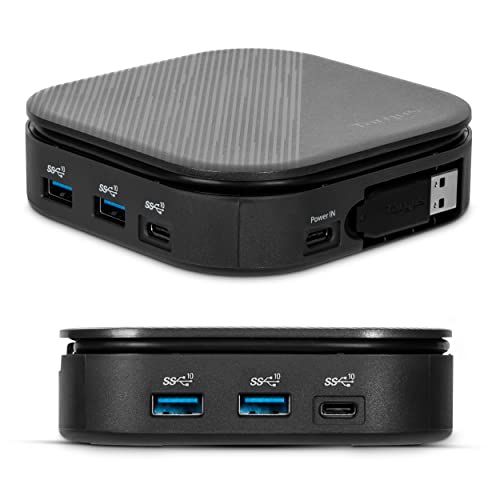
Targus USB-C Universal Dual HD Docking Station With 80W PD
Why We Love It

UGREEN Docking Station Triple Monitors with 2×4K@60Hz HDMI
Why We Love It

WAVLINK USB C Docking Station with 3 HDMI
Why We Love It

UGREEN Laptop Docking Station Dual Monitor
Why We Love It

J5create USB-C® Dual 4K HDMI™ Docking Station with PD 3.1
Why We Love It
Quick Pick
10 Best Displaylink Usb C Docking Station Of 2026
Quick Pick
WAVLINK USB C Docking Station with 3 HDMI, Displaylink Laptop Dock Triple Monitor 4K60Hz, 100W Charging for M1 M2 M3 M4 Mac and Windows, 5 USB Ports, 2DP, 1Gbps Ethernet Port, Audio/Mic, SD/TF
ACASIS USB C to Dual HDMI DisplayLink Adapter for Mac M1/M2/M3/M4/Windows | USB C DisplayLink Docking Station with 2HDMI 4K@60Hz, 3USB-A Ports, 100W PD Charging ,USB A/C to Dual Monitor,Grey
Belkin Connect 16-in-1 Docking Station 140W, Triple Display USB C Dock with 4K@60Hz Support, DisplayLink Technology, USB C Dock with 10Gbps Data Transfer, 2.5Gb Ethernet Port - Laptop Expansion Hub
USB C/USB 3.0 to HDMI Splitter Extended Display, USB C to HDMI Adapter for Windows and Mac OS, Support Displaylink Expand up to 6 Monitors, 4K 30Hz High-Definition Docking Station for Dual Display
UGREEN Revodok Pro 207 USB C Docking Station Dual Monitor, 7-in-1 Dock with 4K@60Hz HDMI, 10Gbps 2 Type C and A Data Ports, 100W PD Port for PC, Laptop, Dell XPS, HP, Thinkpad, and More | 100W PD Ports, Aluminium Revodok Pro 207 USB C Dock Compatible with PC, Laptop, XPS, HP, ThinkPad, Surface, Chromebook, etc
Targus USB-C Universal Dual HD Docking Station With 80W PD Pass-Thru, Dual Monitor (HD) or Single Monitor (2K), TAA Compliant, DisplayLink (DOCK116GLZ)
UGREEN Docking Station Triple Monitors with 2×4K@60Hz HDMI, 4K@120Hz DP | 2×Type-C 3.2, 2×USB-A 2.0 Data, 170MB/s SD/TF, 1Gbps Ethernet, 3.5mm Audio, 100W PD, 12-in-1 Dock for Laptop, HP, Thinkpad
WAVLINK USB C Docking Station with 3 HDMI, 15 in 1 Displaylink Laptop Dock Triple Monitor 4K+Dual 2K, 100W PD for M1 M2 M3 Mac and Windows, 5 USB Ports, 2DP, 1Gbps Ethernet Port, Audio/Mic, SD/TF
UGREEN Laptop Docking Station Dual Monitor, 10-in-1 Dual 4K@60Hz USB C Hub | 2x HDMI, Single 8K, 100W PD, 1Gbps Ethernet, 4x 5Gbps USB-A/C Data, SD/TF, Revodok Pro Aluminum USB-C Dock for Dell/HP/Lenovo
J5create USB-C® Dual 4K HDMI™ Docking Station with PD 3.1 Pass-Through Charging, Gigabit Ethernet, SD/microSD, 140W Power Adapter(JCD3199P)
Buying Guide: Displaylink Usb C Docking Station
📋 Table of Contents
1What DisplayLink chip version should I look for in a USB-C docking station?
Opt for models with DisplayLink DL-3000 or newer chips for better performance and support for higher resolutions. Older DL-2000 series chips may struggle with 4K or multiple monitors, so check the chip version for compatibility with your needs.
2How many USB ports and what speeds are important for a DisplayLink docking station?
Look for at least two USB 3.0 or USB-C ports for fast data transfer, and ensure the docking station supports USB 3.1 or higher for future-proofing. More ports are better if you need to connect peripherals like mice, keyboards, or external drives simultaneously.
3What resolution and monitor support should I expect from a DisplayLink USB-C docking station?
Most modern DisplayLink docks support up to 4K resolution at 60Hz on a single monitor, and some can drive dual 4K displays. Check the product specs for exact resolution support, as older models may be limited to 1080p or lower.
4Is DisplayLink software necessary, and what should I look for in it?
Yes — DisplayLink software is essential for driver support and monitor configuration. Look for versions with regular updates, good user reviews, and features like multi-monitor support, resolution scaling, and low-latency performance for tasks like video editing or gaming.
5What are common mistakes to avoid when buying a DisplayLink USB-C docking station?
Avoid models with outdated DisplayLink chips or insufficient power delivery for your laptop. Also, ensure the docking station supports your laptop’s USB-C version (e.g., Thunderbolt 3 or USB 3.1) and that it provides enough wattage for charging if needed.
How we choose
Our editors are people who genuinely love testing and writing about products. We compare each product's real-world usability and strengths, then distill what matters most into our own "Why We Love It" points — so you get an honest, at-a-glance sense of what counts before you buy.