10 Best Diskless Network Attached Storage Of 2026
Diskless Network Attached Storage — Reviews, Recommendations & Updated Buying Guide November 2026


UGREEN DH2300 2 Bay Desktop NAS
Why We Love It


UGREEN NASync DXP4800 Pro 4-Bay 8GB Desktop NAS
Why We Love It

UGREEN NASync DH4300 Plus 4-Bay Desktop NAS
Why We Love It

UGREEN NAS DXP4800 GT 4-Bay for Creators
Why We Love It
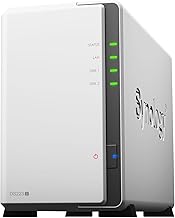
Synology 2-Bay DiskStation DS223j (Diskless)
Why We Love It

TERRAMASTER F2-425 2-Bay NAS
Why We Love It

TERRAMASTER D5-310 5-Bay Hardware RAID Enclosure
Why We Love It

TERRAMASTER F4 SSD 4-Bay All-Flash NAS
Why We Love It

TERRAMASTER D2-320 USB RAID Enclosure 2-Bay (Diskless)
Why We Love It

TERRAMASTER F6-425 Pro NAS Server
Why We Love It
Quick Pick
10 Best Diskless Network Attached Storage Of 2026
Quick Pick
UGREEN DH2300 2 Bay Desktop NAS, Cloud Backup, 4K HDMI,AI Album NAS Server | 1GbE Port, 4GB RAM, Cloud Backup, Remote Access, NFC, Multi-Device Connectivity, Versatile Expansion Ports (Diskless)
UGREEN NASync DXP4800 Pro 4-Bay 8GB Desktop NAS,Network Attached Storage (Diskless)
UGREEN NASync DH4300 Plus 4-Bay Desktop NAS, 4K HDMI NAS Server for Home | 2.5 GbE Port, 8GB LPDDR4X RAM, A76+A55 8 Cores SoC, Cloud Backup, Remote Access, NFC, Multi-Device Connectivity (Diskless)
UGREEN NAS DXP4800 GT 4-Bay for Creators, Tech Enthusiasts and Office Teams | Smart Home Data Hub, Direct NAS Editing & Dual 10GbE Transfers, Ryzen R2514, 8GB DDR4, 2x 10GbE, 2x M.2 NVMe Slots, Diskless
Synology 2-Bay DiskStation DS223j (Diskless)
TERRAMASTER F2-425 2-Bay NAS, N5095, 4GB DDR4, 2.5GbE, Diskless | Auto-back up phones and PCs, organize photos with local AI, and stream 4K media via Plex or Emby from one home NAS.
TERRAMASTER D5-310 5-Bay Hardware RAID Enclosure, USB-C, 120TB, Diskless | RAID 5/0/1/10 and hot spare, up to 120TB and 220MB/s, plus temperature-controlled cooling and free backup software.
TERRAMASTER F4 SSD 4-Bay All-Flash NAS, N95, 8GB DDR5, 5GbE, Diskless | Four M.2 NVMe SSDs deliver compact, quiet, high-speed storage with 5GbE for photo, video, and large-file management.
TERRAMASTER D2-320 USB RAID Enclosure 2-Bay (Diskless)
TERRAMASTER F6-425 Pro NAS Server, Intel Core i3-1315U, 8GB DDR5 (Diskless)
Buying Guide: Diskless Network Attached Storage
📋 Table of Contents
1What are the key performance specs to look for in a diskless NAS?
Look for at least 1 Gbps Ethernet ports for reliable data transfer, and consider 10 Gbps for high-speed environments. Also, check for support for protocols like NFS, SMB, and iSCSI, and ensure the device has sufficient RAM (at least 4GB) for smooth multi-user access and file serving.
2How does a diskless NAS differ from a traditional NAS in terms of scalability?
A diskless NAS relies on external storage devices like USB drives, NAS enclosures, or network-attached storage arrays, making it more flexible for scaling. However, performance can vary based on the external storage’s speed and interface, unlike traditional NAS units that have built-in drives for consistent performance.
3What are the advantages of using a diskless NAS for small businesses?
Diskless NAS is cost-effective for small businesses that already have storage infrastructure, as it avoids the need for built-in drives. It also allows for centralized management of existing storage, simplifying backup and file sharing without requiring additional hardware investment.
4What should I consider regarding power consumption and cooling for a diskless NAS?
Since diskless NAS units typically have fewer internal components, they consume less power and generate less heat than traditional NAS. However, ensure the external storage devices used are energy-efficient and that the NAS enclosure has proper ventilation to prevent overheating during extended use.
5Are there any common mistakes to avoid when setting up a diskless NAS?
Avoid connecting low-speed external drives, as this can bottleneck performance. Also, ensure the NAS firmware and external storage drivers are up to date, and configure RAID or redundancy properly to prevent data loss in case of drive failure or network issues.
How we choose
Our editors are people who genuinely love testing and writing about products. We compare each product's real-world usability and strengths, then distill what matters most into our own "Why We Love It" points — so you get an honest, at-a-glance sense of what counts before you buy.