10 Best Digital Slide Viewers Of 2026
Digital Slide Viewers — Reviews, Recommendations & Updated Buying Guide November 2026


KODAK SLIDE N SCAN Film and Slide Scanner with Large 5” LCD
Why We Love It


Magnasonic All-In-One 24MP Film Scanner with Large 5"
Why We Love It

Sorandy Slide Viewer Light Box
Why We Love It
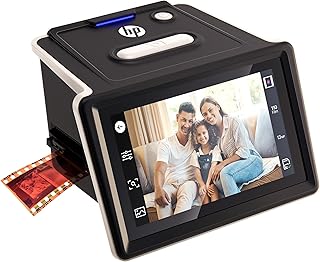
HP FilmScan Touch Screen Film and Slide Scanner with 5" LCD
Why We Love It

DGODRT Slide Viewer Light Pad Backlight for Viewing and
Why We Love It
Slide Viewer Light Pad A4 Magnetic LED Light Panel for old
Why We Love It

DigitConvert 35mm Mobile Film and Slide Scanner Converts
Why We Love It

35mm Film and Slide Viewer for Old Slides
Why We Love It
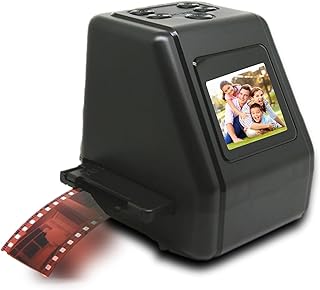
Gugxiom Film and Slide Scanne
Why We Love It

Generic Mobile Film Scanner 35mm 120mm
Why We Love It
Quick Pick
10 Best Digital Slide Viewers Of 2026
Quick Pick
KODAK SLIDE N SCAN Film and Slide Scanner with Large 5” LCD Screen, Convert Color & B&W 35mm, 126, 110 Negatives & Slides to High Resolution 22MP JPEG Digital Photos
Magnasonic All-In-One 24MP Film Scanner with Large 5" Display & HDMI, Converts 35mm/126/110/Super 8 Film & 135/126/110 Slides into Digital Photos, Built-in Memory (FS71)
Sorandy Slide Viewer Light Box, Negative Viewer, Ultra-Thin Light Pad Scanner, Slide Viewer, Artist Sketching, Old Slides Scanning Light Box with 3 Adjustable Brightness, USB
HP FilmScan Touch Screen Film and Slide Scanner with 5" LCD Display, Quickly Converts Negatives and Slides into 22MP Digital JPEG Photos, Compatible with 135, 126, and 110 Films and Slides | Digitizes 35mm, 126 & 110 slides and negatives - saves to SD card; gallery mode turns it into a digital picture frame
DGODRT Slide Viewer Light Pad Backlight for Viewing and Scanning Photos Slides Negatives Films, Ultra-Thin Light Box Scanner with 3 Adjustable Brightness, USB Powered
Slide Viewer Light Pad A4 Magnetic LED Light Panel for old slides, Film Scanner, Negative Scanning Slide Viewer with 3 Levels of Bright Lights
DigitConvert 35mm Mobile Film and Slide Scanner Converts Slides to Digital | Digitize 35mm old slides and negatives via smartphone. Battery-powered, portable film viewer for old photos
35mm Film and Slide Viewer for Old Slides, Negative/Positive Film Portable LED Lighted 3x Magnification Desktop Viewer with USB Power Cable or Battery Operation
Gugxiom Film and Slide Scanne, All in 1 Film & Slide Scanner Converts 35mm 135 110 126 and Super 8 Films, Slides, Negatives to Digital JPG Photos, Built in 128MB Memory, 2 LCD Screen
Generic Mobile Film Scanner 35mm 120mm, Portable Slide and Negative Scanner Slide Viewer Converts Slides and Negatives to Digital Photos, Battery Powered
Buying Guide: Digital Slide Viewers
📋 Table of Contents
1What magnification range is best for most digital slide viewers?
Look for a magnification range of 40x to 1000x for general use, with 10x to 40x objective lenses and a 10x eyepiece. Higher magnifications (up to 1000x) are useful for detailed cellular structures, but avoid overpaying for magnifications beyond your needs, as image quality drops without proper resolution.
2Should I prioritize a monochrome or color camera for my digital slide viewer?
Monochrome cameras offer higher resolution and are better for quantitative analysis and brightfield imaging, while color cameras are ideal for educational use or when color accuracy matters, like in histology. Choose based on your workflow: monochrome for precision, color for clarity and presentation.
3What image resolution should I look for in a digital slide viewer?
A minimum of 2 megapixels is standard, but 5–10 megapixels is better for high-quality imaging and detailed analysis. Higher resolution allows for clearer zooming and better image capture, especially when sharing or publishing digital slides.
4Is a motorized stage worth the extra cost?
Motorized stages improve precision and ease of use, especially for repetitive tasks or multi-slide scanning, but they add cost and complexity. If you're a student or occasional user, a manual stage may be sufficient and more budget-friendly.
5What software features are essential for digital slide analysis?
Look for software that supports image annotation, measurement tools, and slide sharing. Some systems offer AI-based analysis or integration with LMS platforms for education. Ensure the software is compatible with your workflow and device, and check if it requires a subscription or one-time purchase.
How we choose
Our editors are people who genuinely love testing and writing about products. We compare each product's real-world usability and strengths, then distill what matters most into our own "Why We Love It" points — so you get an honest, at-a-glance sense of what counts before you buy.