10 Best Desktop Network Switches Of 2026
Desktop Network Switches — Reviews, Recommendations & Updated Buying Guide November 2026


TP-Link TL-SG108, 8 Port Gigabit Unmanaged Ethernet Switch
Why We Love It


D-Link DGS-105, 5 Port Gigabit Ethernet Switch Unmanaged
Why We Love It

TP-Link TL-SG105 5-Port Gigabit Unmanaged Ethernet Network
Why We Love It

UGREEN Ethernet Switch 5-Port Gigabit
Why We Love It

TP-Link TL-SG1008D, 8 Port Gigabit Ethernet Network Switch
Why We Love It
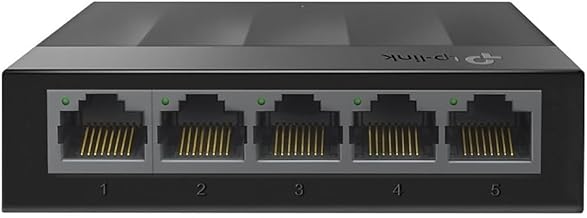
TP-Link LS1005G
Why We Love It

TP-Link LS1008G 8-Port Gigabit Network Switch
Why We Love It

Tp-Link SG105 GiGabit metal body 5-Port 10/100/1000Mbps
Why We Love It

D-Link DGS-105/B 5-Port Gigabit Unmanaged Metal Desktop
Why We Love It

TP-LINK Desktop Switch 5 port 10/100Mbps LiteWave LS1005
Why We Love It
Quick Pick
10 Best Desktop Network Switches Of 2026
Quick Pick
TP-Link TL-SG108, 8 Port Gigabit Unmanaged Ethernet Switch, Black | Fanless Metal Design, Plug & Play, Desktop/Wall Mount, Traffic Optimization, Limited Lifetime Protection
D-Link DGS-105, 5 Port Gigabit Ethernet Switch Unmanaged, Network Splitter, Silent Fanless, Network Hub, Sturdy Metal with Shielded Ports, Desktop/Wall Mount, QoS, Energy Saving, Plug and Play
TP-Link TL-SG105 5-Port Gigabit Unmanaged Ethernet Network Switch, Fanless Metal Design, Black
UGREEN Ethernet Switch 5-Port Gigabit,240W Desktop Network Splitter | 5*RJ45 Port Support 10/100/1000Mbps,Unmanaged Plug & Play Ethernet Adapter,Compatible with Router,TV,Game Console,Computer
TP-Link TL-SG1008D, 8 Port Gigabit Ethernet Network Switch | Plug and Play, Desktop or Wall Mount, Plastic Case Ethernet Splitter, Fanless, Traffic Optimization, Unmanaged
TP-Link LS1005G, Litewave 5 Port Gigabit Ethernet Unmanaged Switch | Desktop Ethernet Splitter, Unshielded Network Switch, Plug & Play, Fanless Quiet
TP-Link LS1008G 8-Port Gigabit Network Switch, Ethernet Splitter | Power-Saving Ethernet Switch, Desktop&Wall-Mount, Silent Operation, Plug & Play, Auto-MDI/MDIX, Home/Office/Surveillance
Tp-Link SG105 GiGabit metal body 5-Port 10/100/1000Mbps Desktop Switch
D-Link DGS-105/B 5-Port Gigabit Unmanaged Metal Desktop Switch 10/100/1000 Mbit/s - UK Version, black DGS-105/B
TP-LINK Desktop Switch 5 port 10/100Mbps LiteWave LS1005
Buying Guide: Desktop Network Switches
📋 Table of Contents
1What port speed should I look for in a desktop network switch?
For most home or small office setups, a 1 Gbps (Gigabit) switch is sufficient. If you're handling large file transfers, video streaming, or gaming, consider a 2.5 Gbps or 10 Gbps switch for faster data throughput and reduced latency.
2How many ports do I really need?
Start with 4-8 ports for basic use, but plan for future expansion. If you have multiple devices like PCs, printers, and IoT gadgets, aim for 12-24 ports. Some switches offer stackable or modular options for scalability.
3What’s the difference between managed and unmanaged switches?
Unmanaged switches are plug-and-play with no configuration, ideal for simple networks. Managed switches offer VLAN support, QoS, and security features, making them better for complex setups or when you need control over traffic and access.
4Should I prioritize PoE (Power over Ethernet) support?
If you use devices like IP cameras, VoIP phones, or wireless access points that need power and data over a single cable, look for a PoE or PoE+ switch. It simplifies cabling but may increase cost and power requirements.
5What’s the importance of switch latency and packet forwarding rate?
Lower latency and higher packet forwarding rates (measured in Mpps) ensure smoother data flow, especially in high-traffic environments. For gaming or video conferencing, look for switches with latency under 1ms and at least 10 Mpps for reliable performance.
How we choose
Our editors are people who genuinely love testing and writing about products. We compare each product's real-world usability and strengths, then distill what matters most into our own "Why We Love It" points — so you get an honest, at-a-glance sense of what counts before you buy.