10 Best Desktop Computer Of 2026
Desktop Computer — Reviews, Recommendations & Updated Buying Guide November 2026


Lenovo (Upgraded) AIO A100 All-in-One Desktop PC
Why We Love It


BOSGAME E5 Mini PC Windows 11 Pro
Why We Love It

All in One Computer
Why We Love It

All-in-one computer 23.8 inch curved screen
Why We Love It
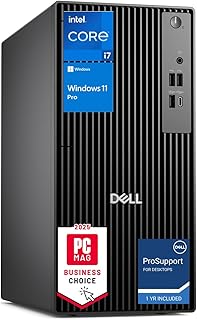
Dell Pro Tower QCT1250 Desktop
Why We Love It

Acer Aspire C27-1800 All-in-One Desktop
Why We Love It

Lenovo IdeaCentre AIO 27 Desktop PC F0JW0006AX
Why We Love It

Lenovo IdeaCentre AIO 24IRH9 All-in-One Desktop
Why We Love It

Lenovo AIO V100 All-in-One Desktop 23.8" FHD IPS Display
Why We Love It

Lenovo AIO A100 All-in-One Desktop – 23.8″ FHD IPS Display
Why We Love It
Quick Pick
10 Best Desktop Computer Of 2026
Quick Pick
Lenovo (Upgraded) AIO A100 All-in-One Desktop PC – 23.8" FHD IPS Display, Intel N100 (i3 Alternative), 8GB DDR4, 512GB SSD, Wi-Fi 6, Windows 11 Pro, USB Keyboard & Mouse Included – Cloud Grey
BOSGAME E5 Mini PC Windows 11 Pro, Ryzen 5300U (Beats 4300U/N150, Up to 3.8GHz), 8GB DDR4 RAM 256GB SSD, HDMI/DP/USB-C, Triple 4K Display, Dual 2.5G LAN, WiFi 5, BT5.0, Mini Computer for Home Office
All in One Computer, 27 inch All in One Desktop Computer with I5-3380M CPU 8GB DDR3 256GB SSD 1920x 1080 Screen, 5MP Retractable Hidden Camera, Arabic Wired Keyboard & Wired Mouse Arabic system
All-in-one computer 23.8 inch curved screen,slim design for office
Dell Pro Tower QCT1250 Desktop – 14th Gen Intel i7-14700 (Up to 5.4GHz), 16GB DDR5 RAM, 512GB SSD, Windows 11 Pro, Intel UHD Graphics, Wi-Fi 6E, BT, Dell Keyboard & Mouse, TPM, 1-Year ProSupport
Acer Aspire C27-1800 All-in-One Desktop – 13th Gen Intel® Core™ i7-1355U, 16GB RAM, 1TB SSD, 27" FHD 120Hz Display, Wireless Keyboard & Mouse, Windows 11 Pro, English, 1 Year Warranty (Black)
Lenovo IdeaCentre AIO 27 Desktop PC F0JW0006AX, 27" FHD IPS Display, Intel Core Ultra 7 256V Processor, 16GB LPDDR5X RAM, 512GB PCIe SSD,WIN 11 Home, Grey
Lenovo IdeaCentre AIO 24IRH9 All-in-One Desktop, 23.8" FHD IPS 100Hz Display, Intel Core i3-1315U, 8GB DDR5 RAM, 512GB SSD, Wireless Keyboard & Mouse, Microsoft 365 Basic + Office Home 2024
Lenovo AIO V100 All-in-One Desktop 23.8" FHD IPS Display, Intel N100 (i3 Alternative), 16GB DDR4, 512GB SSD, Wi-Fi 6, Windows 11 Pro, Wired Keyboard & Mouse, (Black-Upgraded)
Lenovo AIO A100 All-in-One Desktop – 23.8″ FHD IPS Display, Intel i3-N305, 16GB DDR4, 512GB SSD, Wi-Fi 6, Windows 11 Pro, Wireless Keyboard & Mouse, 1 Year Lenovo Warranty (Cloud Grey)(Upgraded)
Buying Guide: Desktop Computer
📋 Table of Contents
1What should I look for when choosing a desktop computer?
Consider your primary use, such as gaming, video editing, or general tasks, and match it with the right processor, RAM, and storage capacity.
2What are the key specifications to check?
Key specs include CPU performance, RAM size, storage type (SSD vs. HDD), graphics card (for gaming), and the operating system.
3How do I ensure the desktop is compatible with my needs?
Check the form factor to ensure it fits your space, and confirm that the ports and connectivity options match your peripherals and devices.
4When should I pay more for a desktop computer?
Pay more if you need high-end components like a dedicated GPU, larger SSDs, or a more powerful CPU for professional tasks like video rendering or 3D modeling.
5What are common mistakes to avoid when buying a desktop?
Avoid buying more RAM or storage than needed, and don't overlook cooling systems or build quality, which can affect long-term performance and reliability.
How we choose
Our editors are people who genuinely love testing and writing about products. We compare each product's real-world usability and strengths, then distill what matters most into our own "Why We Love It" points — so you get an honest, at-a-glance sense of what counts before you buy.