10 Best Dell Touchscreen Laptop With Pen Of 2026
Dell Touchscreen Laptop With Pen — Reviews, Recommendations & Updated Buying Guide November 2026


Dell Inspiron 15.6" FHD Touchscreen Laptop
Why We Love It


Dell Inspiron 15 3530 Business Laptop 15.6" Touchscreen FHD
Why We Love It

Dell Inspiron 2-in-1 14" FHD Touch Screen Laptop
Why We Love It

Dell 16 Plus 2 in 1
Why We Love It

Dell Inspiron 7440 2-in-1 Laptop Touch
Why We Love It

Dell 16 Plus 2-in-1 AI Laptop Intel Core Ultra 7 256V (>
Why We Love It
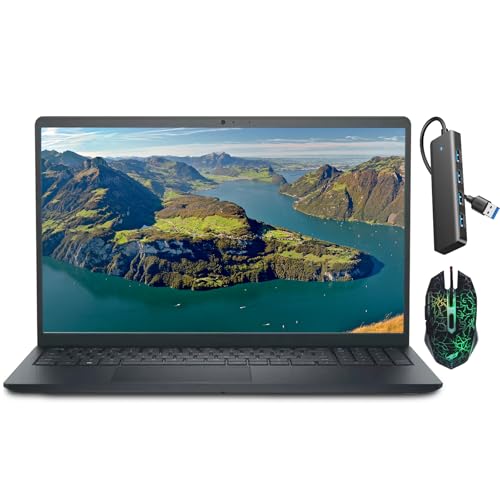
DELL (Upgraded) Inspiron 15 3530
Why We Love It

Dell Latitude 5450 Business Laptop (14" FHD Touchscreen
Why We Love It

Dell Flagship 2021 Inspiron 14 5000 5406 2 in 1 Laptop 14"
Why We Love It

Dell Latitude 9000 (9450) 2-in-1 Tablet Laptop
Why We Love It
Quick Pick
10 Best Dell Touchscreen Laptop With Pen Of 2026
Quick Pick
Dell Inspiron 15.6" FHD Touchscreen Laptop, Intel 13th Gen 10-Core i5-1334U, 32GB DDR4 RAM, 1TB PCIe SSD, WiFi 6, Bluetooth, Type-C, HDMI, Black
Dell Inspiron 15 3530 Business Laptop 15.6" Touchscreen FHD Display (Intel i5-1334U (Beat i7-1250U), 16GB DDR4, 1TB SSD, WiFi 6, HD Webcam, BT 5.3, Win11P)
Dell Inspiron 2-in-1 14" FHD Touch Screen Laptop, Intel Core 7 150U (Beats i7-1335U), 16GB RAM, 1TB SSD + 512GB Portable SSD, Wi-Fi 6E, Backlit, FP, Stylus Pen, Win 11 Pro
Dell 16 Plus 2 in 1,16" 2K FHD+ Touchscreen,Intel Core Ultra 7 256V,16GB RAM,1TB SSD,Intel Arc Graphics,Backlit KB,Win 11 Pro w/Copilot,With Free Office 365
Dell Inspiron 7440 2-in-1 Laptop Touch | 14" 1920x1200 FHD+ | Core 5-120U - 512GB SSD Hard Drive - 16GB RAM | 10 cores Win 11 Blue
Dell 16 Plus 2-in-1 AI Laptop Intel Core Ultra 7 256V (> i7-1355U) 16" FHD+ Touchscreen 16GB DDR5 1TB SSD Copilot+ PC Fingerprint Win 11 Pro, Ice Blue
DELL (Upgraded) Inspiron 15 3530, 15.6" Touchscreen Laptops Computer, Intel 10-Core i5 1334U, 16GB RAM 512GB SSD Wi-Fi 6 Bluetooth Lifetime MS, Win 11 Pro w/Copilot, USB Hub, Seibosfy
Dell Latitude 5450 Business Laptop (14" FHD Touchscreen, Intel 12-Core Ultra 7 155U), IR Webcam, Backlit, Thunderbolt 4, IST Computer Customized 16GB/32GB/64GB DDR5 RAM, 512GB/1TB/2TB SSD, Win 11 Pro
Dell Flagship 2021 Inspiron 14 5000 5406 2 in 1 Laptop 14" FHD Touchscreen 11th Gen Intel Quad-Core i7-1165G7 8GB RAM 512GB SSD Fingerprint Backlit KB USB-C WiFi6 MaxxAudio Win10 Grey + iCarp Pen
Dell Latitude 9000 (9450) 2-in-1 Tablet Laptop - 14 inch QHD+ (2560 x 1600) 500-nits Touch Display - Intel Core Ultra 7 Processor 165U 12-Core - 1TB SSD - 32GB RAM - Win11 pro
Buying Guide: Dell Touchscreen Laptop With Pen
📋 Table of Contents
1What's the difference between Dell's touchscreen laptops with pen support?
Dell's XPS and Inspiron lines both offer touchscreen with pen, but XPS models feature higher refresh rates and more precise pressure sensitivity, making them better for design work. Inspiron touchscreens are solid for general use and note-taking at a lower price point.
2Does the pen come included with every Dell touchscreen laptop?
Most Dell touchscreen laptops don't include a pen in the box—you'll need to buy one separately. Check the product specs carefully, as some bundles or premium models may include one, but it's safer to budget for a dedicated stylus.
3What screen size is best for using a pen on a Dell touchscreen laptop?
A 13-14 inch screen offers good portability without feeling cramped for pen input, while 15-16 inch models give you more writing space if you do detailed design or note-taking. Choose based on whether you prioritize carrying it around or having a larger work area.
4How important is pressure sensitivity when choosing a Dell touchscreen laptop with pen?
If you're doing digital art, photo editing, or handwriting recognition, higher pressure levels (4096+ levels) make a real difference in control and natural feel. For casual note-taking and basic sketching, standard pressure sensitivity is perfectly adequate.
5Should I spend more on a higher refresh rate touchscreen?
A 120Hz or 144Hz touchscreen makes pen strokes feel smoother and more responsive, which matters if you draw or write frequently. For regular browsing and office work, a standard 60Hz touchscreen performs fine, so upgrade only if pen responsiveness is a priority for your workflow.
How we choose
Our editors are people who genuinely love testing and writing about products. We compare each product's real-world usability and strengths, then distill what matters most into our own "Why We Love It" points — so you get an honest, at-a-glance sense of what counts before you buy.