10 Best Dell Portable Monitor Of 2026
Dell Portable Monitor — Reviews, Recommendations & Updated Buying Guide November 2026

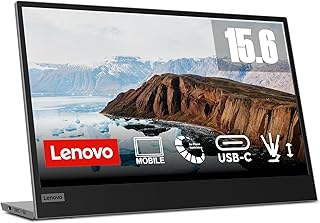
Lenovo L15 15.6 Inch Portable Monitor
Why We Love It


ASUS ZenScreen MB169CK Portable USB Monitor- 16 inch (15.6
Why We Love It

Dell P2425H 24" Full HD (1920x1080) PC Display
Why We Love It

UPERFECT 4K Portable Monitor Touchscreen
Why We Love It

Lenovo L15 Portable Monitor
Why We Love It

ASUS ZenScreen MB169CK 15.6 Inch 1080p Portable Monito
Why We Love It

Dell 34 Plus USB-C Monitor - S3425DW
Why We Love It

MSI PRO MP161 E2 15.6 Inch Full HD Portable Monitor
Why We Love It

UPERFECT Portable Monitor 4K 16" | 1200 Nits Laptop Monitor
Why We Love It

UPERFECT 15.6" Touchscreen Portable Monitor
Why We Love It
Quick Pick
10 Best Dell Portable Monitor Of 2026
Quick Pick
Lenovo L15 15.6 Inch Portable Monitor, HD, 1080p, 60Hz, IPS, 6ms, USB-C/Type-C Connector
ASUS ZenScreen MB169CK Portable USB Monitor- 16 inch (15.6 inch viewable), Full HD, IPS, dual USB Type-C, mini-HDMI, Flicker Free, Blue Light Filter, Anti-glare surface, 360° kickstand
Dell P2425H 24" Full HD (1920x1080) PC Display, 100Hz, IPS, 5ms, 99% sRGB, USB-C, DisplayPort, HDMI, VGA, 4X USB, 3 Year Warranty, Black
UPERFECT 4K Portable Monitor Touchscreen, 15.6” 125% sRGB Laptop Monitor, 3840 * 2160 UHD, 450 Nits Ultra-Slim Monitor, USB-C & MINI HDM, VESA & Stand, Travel Screen for Computer, PC, Game Consoles
Lenovo L15 Portable Monitor, 15.6” Display, Full HD Resolution, IPS Panel, 250 nits Brightness, 60Hz Refresh Rate, USB-C Ports, Height-Adjustable Stand, Flicker-Free Technology, Grey
ASUS ZenScreen MB169CK 15.6 Inch 1080p Portable Monito | Dual USB-C, 360 Kickstand, Anti-Glare IPS, Plug and Play, Laptop Screen Extender, Travel Display for MacBook and PC
Dell 34 Plus USB-C Monitor - S3425DW, WQHD (3440x1440), 21:9 Curved, 120Hz, VA, 1ms, AMD FreeSync Premium, HDR10, Height Adjust, Built-in Speakers, 2 USB-C, 2 HDMI, 3 Year Warranty | AMD FreeSync Premium, 21:9 Curved, HDR10, Height Adjust, Built-in Speakers, 2 USB-C, 2 HDMI, 2 USB, 3 Year Warranty
MSI PRO MP161 E2 15.6 Inch Full HD Portable Monitor - 1920 x 1080 IPS Panel, 60Hz, Eye-Friendly Screen (PC, Laptop, Mobile), Speakers, Enhanced Chassis & Kickstand - Mini-HDMI 2.0b, 2 x USB Type-C
UPERFECT Portable Monitor 4K 16" | 1200 Nits Laptop Monitor | 3840 * 2400 UHD | 1MS FreeSync 2000:1 Contrast | USB-C & HDMI | VESA & Smart Case | Travel Screen for Computer, Mini PC, Game Consoles
UPERFECT 15.6" Touchscreen Portable Monitor | 1080P IPS Matte Screen, Ultra-Thin Travel Monitor with Adjustable Stand | HDMI USB-C External Display for Laptop, Phone, Mini Host, Game Console
Buying Guide: Dell Portable Monitor
📋 Table of Contents
1What size portable monitor should I choose for my laptop?
Most Dell portable monitors come in 13-17 inch sizes. If you're pairing it with a laptop, match the size to your device—13-15 inches works well for ultrabooks and MacBook Air, while 17 inches pairs better with larger workstations. Consider your desk space and whether you'll move it frequently, as larger screens are harder to carry.
2Do I need USB-C or HDMI connectivity for a Dell portable monitor?
USB-C is more convenient since it provides both display signal and power from a single cable, reducing desk clutter. HDMI requires a separate power connection but works with virtually any device, so choose based on what ports your laptop has—most modern Dell laptops have USB-C, while older models may only have HDMI.
3What's the difference between 1080p and 1440p resolution on portable monitors?
1440p gives you sharper text and more screen real estate, making it better for detailed work like spreadsheets or design, but it drains battery faster and needs more processing power. 1080p is lighter on resources and sufficient for video calls and general work, so choose 1440p only if you do precision tasks regularly.
4Is a portable monitor worth buying alongside my Dell laptop?
It's worth it if you work from multiple locations, need extra screen space on the go, or attend frequent video calls away from your desk. If you mostly work at one location, a traditional external monitor is more practical and affordable.
5What specs should I prioritize—brightness, refresh rate, or color accuracy?
Brightness (300+ nits) matters most for outdoor or bright environments, while refresh rate above 60Hz only helps if you use it for gaming or video editing. For business work, focus on brightness and color accuracy; for general use, a bright 60Hz display is sufficient and more battery-efficient.
How we choose
Our editors are people who genuinely love testing and writing about products. We compare each product's real-world usability and strengths, then distill what matters most into our own "Why We Love It" points — so you get an honest, at-a-glance sense of what counts before you buy.