10 Best Datacolor Spyder Of 2026
Datacolor Spyder — Reviews, Recommendations & Updated Buying Guide November 2026

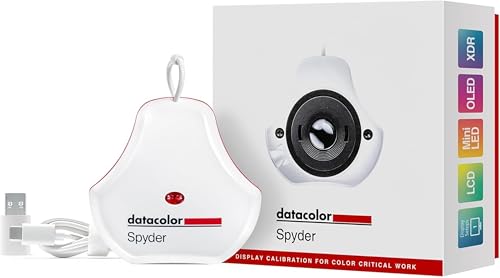
Datacolor Spyder Monitor Calibration for Optimised Colour
Why We Love It


Datacolor SpyderExpress Monitor Calibrator & Screen Color
Why We Love It

Datacolor Spyder Checkr 24 - Has 24 Target Colours
Why We Love It

Datacolor SpyderCUBE, SC200
Why We Love It

Datacolor Spyder5PRO
Why We Love It

Datacolor Spyder X2 Photo Studio Kit: The ultimate colour
Why We Love It

Datacolor Spyder Checkr Photo for Accuracy & Consistency
Why We Love It

Datacolor Spyder4Pro S4P100 Colorimeter for Display
Why We Love It

Datacolor Spyder4Elite S4EL100 Colorimeter for Display
Why We Love It

Datacolor Spyder Photo/Video Kit: Color Management Tools for
Why We Love It
Quick Pick
10 Best Datacolor Spyder Of 2026
Quick Pick
Datacolor Spyder Monitor Calibration for Optimised Colour Management - User-friendly Screen Calibration for Colour Accuracy and Consistency in Colour Rendering, 2024 Version
Datacolor SpyderExpress Monitor Calibrator & Screen Color Calibrator
Datacolor Spyder Checkr 24 - Has 24 Target Colours, Includes a Grey Card, Calibrates Your Camera for Consistent Image Colour Across Multiple Camera Systems and Lighting Conditions
Datacolor SpyderCUBE - SC200
Datacolor Spyder5PRO – Designed for Serious Photographers and Designers (S5P100)
Datacolor Spyder X2 Photo Studio Kit: The ultimate colour management toolkit for photographers for precise colour management in any lighting situation across the workflow, from recording to editing
Datacolor Spyder Checkr Photo for Accuracy & Consistency, Portable Color Matching Tool with Ergonomic Case, 62 Color Targets, Correction Chart for Photography & Portraits (SCK310)
Datacolor Spyder4Pro S4P100 Colorimeter for Display Calibration
Datacolor Spyder4Elite S4EL100 Colorimeter for Display Calibration
Datacolor Spyder Photo/Video Kit: Color Management Tools for Photo and Video, from Capture Through Editing
Buying Guide: Datacolor Spyder
📋 Table of Contents
1What color accuracy metrics should I prioritize?
Look for devices that measure Delta E (ΔE) values — aim for ΔE < 2 for professional-grade accuracy, as this ensures colors appear consistent across screens and print. A calibrator with support for sRGB, Adobe RGB, and DCI-P3 color spaces covers most creative workflows.
2Is hardware calibration better than software-only solutions?
Hardware calibrators adjust the monitor directly for more stable, long-lasting results, while software-only tools rely on the OS and can drift over time. For photographers or designers, hardware calibration is worth the extra cost for consistent color fidelity.
3What sensor type offers the best performance?
Spectrophotometers are the most accurate for measuring color and brightness, while colorimeters are more affordable and suitable for general use. If you work in print or video, go for a spectrophotometer; for casual or office use, a colorimeter may suffice.
4How often should I recalibrate my monitor?
Most monitors drift over time, so recalibrate every 1-2 weeks for critical work, or monthly for casual use. Some calibrators offer automatic calibration schedules, which help maintain consistency without manual effort.
5What accessories or features are worth considering?
A calibrator with a built-in ambient light sensor adjusts for room lighting changes, improving visual comfort. A durable carrying case and USB cable are also useful for users who calibrate multiple screens or travel between workspaces.
How we choose
Our editors are people who genuinely love testing and writing about products. We compare each product's real-world usability and strengths, then distill what matters most into our own "Why We Love It" points — so you get an honest, at-a-glance sense of what counts before you buy.