10 Best Darkflash Gaming Monitor 2k Qhd Of 2026
Darkflash Gaming Monitor 2k Qhd — Reviews, Recommendations & Updated Buying Guide November 2026


DarkFlash S275QG 27 Inch 2K(QHD) 180Hz 1MS Fast IPS Gaming
Why We Love It


DarkFlash S275QR 27 Inch 2K(QHD) 240Hz 1MS Fast IPS Gaming
Why We Love It
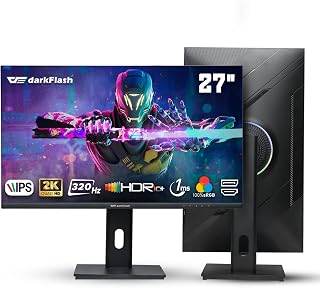
DarkFlash S275QT 27 Inch 2K(QHD) 320Hz 1MS Fast IPS Gaming
Why We Love It

DarkFlash G271QG-2 27 Inch 2K (QHD) 200Hz 1ms MPRT IPS
Why We Love It

GAMEON GOAE24QHD180IPS 24 Inch Gaming Monitor QHD 2K 180Hz
Why We Love It
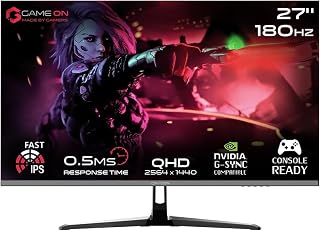
GAMEON GOPS27QHD180IPS 27 Inch Gaming Monitor QHD 2K 180Hz
Why We Love It

KOORUI 27" QHD IPS Gaming Monitor: Immerse in 95% DCI-P3
Why We Love It

Xiaomi 2K Gaming Monitor G27Qi
Why We Love It

GAMEON GOA27QHD180IPS Arctic Pro-Series 27" White Gaming
Why We Love It

27 inch QHD, 165Hz
Why We Love It
Quick Pick
10 Best Darkflash Gaming Monitor 2k Qhd Of 2026
Quick Pick
darkFlash S275QG 27 Inch 2K(QHD) 180Hz 1MS Fast IPS Gaming Monitor, HDR10+, 100% sRGB,1.07B Colors, Compatible with HDMI/DP, ARGB Backlight Esports Monitor for Gamers (27inch 180Hz 2KQHD)
darkFlash S275QR 27 Inch 2K(QHD) 240Hz 1MS Fast IPS Gaming Monitor, HDR10+, 100% sRGB,1.07B Colors, Compatible with HDMI/DP, ARGB Backlight Esports Monitor for Gamers (27inch 240Hz 2KQHD)
DarkFlash S275QT 27 Inch 2K(QHD) 320Hz 1MS Fast IPS Gaming Monitor, HDR10+, 100% sRGB,1.07B Colors,Compatible with HDMI 2.1, ARGB Backlight Computer Monitor for Gamers (27 Inch 320hz QHD)
DarkFlash G271QG-2 27 Inch 2K (QHD) 200Hz 1ms MPRT IPS Gaming Monitor, 99% sRGB, FreeSync & G-Sync Compatible, Ultra-Narrow Bezel, HDMI/DP, Low Blue Light Eye-Care Display (27 Inch 200hz 2K QHD)
GAMEON GOAE24QHD180IPS 24 Inch Gaming Monitor QHD 2K 180Hz Fast IPS Computer Monitor, 0.5ms MPRT, HDMI 2.1, HDR, 99% sRGB, G-Sync & FreeSync Compatible, Built-in Speakers, PS5 & Console Ready, Black
GAMEON GOPS27QHD180IPS 27 Inch Gaming Monitor QHD 2K 180Hz Fast IPS Computer Monitor, 0.5ms MPRT, HDMI 2.1, HDR, 99% sRGB, G-Sync & FreeSync Compatible, Built-in Speakers, PS5 & Console Ready, Black
KOORUI 27" QHD IPS Gaming Monitor: Immerse in 95% DCI-P3 Color | 200Hz, 1ms, 350 Nits, HDR400, FreeSync Premium,Tilt Adjustable,Black
Xiaomi 2K Gaming Monitor G27Qi, QHD 2560×1440, Fast IPS, 180Hz 1ms, AMD Freesync, 100% sRGB, 178 Viewing Angle, 2× HDMI2.0 DP 1.4×2, Black
GAMEON GOA27QHD180IPS Arctic Pro-Series 27" White Gaming Monitor, 2560x1440p 2K QHD, Fast IPS Panel, 180Hz, 0.3ms, HDMI 2.1, FreeSync & G-Sync, Crosshair Assistant, HDR, PS5, VRR Support
27 inch QHD, 165Hz, 0.5ms (2560x1440) 2K Flat IPS Gaming Monitor With G-Sync & FreeSync - (HDMI 2.1 Console Compatible) GOAEP27QHD165 Black
Buying Guide: Darkflash Gaming Monitor 2k Qhd
📋 Table of Contents
1What refresh rate should I look for in a Darkflash 2K gaming monitor?
Most Darkflash 2K models come with 144Hz or 165Hz refresh rates, which is solid for competitive gaming. If you're playing fast-paced shooters or competitive titles, 165Hz is worth the extra investment over 144Hz for smoother gameplay.
2Is a 2K monitor better than 1440p for gaming, or are they the same thing?
They're the same thing—2K and 1440p both refer to 2560×1440 resolution. This resolution sits between standard 1080p and 4K, offering sharper visuals than 1080p without the heavy GPU demands of 4K gaming.
3What panel type does Darkflash use, and does it matter for gaming?
Darkflash typically uses VA or IPS panels depending on the model—VA panels offer better contrast and deeper blacks, while IPS panels provide better color accuracy and viewing angles. For gaming, VA is generally preferred for the enhanced visual punch, though IPS works fine if color matters to you.
4How do I know if my graphics card can handle a 2K gaming monitor?
Check your GPU's capabilities against the games you play—an RTX 3070 or RX 6800 XT handles 2K gaming at high settings and 100+ fps, while older cards like RTX 2070 will need lower settings. If you're unsure, look at benchmark reviews for your specific card and game combinations.
5What size Darkflash 2K monitor should I buy—27 inches or smaller?
27 inches is the sweet spot for 2K gaming because pixels stay sharp and the screen fills your vision without requiring excessive head movement. Going smaller than 27 inches can make text and UI elements harder to read, while larger screens at 2K resolution may show visible pixelation.
How we choose
Our editors are people who genuinely love testing and writing about products. We compare each product's real-world usability and strengths, then distill what matters most into our own "Why We Love It" points — so you get an honest, at-a-glance sense of what counts before you buy.