10 Best Curved Monitor For Developer Of 2026
Curved Monitor For Developer — Reviews, Recommendations & Updated Buying Guide November 2026


Z-Edge 27 inch Curved Gaming Monitor 300Hz Monitor
Why We Love It


KOORUI 34 inch Gaming Monitor
Why We Love It

Z-Edge 34" Curved Ultrawide Gaming Monitor
Why We Love It

Xiaomi Mi Monitor G34WQI
Why We Love It

Z-Edge 34" UWQHD 165Hz 1ms Curved IPS Gaming Monitor
Why We Love It

Z-EDGE 24-inch Curved Gaming Monitor
Why We Love It
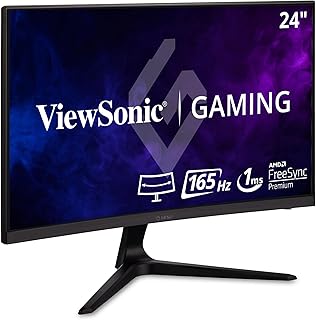
Viewsonic Omni VX2418C 24 Inch 1080p 1ms 165Hz Curved Gaming
Why We Love It

Xiaomi Monitor Curved G34WQi EU
Why We Love It

KOORUI 27 Inch Curved Gaming Monitor
Why We Love It

Z-EDGE 34inch Ultrawide Gaming Monitor
Why We Love It
Quick Pick
10 Best Curved Monitor For Developer Of 2026
Quick Pick
Z-Edge 27 inch Curved Gaming Monitor 300Hz Monitor, 1ms 16:9 FHD 1080P Frameless Curved Monitor, UG27S Freesync Eye Care, 2×Display Port, 2×HDMI
KOORUI 34 inch Gaming Monitor, 240Hz, Ultrawide UWQHD (3440x1440P), Curved 1500R, HDR400, PIP/PBP, 1ms MPRT, Adaptive Sync, Height Adjustable, DP,HDMI,PS5 G3441XC
Z-Edge 34" Curved Ultrawide Gaming Monitor, Max 240Hz,WQHD,VA LED, AG34P
Xiaomi Mi Monitor G34WQI, 34 Inch Curved Gaming Monitor, Black, EU ELA5454EU, QHD Ultra Wide 1440p
Z-Edge 34" UWQHD 165Hz 1ms Curved IPS Gaming Monitor, FreeSync, 1500R Curvature, UWQHD 3440 * 1440, 96% DCI-P3, 1.07 Colors, 300 cd/㎡, 21:9, Powerful Connections, 2000:1, UG34I-Black
Z-EDGE 24-inch Curved Gaming Monitor,200Hz,Frameless/FreeSync/HDR,FHD UG24 | MPRT 1ms/16.7 Million Colors/300cd/m²Brightness/LED/VESA/DP1.4 & HDMI2.1 Ports
Viewsonic Omni VX2418C 24 Inch 1080p 1ms 165Hz Curved Gaming Monitor with AMD FreeSync Premium, Eye Care, HDMI and DisplayPort
Xiaomi Monitor Curved G34WQi EU
KOORUI 27 Inch Curved Gaming Monitor,180Hz, VA Display, QHD 1440P Computer Monitor, 1ms, HDR10,90% DCI-P3, Adaptive Sync, VESA Compatible,Tilt Adjustable 27E6QCA
Z-EDGE 34inch Ultrawide Gaming Monitor, Curved,165Hz,WQHD 3440x1440,UG34 | FreeSync/1ms/VESA Compatible/PIP&PBP/VA/HDMI & DisplayPort /for Game,Office
Buying Guide: Curved Monitor For Developer
📋 Table of Contents
1What screen size and curvature is best for a developer?
Look for 27-32 inches with a 1800R curvature for immersive, wide-angle viewing without distortion. This range reduces eye strain during long coding sessions and provides a more natural field of view compared to flat monitors.
2What resolution should I prioritize for coding?
At least 1440p (QHD) or 4K UHD is ideal for developers, offering sharp text and more screen real estate for multiple windows. 4K is best with a high refresh rate (144Hz or higher) to maintain smooth performance on powerful GPUs.
3Does a high refresh rate matter for a developer monitor?
While not as critical as for gaming, a 144Hz or higher refresh rate improves responsiveness and reduces motion blur when scrolling or switching between apps. It’s especially useful if you multitask with video calls or animations.
4What kind of panel technology is best for developers?
IPS panels are preferred for accurate color reproduction and wide viewing angles, which is important for code readability and design work. Avoid TN panels, which have slower response times and less color accuracy.
5Are curved monitors worth the extra cost for developers?
Yes, if you spend long hours coding or need a more immersive setup. Curved monitors reduce the need to move your head between windows and can enhance focus. However, ensure the curvature is not too extreme to avoid distortion in the periphery.
How we choose
Our editors are people who genuinely love testing and writing about products. We compare each product's real-world usability and strengths, then distill what matters most into our own "Why We Love It" points — so you get an honest, at-a-glance sense of what counts before you buy.