10 Best Creality Printers Of 2026
Creality Printers — Reviews, Recommendations & Updated Buying Guide November 2026


Creality 3D Printer Hi Combo
Why We Love It


Creality Smart 3D Printer
Why We Love It

Creality 3D Printer
Why We Love It

Creality i7 3D Printer for Beginners – Auto Leveling
Why We Love It

Creality Ender 3V3 SE 3D Printer
Why We Love It

Creality K2 Combo (A) 3D Printer
Why We Love It

Creality K2 SE Combo 3D Printer
Why We Love It

Creality K1C 3D Printer
Why We Love It

Creality K2 Pro Combo (A) 3D Printer
Why We Love It
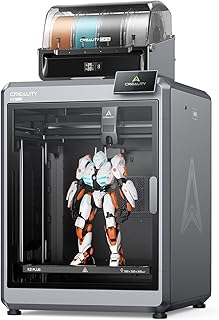
Creality K2 Plus Combo 3D Printer
Why We Love It
Quick Pick
10 Best Creality Printers Of 2026
Quick Pick
Creality 3D Printer Hi Combo, with CFS Support Up to 16 Colors Printing, 500mm/s High Speedy 3D Printer with Color Touch Screen, Auto Leveling, for Home and office, Print Size 260×260×300mm
Creality Smart 3D Printer, Support up to 16 Colors Printing, with 500mm/s High-Speed, New 3D Printer with Color Touch Screen, Full-auto Leveling, Silent, for Home and office, Print Size 26×26×30cm(Hi)
Creality 3D Printer, Professional 3D Printers with 600mm/s Max, AI Camera, Auto Leveling and Clog-Free Direct Extruder, Print Size 22×22×25cm, Support Carbon Fiber Filament High-Temp Print, K1C 2025
Creality i7 3D Printer for Beginners – Auto Leveling, AI Camera Monitoring, Automatic Filament Reload, Easy-to-Use High Speed, Perfect for Home Use
Creality Ender 3V3 SE 3D Printer, 250mm/s Print Speed FDM Auto Leveling 3D Printers, Sprite Direct Extruder with Filament Automatic Loading
Creality K2 Combo (A) 3D Printer, Multi Color 3D Printing with CFS 600mm/s, High-Speed Auto-Leveling, Creality 3D Printer, Build Volume 260 * 260 * 260mm
Creality K2 SE Combo 3D Printer, Support Multicolor Printing with CFS, 500mm/s High-Speed, Smart Auto Leveling, Solid Metal Build Frame, Fully Assembled, Next-Gen Extruder, 220×215×245mm Build Volume
Creality K1C 3D Printer, 600mm/s Fast Speed Auto Leveling 3D Printers | AI Camera, Support 300°C Printing, Switchable Silent Mode Reliable Carbon Fiber 3D Printing 220 * 220 * 250mm
Creality K2 Pro Combo (A) 3D Printer, Multi Color 3D Printing with CFS Dual Al Camera 600mm/s, High-Speed Auto-Leveling, Creality 3D Printer, Build Volume 300 * 300 * 300mm
Creality K2 Plus Combo 3D Printer, Multi Color Printing with New CFS, Max 600mm/s Printing Speed, Full-auto Leveling, Next-Gen Direct Drive Extruder, Dual Al Camera, Build Volume 350 * 350 * 350mm
Buying Guide: Creality Printers
📋 Table of Contents
1What's the difference between Creality Ender 3 and Ender 5 models?
The Ender 3 has a moving bed on the Z-axis and is more affordable and compact, while the Ender 5 uses a moving gantry design that's more stable during printing. The Ender 5 typically produces better quality prints for larger projects, but the Ender 3 is easier to maintain and modify.
2What build size do I need for my prints?
The standard Ender 3 offers 220x220x250mm, which suits most hobby prints and miniatures. If you regularly need larger parts, jump to the Ender 3 V3 or Ender 5 with bigger platforms, otherwise you'll just waste money and desk space.
3Is a Creality printer worth buying over cheaper alternatives?
Creality printers offer solid build quality, better customer support, and a massive online community with tutorials and upgrades. You'll spend more upfront than ultra-budget brands, but you'll waste less time troubleshooting and get better print reliability.
4What maintenance and setup should I expect with a Creality printer?
Plan 1-2 hours for initial assembly and calibration, then routine tasks like leveling the bed every few prints and occasional nozzle cleaning. Budget-friendly filament costs are offset by spending time on maintenance, so only buy if you're willing to learn the basics.
5Should I buy the latest Creality model or save money on older versions?
Newer models like the Ender 3 V3 have auto-leveling and faster print speeds, but older versions still produce quality prints and have cheaper spare parts available. Go with an older model if you're on a tight budget and don't mind manual setup—newer features justify the premium only if they solve your specific problems.
How we choose
Our editors are people who genuinely love testing and writing about products. We compare each product's real-world usability and strengths, then distill what matters most into our own "Why We Love It" points — so you get an honest, at-a-glance sense of what counts before you buy.