10 Best Cordless Mice Of 2026
Cordless Mice — Reviews, Recommendations & Updated Buying Guide November 2026


Logitech M171 Wireless Mouse for PC
Why We Love It


UGREEN Wireless Ergonomic Mouse
Why We Love It

TECKNET Wireless Mouse for Laptop
Why We Love It

TECKNET Wireless Mouse
Why We Love It

HP Wireless Mouse S1500 (Black)
Why We Love It
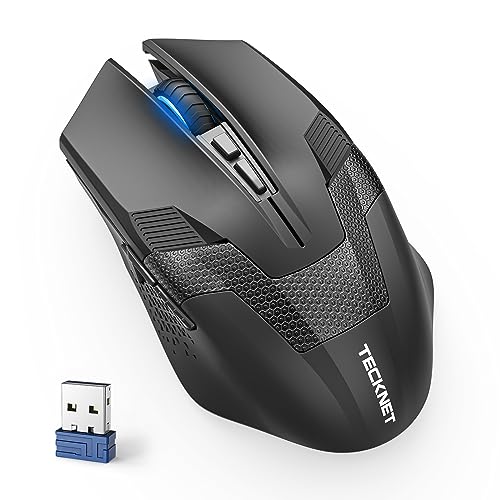
TECKNET Wireless Mouse-USB Ergonomic Optical Cordless Mouse
Why We Love It

Nabelisen Bluetooth Mouse
Why We Love It

Promate Wireless Mouse
Why We Love It

Logitech M185 Wireless Mouse
Why We Love It

SYOSI Wireless Mouse for Laptop Bluetooth Mouse for MacBook
Why We Love It
Quick Pick
10 Best Cordless Mice Of 2026
Quick Pick
Logitech M171 Wireless Mouse for PC, Mac, Laptop, 2.4 GHz with USB Mini Receiver, Optical Tracking, 12-Months Battery Life, Ambidextrous - Black
UGREEN Wireless Ergonomic Mouse, 2.4G USB, 1600 DPI Optical Tracking, Silent Mice, ≤40dB, 12-Month Battery Life for Laptop, MacBook, Chromebook
TECKNET Wireless Mouse for Laptop, 2.4G Silent Computer Mouse Quiet Click with 5 DPI Levels,Contoured Grip,Small Portable 30 Months Battery Cordless Mice for PC, Chromebook, Mac - Pink
TECKNET Wireless Mouse, 2.4G Quiet Computer Mouse with USB Receiver, 4 Buttons Portable Cordless Mice for Chromebook, Laptop, PC, Mac, 800/1200/1600 DPI - Blue
HP Wireless Mouse S1500 (Black)
TECKNET Wireless Mouse-USB Ergonomic Optical Cordless Mouse with 8 Buttons,12-Month Battery Life,4800 DPI Optical Tracking,High-Precision 5 Adjustable DPI for PC/Mac/Laptop, Black
Nabelisen Bluetooth Mouse,Rechargeable Wireless Mouse for MacBook Pro/MacBook Air,Bluetooth Wireless Mouse for Laptop/PC/Mac/iPad pro/Computer (black)
Promate Wireless Mouse, Ergonomic Silent Click Optical 2.4GHz Cordless Mice with Adjustable 2200DPI, 6 Programmable Buttons, USB Nano Receiver and 10m Working Distance for MacBook Air, Samit Black
Logitech M185 Wireless Mouse, 2.4GHz with USB Mini Receiver, 12-Month Battery Life, 1000 DPI Optical Tracking, Ambidextrous, Compatible with PC, Mac, Laptop - Grey
SYOSI Wireless Mouse for Laptop Bluetooth Mouse for MacBook Pro/Air/Mac/iPad/Chromebook/Computer Dual Mode Silent Cordless Mouse with USB C Adapter (White)
Buying Guide: Cordless Mice
📋 Table of Contents
1How long should the battery last between charges?
Most cordless mice offer 10–30 hours of use on a single charge, depending on usage intensity. Look for models with at least 15 hours for daily use, and consider a low-power mode if you need extended sessions without access to a charger.
2What sensor type gives the best performance?
Optical sensors are reliable for most surfaces, while laser or hybrid sensors offer better precision on reflective or uneven surfaces. For high-accuracy tasks like gaming or graphic design, a sensor with at least 1000 DPI is recommended, with 4000+ DPI for advanced users.
3Is a wired charging option better than a rechargeable battery?
Wired charging (via USB-C or micro-USB) is faster and more reliable than replaceable batteries, which can degrade over time. If you want long-term convenience, choose a model with a fast-charging USB-C port and a battery that lasts at least a day on a full charge.
4What size and weight are best for comfort?
A typical cordless mouse weighs 80–120g and fits comfortably in most hand sizes. For extended use, look for a contoured shape and a weight that feels balanced in your hand — too light can feel flimsy, while too heavy can cause fatigue over time.
5Are extra buttons or customizable features worth it?
Extra buttons are useful for productivity tasks like scrolling or switching apps, but they add complexity. If you're a casual user, a simple two-button design with a scroll wheel is sufficient. For power users, look for programmable buttons and software support for custom actions.
How we choose
Our editors are people who genuinely love testing and writing about products. We compare each product's real-world usability and strengths, then distill what matters most into our own "Why We Love It" points — so you get an honest, at-a-glance sense of what counts before you buy.