10 Best Cordless Left Handed Mouse Of 2026
Cordless Left Handed Mouse — Reviews, Recommendations & Updated Buying Guide November 2026


Left-Handed Mouse
Why We Love It


Perixx PERIMICE-713L, Left Handed Wireless Vertical Mouse
Why We Love It

Hama Ergonomic Left Handed Wireless Mouse
Why We Love It

Wireless Mouse Vertical Ergonomic Left Handed Mouse
Why We Love It

Logitech Lift Left Vertical Ergonomic Mouse
Why We Love It

AURTEC Left Handed Mouse
Why We Love It

Perixx PERIMICE-513L Left Handed Ergonomic Vertical Mouse
Why We Love It

Perixx PERIMICE-713LR
Why We Love It
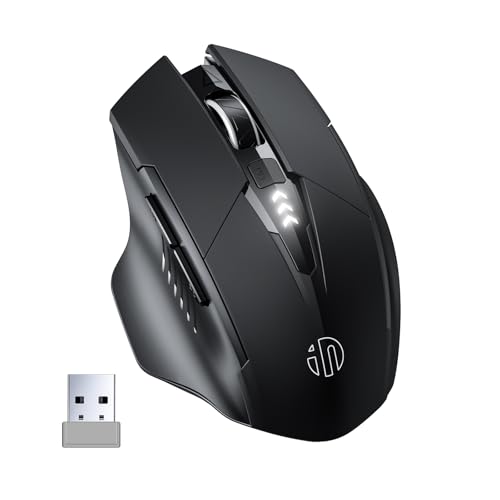
Wireless Mouse
Why We Love It

Hama Mini Wireless Mouse with No Click Noise
Why We Love It
Quick Pick
10 Best Cordless Left Handed Mouse Of 2026
Quick Pick
Left-Handed Mouse, Rechargeable 2.4G Wireless Ergonomic Vertical Mice with USB Receiver, 6 Buttons and 3 Adjustable DPI 800/1200/1600 for Laptop Computer PC Desktop (Left Hand)
perixx PERIMICE-713L, Left Handed Wireless Vertical Mouse, 6 Buttons Design, 3 Level DPI, Power Switch
Hama Ergonomic Left Handed Wireless Mouse, Black | Left-Handed Mouse without Cable, Radio Mouse, USB Receiver, 800-1600 DPI, 3 Buttons Including Browser Buttons, 2.4 GHz
Wireless Mouse Vertical Ergonomic Left Handed Mouse, Rechargeable 2.4G Wireless Vertical Mice USB Optical Mouse, 1600 DPI, 6 Buttons Cordless Left-Handed Mice for Office PC Laptop Computer Desktop Mac
Logitech Lift Left Vertical Ergonomic Mouse | Left-handed Wireless Bluetooth/Logi Bolt USB Mouse, Quiet clicks, 4 buttons, Win/macOS/iPadOS, Laptop/PC - Grey
AURTEC Left Handed Mouse, Rechargeable 2.4G Wireless Ergonomic Vertical Mice with USB Receiver, 6 Buttons and 3 Adjustable DPI 800/1200/1600 for Left Hand, Black
Perixx PERIMICE-513L Left Handed Ergonomic Vertical Mouse 1000/1600 DPI Recommended with RSI User
Perixx PERIMICE-713LR - Wireless Rechargeable Vertical Mouse for Left Handed Users - Dual Charging Function (Cable & Wireless) - 6 Buttons - Left Handed Design
Wireless Mouse, inphic Rechargeable Gaming Mouse with USB Nano Receiver for Notebook, PC, Laptop, Computer, MacBook (Black )
Hama Mini Wireless Mouse with No Click Noise, for Right Handed/Left Handed Users, 3 Buttons, 1600 DPI, 2.4 GHz Technology, Standby Mode, Ideal as Computer Mouse, Laptop Mouse, Black
Buying Guide: Cordless Left Handed Mouse
📋 Table of Contents
1What DPI range is best for a cordless left-handed mouse?
Look for a DPI range of 800-4000 for versatility across tasks. Lower DPI (800-1200) is ideal for precise tasks like graphic design, while higher DPI (2400-4000) suits gaming or fast scrolling. Adjustable DPI settings let you customize based on your workflow and surface type.
2How does battery life affect performance for a cordless left-handed mouse?
A battery life of 24-48 hours is standard for most models, but longer-lasting options (up to 72 hours) are worth considering for heavy use. Rechargeable batteries with quick-charge capabilities are practical, while disposable batteries add ongoing costs and environmental impact.
3What ergonomic features should I prioritize in a left-handed mouse?
Opt for a contoured, asymmetrical design that fits the natural curve of your left hand. Look for a thumb rest and a click area that aligns with your palm. Some models offer customizable button layouts, which can improve comfort and efficiency for left-handed users.
4Are wireless connectivity options important for a cordless left-handed mouse?
Yes — Bluetooth is common and reliable, while RF (radio frequency) offers lower latency and better range for gaming or high-precision tasks. Ensure the mouse is compatible with your device’s operating system, and check if it supports multi-device pairing for added convenience.
5What should I look for in a left-handed mouse for gaming or productivity?
For gaming, prioritize high DPI, low latency, and programmable buttons. For productivity, focus on comfort, customizable buttons, and a silent click mechanism. A lightweight build (under 100g) reduces hand fatigue, and a scroll wheel with tactile feedback improves precision for both uses.
How we choose
Our editors are people who genuinely love testing and writing about products. We compare each product's real-world usability and strengths, then distill what matters most into our own "Why We Love It" points — so you get an honest, at-a-glance sense of what counts before you buy.