10 Best Cordless Electronics Compressed Air Dusters Of 2026
Cordless Electronics Compressed Air Dusters — Reviews, Recommendations & Updated Buying Guide November 2026


Duster-3 Gear 100000 RPM Adjustable Electric Air Duster with
Why We Love It


CLEVAST Electric Air Duster
Why We Love It

Electric Air Duster, 120000 RPM Cordless Air Blower
Why We Love It

Compressed Air Duster
Why We Love It

Compressed air Duster, Keyboard Cleaner for Office
Why We Love It

Compressed Air Duster
Why We Love It

Electric Air Duster 130000RPM
Why We Love It

FT03 Compressed Air Duster
Why We Love It
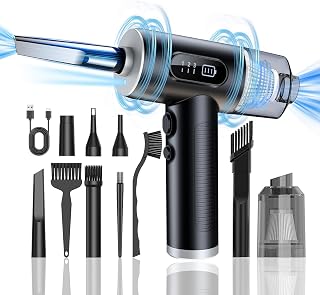
Nalacal Electric Compressed Air Duster & Vacuum 2 In 1
Why We Love It

SYOSI Air Duster
Why We Love It
Quick Pick
10 Best Cordless Electronics Compressed Air Dusters Of 2026
Quick Pick
Duster-3 Gear 100000 RPM Adjustable Electric Air Duster with LED Light, Rechargeable Cordless Air Blower for Keyboard and Electric Cleaning Devices Replaces Air Cans
CLEVAST Electric Air Duster, Cordless Compressed Air Blower, 130000 RPM, Stepless Speed, Rechargeable Cleaning Kit for PC, Keyboard, Car and Electronics
Electric Air Duster, 120000 RPM Cordless Air Blower, Compressed Air Duster | with 4 Nozzles and 10 Brushs, Mini Turbo Jet Blower with 4 Adjustable Speed Level Rechargeable for Keyboard, PC, Car Cleaning
Compressed Air Duster, 100000RPM Handheld Car Vacuum/Air Blower& Pump, 3 Gear Adjustable Electric Air Duster/Car Vacuum Cleaner, Keyboard Duster with LED Light-10 Kits Air Blower for Computer(Black)
Compressed air Duster - Keyboard Cleaner for Office - no Canned air Duster - Reusable - Good Replacement for Compressed Air Can - Electric air Duster 91000 RPM - Cordless Air Duster 7600 mAh
Compressed Air Duster, 130000rpm Super Power Cordless Air Duster, Fast Charging, Long Battery Life, Suitable For Computers, Keyboards, Home, Outdoor, Car Dusting, Electronic Equipment Cleaning
Electric Air Duster 130000RPM, Compressed Air Duster Cordless Rechargeable, 3-Speed Air Blower with 4 Nozzles, Keyboard Cleaner for PC Computer Electronics Car Cleaning
FT03 Compressed Air Duster, 1-100 Stepless Speed Adjustable | Electric Dust Blower, 110000RPM Brushless Motor, Cordless Jet Fan for Keyboard, PC, Car & Outdoor Cleaning, Black
Nalacal Electric Compressed Air Duster & Vacuum 2 In 1, Cordless For Electronics Computers Pc Keyboard Handheld Cleaner - Computer/Keyboard, Car,
SYOSI Air Duster, Compressed Electric Air Duster Cleaner for PC, Rechargeable 6000mAH Cordless Air Cleaner Blower for Laptop, Keyboard, Electronics, Home Cleaning, Alternative to Canned Air Duster
Buying Guide: Cordless Electronics Compressed Air Dusters
📋 Table of Contents
1What air pressure (PSI) range is best for electronics cleaning?
Look for models with 10-20 PSI for safe, effective dust removal without damaging sensitive components. Higher pressure can risk blowing debris into hard-to-reach areas or dislodging parts, while lower pressure may not clear stubborn dust effectively.
2How does cordless design affect runtime and performance?
Cordless dusters typically offer 10-30 minutes of runtime on a full charge, depending on battery capacity. Higher-capacity lithium-ion batteries provide longer use, but runtime decreases with higher pressure settings or continuous use, so balance power and portability based on your cleaning needs.
3What nozzle types are most useful for electronics cleaning?
A narrow, precision nozzle is essential for targeting small crevices and delicate circuitry, while a wide fan nozzle helps clear larger areas quickly. Some models include a brush attachment for scrubbing dust from fans or heatsinks, which is especially useful for regular maintenance.
4Is a HEPA filter necessary for a compressed air duster?
A HEPA filter is not standard in compressed air dusters, but some models include a dust collection chamber to trap particles. This is helpful for preventing dust from being blown back into the air, especially in cleanroom or sensitive environments where airborne particles are a concern.
5What are common mistakes to avoid when using a cordless compressed air duster?
Avoid using the duster upside down, as this can cause liquid from the canister to escape and damage electronics. Also, never use it on hot components, as sudden cooling can cause condensation and short circuits. Always hold the canister upright and use short bursts for best results.
How we choose
Our editors are people who genuinely love testing and writing about products. We compare each product's real-world usability and strengths, then distill what matters most into our own "Why We Love It" points — so you get an honest, at-a-glance sense of what counts before you buy.