10 Best Cooling Laptop Accessories Of 2026
Cooling Laptop Accessories — Reviews, Recommendations & Updated Buying Guide November 2026


TopMate C11 Laptop Cooling Pad RGB Gaming Notebook Cooler
Why We Love It


WEETOTUNG Laptop Cooling Pad Stand for Gaming
Why We Love It

Adjustable Laptop Stand
Why We Love It

TopMate C5 Laptop Cooling Pad Gaming Notebook Cooler
Why We Love It

Hagibis Laptop Cooling Pad Ergonomic Laptop Stand Small
Why We Love It

Laptop Stand for Desk
Why We Love It
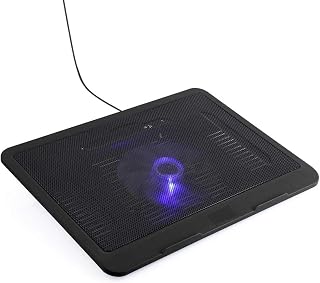
Cusco GOTOTOP Laptop Cooler
Why We Love It

Promate Gaming Laptop Cooling Pad
Why We Love It

2-in-1 Laptop Cooling Stand with Adjustable Speeds
Why We Love It

Necomi Laptop Cooling Pad
Why We Love It
Quick Pick
10 Best Cooling Laptop Accessories Of 2026
Quick Pick
TopMate C11 Laptop Cooling Pad RGB Gaming Notebook Cooler, Laptop Fan Stand | Adjustable Height with 6 Quiet Fans and Phone Holder, Computer Chill Mat, for 15.6-17.3 Inch Laptops - Blue LED Light
WEETOTUNG Laptop Cooling Pad Stand for Gaming - Quiet Fan Height Adjustable Stand with USB Interfaces Charging and Cooler Power Charging Port - Turbofan for Gaming Notebook and Office Laptops
Adjustable Laptop Stand, Portable Aluminium Laptop Riser Laptop Holder for Desk, Foldable Ventilated Cooling Computer Support Stand for Apple MacBook Pro/Air, HP, Sony, Dell
TopMate C5 Laptop Cooling Pad Gaming Notebook Cooler, Laptop Fan Cooling Stand Adjustable Height with 5 Quiet Fans Blue LED Light, Computer Chill Mat with LCD Controller, for 10-15.6 Inch Laptops
Hagibis Laptop Cooling Pad Ergonomic Laptop Stand Small Invisible Portable Magnetic Foot Heat Pad for MacBook Pro Computer (Grey) | Improves air circulation for cooling. Non-slip silicone protects against scratches and slipping. Lightweight and portable
Laptop Stand for Desk, Adjustable Laptop Foldable Portable Laptop Holder, Ventilated Cooling Notebook Stand for MacBook Pro Air, Lenovo, Dell, HP, Laptops,Tablet Silver
Cusco GOTOTOP Laptop Cooler, Laptop Cooler Cooling Pad Base Big Fan USB Stand for 14" or Below Notebook(black)
Promate Gaming Laptop Cooling Pad, Ergonomic High-Speed with 4 Silent Cooling Fan, Adjustable Height, LED Speed Display, Cable Organizer and Anti-Slip Grip for Laptops up to 17 Inch, AirBase-3 Black
2-in-1 Laptop Cooling Stand with Adjustable Speeds, 6 Quiet Fans for Fast Cooling, Built-in Stand Feature, Height Adjustment in 6 Levels - USB Powered, Compatible with Notebooks Up to 18 Inches
Necomi Laptop Cooling Pad, Laptop Cooler Stand with 6 Quiet Cooling Fans and 6 Height Adjustable Dual USB Powered Gaming Laptop Cooling Stand for 12-17 Inch Laptop Computer
Buying Guide: Cooling Laptop Accessories
📋 Table of Contents
1How many fans do I need in a cooling laptop stand?
A single fan is sufficient for light use or thin laptops, but dual or triple-fan stands offer better airflow for high-performance or gaming laptops. More fans typically mean better heat dissipation, especially for models with powerful CPUs or GPUs that run hot.
2Does the material of the cooling pad matter for performance?
Yes — aluminum or steel bases conduct and disperse heat more effectively than plastic. Look for a metal base with a mesh or vented design to maximize airflow and prevent dust buildup, which can reduce cooling efficiency over time.
3What size cooling pad should I choose for my laptop?
Measure your laptop’s dimensions and choose a pad that extends at least 1-2 inches beyond the sides and back for proper airflow. A larger surface area allows for better ventilation and ensures the fans can circulate air around the entire device, not just under it.
4Is USB-powered or plug-in cooling better for my laptop?
USB-powered pads are convenient and portable but may not provide as much airflow as plug-in models. If your laptop is plugged in most of the time, a plug-in cooling pad with a dedicated power source can deliver stronger, more consistent cooling without draining your laptop’s battery.
5Are cooling laptop accessories worth it for ultrabooks or MacBooks?
Yes, especially during intensive tasks like video editing or gaming. While ultrabooks and MacBooks are designed to run cooler, they can still overheat under load. A cooling pad or stand can help maintain performance and prolong the lifespan of your device by preventing thermal throttling and component wear.
How we choose
Our editors are people who genuinely love testing and writing about products. We compare each product's real-world usability and strengths, then distill what matters most into our own "Why We Love It" points — so you get an honest, at-a-glance sense of what counts before you buy.