10 Best Cooling Fan Laptop Accessories Of 2026
Cooling Fan Laptop Accessories — Reviews, Recommendations & Updated Buying Guide November 2026


TopMate C11 Laptop Cooling Pad RGB Gaming Notebook Cooler
Why We Love It


Necomi Laptop Cooling Pad
Why We Love It

WEETOTUNG Laptop Cooling Pad Stand for Gaming
Why We Love It

TopMate C5 Laptop Cooling Pad Gaming Notebook Cooler
Why We Love It
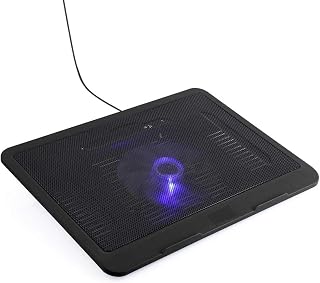
Cusco GOTOTOP Laptop Cooler
Why We Love It

CoolCold Ice Magic 3 Mini Laptop Cooling Fan USB Plug
Why We Love It

Laptop Cooling Pad
Why We Love It

Laptop Cooling Fan
Why We Love It

Laptop Cooling Pad
Why We Love It

PC Cooling Fan
Why We Love It
Quick Pick
10 Best Cooling Fan Laptop Accessories Of 2026
Quick Pick
TopMate C11 Laptop Cooling Pad RGB Gaming Notebook Cooler, Laptop Fan Stand | Adjustable Height with 6 Quiet Fans and Phone Holder, Computer Chill Mat, for 15.6-17.3 Inch Laptops - Blue LED Light
Necomi Laptop Cooling Pad, Laptop Cooler Stand with 6 Quiet Cooling Fans and 6 Height Adjustable Dual USB Powered Gaming Laptop Cooling Stand for 12-17 Inch Laptop Computer
WEETOTUNG Laptop Cooling Pad Stand for Gaming - Quiet Fan Height Adjustable Stand with USB Interfaces Charging and Cooler Power Charging Port - Turbofan for Gaming Notebook and Office Laptops
TopMate C5 Laptop Cooling Pad Gaming Notebook Cooler, Laptop Fan Cooling Stand Adjustable Height with 5 Quiet Fans Blue LED Light, Computer Chill Mat with LCD Controller, for 10-15.6 Inch Laptops
Cusco GOTOTOP Laptop Cooler, Laptop Cooler Cooling Pad Base Big Fan USB Stand for 14" or Below Notebook(black)
CoolCold Ice Magic 3 Mini Laptop Cooling Fan USB Plug Exhaust Fan Speed Adjustable Notebook cooler Lighted
Laptop Cooling Pad, RGB Laptop Cooler Stand with 8 Quiet Fans | Gaming Notebook Cooler for 12-17in Laptops, Dual USB 7 Height Adjustable Computer Chill Mat with LED Light Lap Desk PC Cooler
Laptop Cooling Fan, Internal CPU Cooler Replacement 4Pin Power for 15R 5521 3521
Laptop Cooling Pad, Necomi Laptop Cooler Stand with 8 Quiet Cooling Fans and 8 Height Adjustable Dual USB Powered Gaming Laptop Cooling Stand for 12-17 Inch Laptop Computer
PC Cooling Fan, Aluminum Alloy 4Pin DC 5V Strong Heat Dissipation Laptop Computer Cooler Fan for Gaming Laptops
Buying Guide: Cooling Fan Laptop Accessories
📋 Table of Contents
1What CFM rating do I need for my laptop cooling fan?
Look for at least 30–50 CFM (cubic feet per minute) for most laptops to ensure adequate airflow. Higher-end models with 60+ CFM are better for gaming or high-performance laptops that generate more heat during extended use.
2Should I choose a USB-powered or plug-in cooling pad?
USB-powered pads are more portable and work with most laptops, but may not deliver as strong airflow as plug-in models. Plug-in versions offer more power and better cooling for heavy workloads, but are less convenient for travel.
3How many fans are better: one large or multiple smaller ones?
A single large fan (120–140mm) is quieter and more efficient for general use. Multiple smaller fans (80–100mm) can offer better airflow coverage and faster cooling, but may be noisier and more complex to maintain.
4What materials should I look for in a cooling fan pad?
Aluminum or steel bases conduct heat away more effectively than plastic. A rubberized or non-slip surface keeps your laptop stable, while breathable mesh panels help with airflow and prevent dust buildup inside the fan.
5Are adjustable fan speeds worth it?
Yes — adjustable speeds let you balance noise and cooling based on your laptop’s workload. Look for models with 2–3 speed settings or automatic temperature-based control for optimal performance and quiet operation when idle.
How we choose
Our editors are people who genuinely love testing and writing about products. We compare each product's real-world usability and strengths, then distill what matters most into our own "Why We Love It" points — so you get an honest, at-a-glance sense of what counts before you buy.