10 Best Computer Microphones With Arm Stand Of 2026
Computer Microphones With Arm Stand — Reviews, Recommendations & Updated Buying Guide November 2026


FIFINE AmpliGame AM8TW Gaming XLR/USB Microphone Kit
Why We Love It


FIFINE AmpliGame A6T Gaming PC USB Microphone Kit for
Why We Love It

FIFINE T669 Studio Condenser USB Microphone for Recording
Why We Love It

TONOR Microphone Boom Arm
Why We Love It

FIFINE BM88W White Microphone Boom Arm Stand
Why We Love It
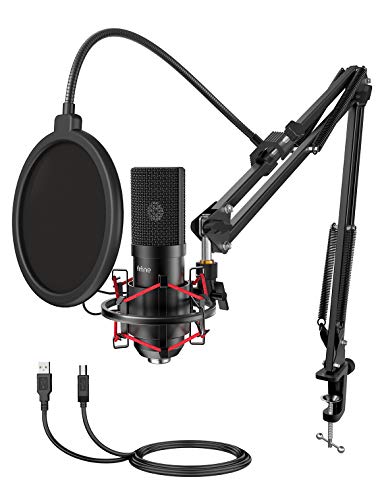
FIFINE USB Microphone Set with Flexible Boom Arm Stand Pop
Why We Love It

7RYMS USB-Microphone Condenser Gaming-Mic
Why We Love It

InnoGear Gaming Mic USB Computer Microphone for PC Boom Arm
Why We Love It

FIFINE CS1 Microphone Scissor Boom Arm Stand
Why We Love It

RØDE PSA1+ Microphone Studio Arm
Why We Love It
Quick Pick
10 Best Computer Microphones With Arm Stand Of 2026
Quick Pick
FIFINE AmpliGame AM8TW Gaming XLR/USB Microphone Kit Streaming Dynamic Mic | Computer Mic with Controllable RGB, Headphones Jack, Gain Knob, Arm Stand, for Vocal Podcast Recording Voiceover, White
FIFINE AmpliGame A6T Gaming PC USB Microphone Kit for Streaming,Podcasting | Condenser Mic with Boom Arm, Pop Filter, Mute Button for Twitch, Online Chat, RGB Computer Mic for PS4/5 PC Gamer Youtuber
FIFINE T669 Studio Condenser USB Microphone for Recording Podcasting | Computer Microphone Kit for Voice Overs, Adjustable Boom Arm Stand, Shock Mount for Vocal, Instruments, Gaming, Streaming
TONOR Microphone Boom Arm, Premium Low Profile Mic Arm Mic Stand for Gaming Podcasting Streaming Recording, Fully Adjustable 360° Rotatable 90° Foldable T20LP
FIFINE BM88W White Microphone Boom Arm Stand | Low Profile Scissor Suspension Stand with Desk Mount, Cable Channels Management. Metal Arm for Recording, Streaming, Gaming
FIFINE USB Microphone Set with Flexible Boom Arm Stand Pop Filter, Plug and Play with PC Desktop Laptop Computer, Streaming Podcast Instrument Mic Kit for Home Studio (T732)
7RYMS USB-Microphone Condenser Gaming-Mic, 192kHz/24bit Tape to Mute Microphone for PC with Boom Arm, Pop Filter, for Streaming Podcast Recording ASMR, for Computer, Phone, PS4/PS5 (SR-AU01-K1)
InnoGear Gaming Mic USB Computer Microphone for PC Boom Arm Stand, Black | Noise Cancellation, Adjustable Boom Arm, One-Touch Mute, Flexible Angle, 4 RGB Modes, Work with PS4/PS5, Wide Frequency Range
FIFINE CS1 Microphone Scissor Boom Arm Stand | Suspension Scissor Boom Arm with Metal Build, 3/8" to 5/8" Adapter, Desk Clamp. for Recording, Streaming, Podcast.
RØDE PSA1+ Microphone Studio Arm, Aluminum, Spring Damping, Black
Buying Guide: Computer Microphones With Arm Stand
📋 Table of Contents
1What microphone type is best for a computer setup with an arm stand?
Condenser mics are ideal for home use with arm stands, offering clear, detailed audio for voice chat, streaming, or podcasting. Dynamic mics are better for louder environments or vocalists, but they’re less sensitive and may not capture nuance as well.
2How much adjustability should the arm stand have?
Look for a stand with 360-degree rotation, height adjustment (at least 10–15 cm range), and a flexible gooseneck for precise positioning. This ensures you can angle the mic directly at your mouth for optimal sound capture.
3What pickup pattern is most useful for everyday use?
A cardioid (heart-shaped) pickup pattern is best for most users, as it focuses on sound from the front and reduces background noise. Omnidirectional mics pick up sound from all directions and are less ideal for noisy environments.
4Do I need a USB or XLR microphone for my setup?
USB mics are plug-and-play and work directly with computers, making them easier for casual use. XLR mics require an audio interface but offer higher audio quality and are better for professional setups or advanced users.
5What accessories are worth including with a computer mic and arm stand?
A pop filter reduces plosive sounds like 'p' and 'b' for cleaner audio, while a shock mount minimizes handling noise. A padded mic cover or windscreen is also helpful if you use the mic in a drafty or noisy room.
How we choose
Our editors are people who genuinely love testing and writing about products. We compare each product's real-world usability and strengths, then distill what matters most into our own "Why We Love It" points — so you get an honest, at-a-glance sense of what counts before you buy.