10 Best Computer Mice Of 2026
Computer Mice — Reviews, Recommendations & Updated Buying Guide November 2026


Logitech M171 Wireless Mouse for PC
Why We Love It


Logitech MX Master 4
Why We Love It

Logitech Lift Vertical Ergonomic Mouse
Why We Love It

Lenovo 150 wireless mouse
Why We Love It

Logitech M330 SILENT PLUS Wireless Mouse
Why We Love It

ATTACK SHARK X11 Gaming Mouse with Magnetic Charging Dock
Why We Love It
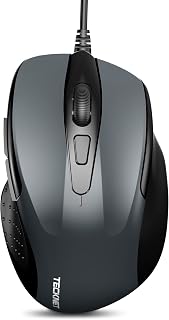
TECKNET USB Wired Mouse
Why We Love It

UGREEN Wireless Ergonomic Vertical Mouse
Why We Love It

UGREEN Rechargeable Wireless Mouse
Why We Love It

Logitech Signature M650 Wireless Mouse
Why We Love It
Quick Pick
10 Best Computer Mice Of 2026
Quick Pick
Logitech M171 Wireless Mouse for PC, Mac, Laptop, 2.4 GHz with USB Mini Receiver, Optical Tracking, 12-Months Battery Life, Ambidextrous - Black
Logitech MX Master 4, Ergonomic Wireless Mouse with Advanced Performance Haptic Feedback, Ultra-Fast Scrolling, USB-C Charging, Bluetooth, Windows, MacOS - Graphite
Logitech Lift Vertical Ergonomic Mouse, Wireless, Bluetooth or Logi Bolt USB Receiver, Quiet clicks, 4 Buttons, Compatible with Windows/macOS/iPadOS, Laptop, PC-Graphite | Wireless, Bluetooth or Logi Bolt, Silent clicks, 4 buttons, Windows/macOS/iPadOS, Laptop, PC - Grey
Lenovo 150 wireless mouse | 2.4G via USB-A Dongle | LED Optical Sensor | 1000 DPI | Black - [GY51L52638]
Logitech M330 SILENT PLUS Wireless Mouse, 2.4GHz with USB Nano Receiver, 1000 DPI Optical Tracking, 2-year Battery Life, Compatible with PC, Mac, Laptop, Chromebook - Black | 2.4GHz with USB Nano Receiver, 1000 DPI, 2-year Battery Life, PC/Mac/Laptop/Chromebook - Black
ATTACK SHARK X11 Gaming Mouse with Magnetic Charging Dock, PixArt PAW3311 Gaming Sensor, BT/2.4G Wireless/Wired Gaming Mouse, 22000 DPI, Office Mice Gamer Mice for Win11/Xbox/PS/Mac (White)
TECKNET USB Wired Mouse, 6400 DPI Mice 4 Adjustable DPI with 6-Button Corded, Optical Computer Mouse with Ergonomic Design for Laptop, Chromebook, PC, Desktop, Mac, Notebook-gray-black
UGREEN Wireless Ergonomic Vertical Mouse, 12-Month Battery Life, 6 Buttons | 57° Ergonomic Angle, 4000DPI Optical Tracking, 4 Adjustable DPI Levels Wireless Silent Mouse for Laptop, Desktop, Macbook
UGREEN Rechargeable Wireless Mouse, Bluetooth5.4 and 2.4GHz, Long Battery Life, Ergonomic Silent Mouse, 6 Buttons with 5 Adjustable 4000 DPI, Compatible with Laptop PC Mac Computer Chromebook MacBook | Long Life Battery Design, Ergonomic, Quiet Click, 4000 DPI for PC Laptop Windows macOS Linux
Logitech Signature M650 Wireless Mouse, Graphite
Buying Guide: Computer Mice
📋 Table of Contents
1What's the difference between wired and wireless mice?
Wired mice plug directly into your computer and never need charging, making them reliable for long gaming sessions or intensive work. Wireless mice offer more freedom to move around but require regular battery changes or charging, so choose based on whether convenience or uninterrupted use matters more to you.
2How do I know what DPI sensitivity is right for me?
DPI (dots per inch) controls cursor speed—lower DPI (400-800) suits office work and precision tasks, while higher DPI (3200+) works better for gaming and fast-paced movements. Most modern mice let you adjust DPI on the fly, so you don't need to pick one setting permanently.
3Should I buy an ergonomic mouse?
If you use your computer for several hours daily, an ergonomic mouse reduces wrist strain and fatigue by supporting your hand naturally. Standard mice work fine for light use, but spending more on ergonomics is worthwhile if you experience hand pain or spend extended time at your desk.
4What's the difference between optical and laser mice?
Optical mice use LED sensors and work well on most surfaces at mid-range speeds, while laser mice are more sensitive and track better on glossy or unusual surfaces. For everyday use, optical mice are reliable and sufficient; laser sensors matter more if you need precision or use non-standard mouse pads.
5How many buttons and programmable features do I actually need?
For basic tasks, the standard left-click, right-click, and scroll wheel are enough. If you use design software, video editing, or competitive gaming, extra programmable buttons save time and boost efficiency—check what your software supports before paying for unused buttons.
How we choose
Our editors are people who genuinely love testing and writing about products. We compare each product's real-world usability and strengths, then distill what matters most into our own "Why We Love It" points — so you get an honest, at-a-glance sense of what counts before you buy.