10 Best Colour Poster Printer Of 2026
Colour Poster Printer — Reviews, Recommendations & Updated Buying Guide November 2026


NAVIGATOR Nuco Colour Documents - A4 Colour Printer Paper
Why We Love It


Dolphin A4 Coloured Paper 80 GSM
Why We Love It

ZilSquare™ Colored Paper 100 Sheets
Why We Love It
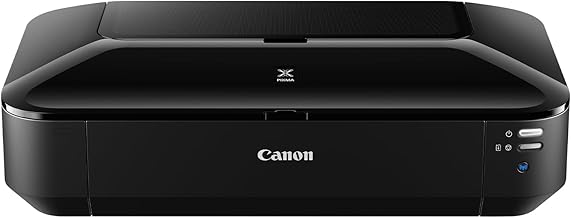
Canon PIXMA IX6850 A3+ Inkjet Printer
Why We Love It

PREMIFY A4 Colored Paper Pack (100 Sheets)
Why We Love It

Phomemo M08F Portable Printer A4 Wireless for Photo
Why We Love It

KODAK Step Instant Smartphone Photo Printer
Why We Love It

NAVIGATOR Nuco Office Card- A4 Colour Printer Paper
Why We Love It

Brother Wireless All In One Ink Tank Printer
Why We Love It

Brother Wireless All In One Ink Tank Printer
Why We Love It
Quick Pick
10 Best Colour Poster Printer Of 2026
Quick Pick
NAVIGATOR Nuco Colour Documents - A4 Colour Printer Paper, White, 120GSM, 250 Sheets
Dolphin A4 Coloured Paper 80 GSM, 100 Sheets, 10 Assorted Colours, Printer Paper for Arts & Crafts, Origami, Card Making, Scrapbooking, School & Office
zilSquare™ Colored Paper 100 Sheets, 180 GSM A4 Cardstock Thick Construction Coloured Paper for Printing, Arts, Crafts, Cardboard, Scrapbooking and School Activities, ورق مقوى a4
Canon PIXMA IX6850 A3+ Inkjet Printer, Borderless Photo & Office | A3+ borderless design and creative printing; wireless AirPrint, Canon PRINT app, 5 individual inks for vivid colour
PREMIFY A4 Colored Paper Pack (100 Sheets) – 80 GSM Double Sided Pastel & Bright Art Paper – Compatible with Laser & Inkjet Printers – Ideal for Origami, Card Making, Office & Kids Crafts
Phomemo M08F Portable Printer A4 Wireless for Photo, Tattoo, Bluetooth Mobile Printer Inkless Thermal Printer Supports A4 Size Compatible with Android and iOS Phone & PC for Business School Office
KODAK Step Instant Smartphone Photo Printer, Portable Mini Color Wireless Mobile Printer, Zink 2x3” (5.1x7.5 cm) Sticky-Back Photos, Bluetooth Compatible with iOS & Android Devices, Editing App, White
NAVIGATOR Nuco Office Card- A4 Colour Printer Paper - Multi-Purpose Photocopier White 160gsm 250 Sheets
Brother Wireless All In One Ink Tank Printer, MFC-T920DW, Automatic 2 Sided Features, Mobile & Cloud Print And Scan, Network Connectivity, High Yield Ink Bottles
Brother Wireless All In One Ink Tank Printer, DCP-T520W, Mobile & Cloud Print And Scan, High Yield Bottles
Buying Guide: Colour Poster Printer
📋 Table of Contents
1What print resolution should I look for in a colour poster printer?
A minimum of 300 dpi is essential for sharp, professional-quality prints. Higher resolutions like 600 dpi or more are ideal for large-format posters to avoid pixelation. Always check that the printer supports photo-quality ink for vibrant, fade-resistant colours.
2What paper sizes and thicknesses are compatible with colour poster printers?
Most colour poster printers handle standard sizes like A3, A2, and even A1, with some models supporting up to A0. Look for printers that accommodate paper thicknesses between 180gsm to 300gsm for durability, especially for outdoor or high-traffic displays.
3Should I choose a printer with pigment-based or dye-based inks?
Pigment-based inks are more fade-resistant and water-resistant, making them better for long-term displays or outdoor use. Dye-based inks offer richer colours but are more prone to fading. Choose pigment inks if your posters will be exposed to light or moisture.
4What’s the difference between inkjet and laser colour poster printers?
Inkjet printers produce higher quality, photo-realistic images with vibrant colours, making them ideal for posters. Laser printers are faster and better for text-heavy or high-volume printing but lack the same level of colour depth and detail for visual art or photography.
5Are there any common mistakes to avoid when buying a colour poster printer?
Avoid models with low ink capacity that require frequent refills, as this increases long-term costs. Also, ensure the printer has a large enough paper tray or roll feed for continuous printing, and check if it supports wireless connectivity for easier file transfers from your computer or phone.
How we choose
Our editors are people who genuinely love testing and writing about products. We compare each product's real-world usability and strengths, then distill what matters most into our own "Why We Love It" points — so you get an honest, at-a-glance sense of what counts before you buy.