10 Best Carlinkit Android Streaming Device Of 2026
Carlinkit Android Streaming Device — Reviews, Recommendations & Updated Buying Guide November 2026


Carlinkit Android 13 Ai Box LED Version
Why We Love It


Carlinkit Tbox Plus Android 13 CarPlay AI Box
Why We Love It

Carlinkit Adapter for Aftermarket Android Head Unit- CCPA
Why We Love It

Carlinkit Android 13 Ai Box 8+128GB Qualcomm 6125 Ultra
Why We Love It

Carlinkit Latest Ai Box LED
Why We Love It

Carlinkit CarPlay AI Box Android 13 4+64GB Pro Built-in GPS
Why We Love It
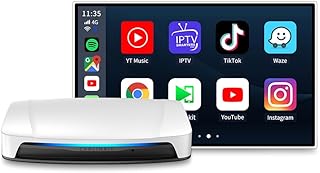
Carlinkit Carplay Android Ai Box 8GB 128GB Qualcomm HDMI
Why We Love It

Carlinkit Tbox Lite S Wireless CarPlay Android Auto HDMI Ai
Why We Love It

Carlinkit Android 13 Ai Box Wireless CarPlay Adapter 4+64GB
Why We Love It

Carlinkit Android 13 Wireless CarPlay Android Auto Adapter
Why We Love It
Quick Pick
10 Best Carlinkit Android Streaming Device Of 2026
Quick Pick
Carlinkit Android 13 Ai Box LED Version, Qualcomm 8 Cores, 8+128GB, 3-in-1 Adapter with 4G Cellular, Streaming Video, SIM/TF Card, Built-in Google Play, Only Suitable for Factory Wired CarPlay Cars
Carlinkit Tbox Plus Android 13 CarPlay AI Box, 8GB+128GB | Built-in 4G LTE & GPS, Open Android 13.0 for Video/Music/Apps, Wireless CarPlay & Android Auto Adapter, SIM/TF Slot
Carlinkit Adapter for Aftermarket Android Head Unit- CCPA CarPlay & Android Auto 2-in-1 Dongle- Support Mirrorlink/Voice Control/Steering Wheel Control- Only Fit for Android Car Radio | AutoKit APK installation, wired screen mirroring, Siri Google Assistant voice control, steering wheel button mapping
Carlinkit Android 13 Ai Box 8+128GB Qualcomm 6125 Ultra Wireless Adapter | Android 13 system for car screen, 8GB RAM 128GB ROM, 4G SIM and TF slots, 2 in 1 wireless carplay and android auto
Carlinkit Latest Ai Box LED, Android 13, Qualcomm 6225, 8GB+128GB, Wireless CarPlay Android Auto 3-in-1 Dongle comes with Google Play Store, Streaming Video, Only for the Vehicle with Wired CarPlay
Carlinkit CarPlay AI Box Android 13 4+64GB Pro Built-in GPS & Glonass | Qualcomm octa-core CPU, integrated 4G LTE cellular SIM, dual Bluetooth, GPS navigation, TF card slot, Carplay ai box
Carlinkit Carplay Android Ai Box 8GB 128GB Qualcomm HDMI Wireless Adapter | Android 13 system for car screen, HDMI cinema video output, 8GB RAM 128GB ROM, Qualcomm octa core processor, SIM and TF slots
Carlinkit Tbox Lite S Wireless CarPlay Android Auto HDMI Ai Box Adapter | Multimedia AI box, HDMI Netflix YouTube streaming, 4+32GB GMS dual Bluetooth, in-car entertainment system, 1 pack
Carlinkit Android 13 Ai Box Wireless CarPlay Adapter 4+64GB Tbox | Qualcomm octa core processor, Tbox multimedia video receiver, SIM and TF card slots, Bluetooth game controller support
Carlinkit Android 13 Wireless CarPlay Android Auto Adapter LED Tbox S2 | 8-core CarPlay AI box, ambient LED smart shell, 4GB 64GB storage, GPS Netflix YouTube video streaming
Buying Guide: Carlinkit Android Streaming Device
📋 Table of Contents
1Will Carlinkit work with my car's existing infotainment system?
Carlinkit connects via your car's USB port and mirrors to the existing display, so it works with most vehicles that have Android Auto or Apple CarPlay capability. Check your car's manual to confirm it has a compatible USB port and supported infotainment system before buying.
2What's the difference between wired and wireless Carlinkit models?
Wired models connect directly via USB and offer more stable connections with no latency, while wireless versions use WiFi or Bluetooth for convenience but may have occasional lag or dropouts. Choose wired if you want reliability for navigation and calls, or wireless if you prioritize convenience and don't mind occasional connectivity hiccups.
3Do I need a specific Android version for Carlinkit to work?
Carlinkit works with most Android phones running 5.0 and above, though newer devices tend to have better compatibility and faster performance. Check the product listing for your specific phone model to avoid compatibility issues.
4What specs should I compare between different Carlinkit models?
Focus on processor speed, RAM (which affects responsiveness), connection type (wired vs wireless), and whether it supports both Android and iOS. Higher specs mean smoother app performance and faster app loading, which matters if you use navigation apps heavily or run multiple apps simultaneously.
5Is the installation process difficult, and will I need professional help?
Installation is straightforward—it's just connecting a USB cable to your car's port, though you may need to enable developer mode on your phone first. Most people can handle it themselves in 10 minutes, but ask the seller for installation support options if you're uncomfortable with tech setup.
How we choose
Our editors are people who genuinely love testing and writing about products. We compare each product's real-world usability and strengths, then distill what matters most into our own "Why We Love It" points — so you get an honest, at-a-glance sense of what counts before you buy.