10 Best Business Touchscreen Laptop With Pen Of 2026
Business Touchscreen Laptop With Pen — Reviews, Recommendations & Updated Buying Guide November 2026


Samsung 12.2" FHD 2-in-1 Touchscreen Chromebook Plus Laptop
Why We Love It

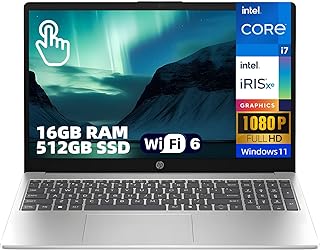
HP 15.6" FHD Touchscreen Business Laptop
Why We Love It

Lenovo ThinkPad T14s 2-in-1 Gen 2 Business Laptop with Intel
Why We Love It
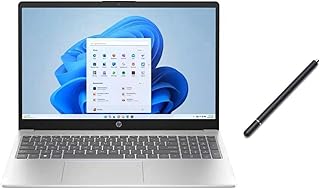
HP 15.6" HD Touch Screen Laptop
Why We Love It

HP 15 Business Laptop
Why We Love It

HP 15.6” FHD Touchscreen IPS AI Laptop
Why We Love It

HP - Touchscreen for laptops
Why We Love It

HP OmniBook 3 16" WUXGA Touchscreen Laptop|AMD Ryzen 5 40
Why We Love It

HP Pavilion 15.6" FHD Touchscreen Business Laptop
Why We Love It

HP OmniBook 3 16-bu0305dx 2K Touchscreen Laptop
Why We Love It
Quick Pick
10 Best Business Touchscreen Laptop With Pen Of 2026
Quick Pick
Samsung 12.2" FHD 2-in-1 Touchscreen Chromebook Plus Laptop for Business&Students, Intel Dual-Core, 4GB RAM, 224GB Storage(64GB eMMC+160GB Docking Station Set), Stylus Pen, Wireless Mouse, Silver
HP 15.6" FHD Touchscreen Business Laptop, Intel Core i7-1355U, 16GB DDR4 RAM, 512GB SSD, Windows 11 Home, Copilot Ready, Wi-Fi 6, Lightweight Notebook for Office and Remote Work
Lenovo ThinkPad T14s 2-in-1 Gen 2 Business Laptop with Intel Core Ultra 7 365 vPro Processor, 14" WUXGA IPS Touchscreen Display, 16GB LPDDR5X-8533MT/s of Memory, 512GB SSD, Pen, Wi-Fi 7 and Win 11 Pro
HP 15.6" HD Touch Screen Laptop | Intel Core i5-1235U | Intel Iris Xe Graphic | HDMI| Silver | 8GB RAM | 512GB SSD | Windows 11 S | Bundle with Stylus Pen
HP 15 Business Laptop | 15.6" HD BrightView Touchscreen | Intel Intel 10-core i5-1235U (>i7-1195G7) | 16GB DDR4 512GB SSD | USB-C Long-Lasting Battery Fast Charging Win11Pro w/DLCA Accessory
HP 15.6” FHD Touchscreen IPS AI Laptop, Powerful Intel Core Ultra 5 225U 12-core CPU, 16GB DDR5 RAM, 512GB Storage, Microsoft 365 Included, Webcam w/Shutter, AI Copilot Key, Win11H, w/Laptop Cooler
HP - Touchscreen for laptops - 17" - Windows 11 - Stylus - AMD Ryzen 5 7530U - Student Business - Computadoras 2024 and above laptop - Wi-Fi 6 - Large screen (32 GB of
HP OmniBook 3 16" WUXGA Touchscreen Laptop|AMD Ryzen 5 40 Processor|Copilot AI|AMD Radeon 610M Graphics| Silver|Windows 11 Home |Bundle with Stylus Pen | MS Office (16GB RAM + 1TB SSD)
HP Pavilion 15.6" FHD Touchscreen Business Laptop, AMD Ryzen 7 7730U, 16GB RAM, 512GB PCIe SSD, Numeric Keypad, Webcam, Wi-Fi 6, HDMI, Windows 11, W/Mouse
HP OmniBook 3 16-bu0305dx 2K Touchscreen Laptop | Intel Core Ultra 5 225U | 8GB DDR5 RAM | 512GB PCIe Gen4 SSD | 16" WUXGA IPS LED Display | Intel Graphics | Windows 11 Home | MS Office | Mica Silver
Buying Guide: Business Touchscreen Laptop With Pen
📋 Table of Contents
1What screen size and resolution should I look for in a business touchscreen laptop with pen?
Opt for 13-15 inch screens with at least 1080p resolution for portability and clarity. Larger screens (15-17 inches) with 4K resolution are better for multitasking and detailed work, but may sacrifice portability. Ensure the display supports 10-point touch for smooth pen and finger interaction.
2What type of touchscreen technology is best for business use with a stylus?
Capacitive touchscreens with high sensitivity and low latency are ideal for precise pen input. Look for models with active stylus support (not just passive) and a high PPI (pixels per inch) for sharp visuals. Resistive screens are outdated and not suitable for stylus use.
3How important is battery life for a business touchscreen laptop with pen?
A minimum of 8-10 hours of battery life is essential for all-day use without frequent charging. Business users often need to work on the go, so look for laptops with efficient processors and power-saving features. Avoid models with less than 6 hours unless you have constant access to power.
4What should I consider when choosing a stylus for a business touchscreen laptop?
Choose a stylus with pressure sensitivity and tilt recognition for tasks like sketching or note-taking. A replaceable tip and ergonomic design improve comfort during long sessions. Ensure the stylus is compatible with the laptop’s touchscreen and works seamlessly with software like OneNote or Adobe applications.
5Are there specific processors and RAM requirements for business use with a touchscreen and stylus?
A mid-range Intel Core i5 or AMD Ryzen 5 processor with 8GB of RAM is suitable for most business tasks. For heavy multitasking or graphic-intensive work, aim for an i7 or Ryzen 7 with 16GB RAM. SSD storage is also crucial for faster performance and quick boot times.
How we choose
Our editors are people who genuinely love testing and writing about products. We compare each product's real-world usability and strengths, then distill what matters most into our own "Why We Love It" points — so you get an honest, at-a-glance sense of what counts before you buy.